Finance-Base
pendingby Amith KC
A comprehensive finance dashboard featuring double-entry accounting, net worth tracking, commodity support, and interactive charts.
Finance-Base Plugin for Obsidian
A comprehensive Finance-Base dashboard for Obsidian, supporting double-entry accounting principles directly within your vault.
Features
- Double-Entry Accounting: Track assets, liabilities, income, and expenses using frontmatter properties in your daily notes or dedicated transaction files. The plugin employs a strict Zero-Sum rule for transaction validity (
Assets - Liabilities + Income - Expenses = 0). - Interactive Dashboard:
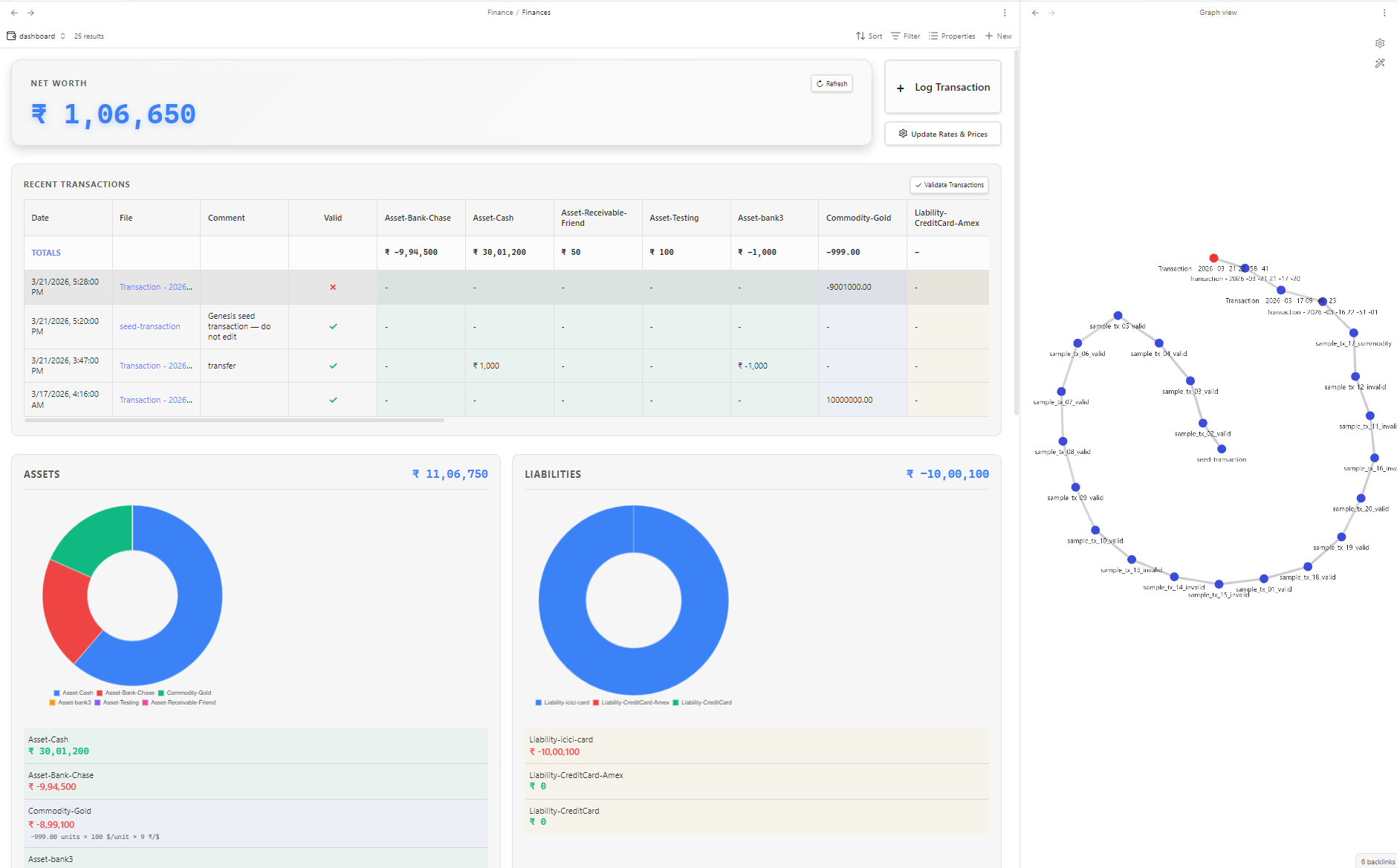
- Net Worth: Real-time calculation and display of your net worth, converting custom currencies and commodity prices on the fly.
- Recent Transactions Table: View recent transactions in an aesthetic, customizable table directly from the dashboard.
- Visualizations: Interactive points-in-time Net Worth line chart, and detailed Doughnut charts for category breakdowns across Assets, Liabilities, Income, and Expenses. Powered by Datacore for hyper-fast querying and caching.
- Blockchain-Linked Transaction Integrity:
- Secures your Finance-Base history through cryptographic hashing, acting as a genuine ledger.
- Validation: Automatically validates new transactions and seamlessly links them to previous entries using
prev_valid_transactionandPrev_valid_transaction_hash. - Tamper Verification: Allows you to walk the ledger backwards mathematically to verify the integrity of past transactions. Any modification to a locked transaction will be instantly flagged as an
integrity_error.
- Commodity Tracking & Pricing:
- Log fractional investments, stocks, and items (e.g.,
Commodity-Gold) inside transactions. - Manage real-time exchange rates (like USD to INR) and static prices securely via the dashboard JSON manager. Includes
UnitPrice-tag for precise accounting of cash equivalent trades.
- Log fractional investments, stocks, and items (e.g.,
- Snapshotting: Create periodic, static snapshots of your financial state to build historical Net Worth line chart data points indefinitely.
- Flexible & Customizable: Customize folders completely natively within settings.
Demo Video
Dashboard Page Screenshot
Installation
Manual Installation
- Create a folder named
finance-baseinside your vault's.obsidian/plugins/directory. - Copy
main.js,styles.css, andmanifest.jsonto that folder. - Reload Obsidian and enable "Finance-Base" in Community Plugins settings.
(Recommended for best compatibility: ensure the plugin folder is named finance-base)
Setup & Automated Initial Generation
On your very first load, the plugin will automatically scaffold your Finance-Base environment securely. It drops essential files inside your designated Finance root path:
Finances.base: A BasesView-ready file that renders your entire dashboard interface.Finance-Base-usage-guide.md: A custom usage guide referencing your unique setup.seed-transaction.md: Found inside your Transactions folder, serving as the required "Genesis Block" template of your immutable blockchain ledger.
Usage Guide
1. Recording Transactions
You can create a note (e.g., using the autogenerated Transaction.md template) inside the Transactions directory, injecting frontmatter metadata describing account movements.
Valid Prefixes:
Asset-: Tracks what you own (e.g.,Asset-Bank1,Asset-Cash).Liability-: Tracks what you owe (e.g.,Liability-CreditCard,Liability-Mortgage).Income-: Tracks money coming in (e.g.,Income-Salary).Expense-: Tracks money going out (e.g.,Expense-Groceries).Commodity-: Tracks quantities of non-currency assets (e.g.,Commodity-Gold).UnitPrice-: Defines the exact trading point at which a commodity interaction took place in monetary value (helps balance the zero-sum ledger).
Dynamic Accounts:
You do not need to manually register separate accounts in Settings. Your dashboard parses accounts strictly by traversing transaction values prefix-by-prefix! For example, assigning Asset-MySecretBank: 50 creates MySecretBank in your Asset slice instantly. Removing the last reference across your files clears the account outright.
Example Transaction:
---
date: 2024-05-20T10:00
Asset-Cash: -100
Expense-Groceries: 100
---
2. The Dashboard and Action Commands
Load your dashboard using the ribbon icon (or running "Open finance dashboard"). Ensure the Datacore community plugin is active alongside it to render the views.
The dashboard integrates core functionality via Action Buttons:
- Refresh: Manually invalidates and refreshes the Datacore cache in case an external file was added or manually edited.
- Log Transaction: Triggers a fast way to initialize new transactions.
- Update Rates & Prices: Tweak your current currency multiplier (USD to INR rate) or adjust the
CommodityPricesJSON data directly via the UI modal. - Validate New Transactions: Checks all loose files. Verifies zero-sum balancing via values and commodity prices, assigns cryptographic hashes if valid, marks
is_valid: true, and establishes cryptographic ties to theirprev_valid_transaction. - Verify transaction integrity: Recalculates altered locked files backwards. Any tampered file is dynamically caught and marked with
invalid_reason: integrity_errorso the chain can be manually verified.
3. Snapshots and Tracking Real Net Worth
Snapshots exist to archive the current sum of all accounts (Assets & Liabilities). Snapshots are permanently saved directly inside the Snapshots folder as .md files. This lets your Net Worth Line graph plot historical wealth without running O(N^2) calculations traversing thousands of old entries, ensuring O(1) fetch times for graphs while keeping the dataset fully resilient against post-transaction timeline adjustments.
Settings
Go to Settings > Finance-Base to configure:
- General & Currency:
- Master currency assignments (
$,₹). - Usd to Inr conversion rate.
- Commodity Prices tracking JSON.
- Rows visible on the transaction table view.
- Master currency assignments (
- File & Folder Structures: Path adjustments for generation (Root, Transactions, Snapshots, Templates, usage guidelines).
- Transaction Integrity: Toggle
Blockchain-linked verificationentirely ON or OFF.
Development & Building
- Clone the repository.
npm installnpm run dev(run watcher)npm run build(produce minified distribution)
(Follows Obsidian MD strict styling and isDesktopOnly ecosystem conditions.)
For plugin developers
Search results and similarity scores are powered by semantic analysis of your plugin's README. If your plugin isn't appearing for searches you'd expect, try updating your README to clearly describe your plugin's purpose, features, and use cases.