Export Bases Files
pendingby Juekun Li
Export files filtered by Bases table views to a specified folder.
Obsidian Export-Bases-Files Plugin
简体中文 | English
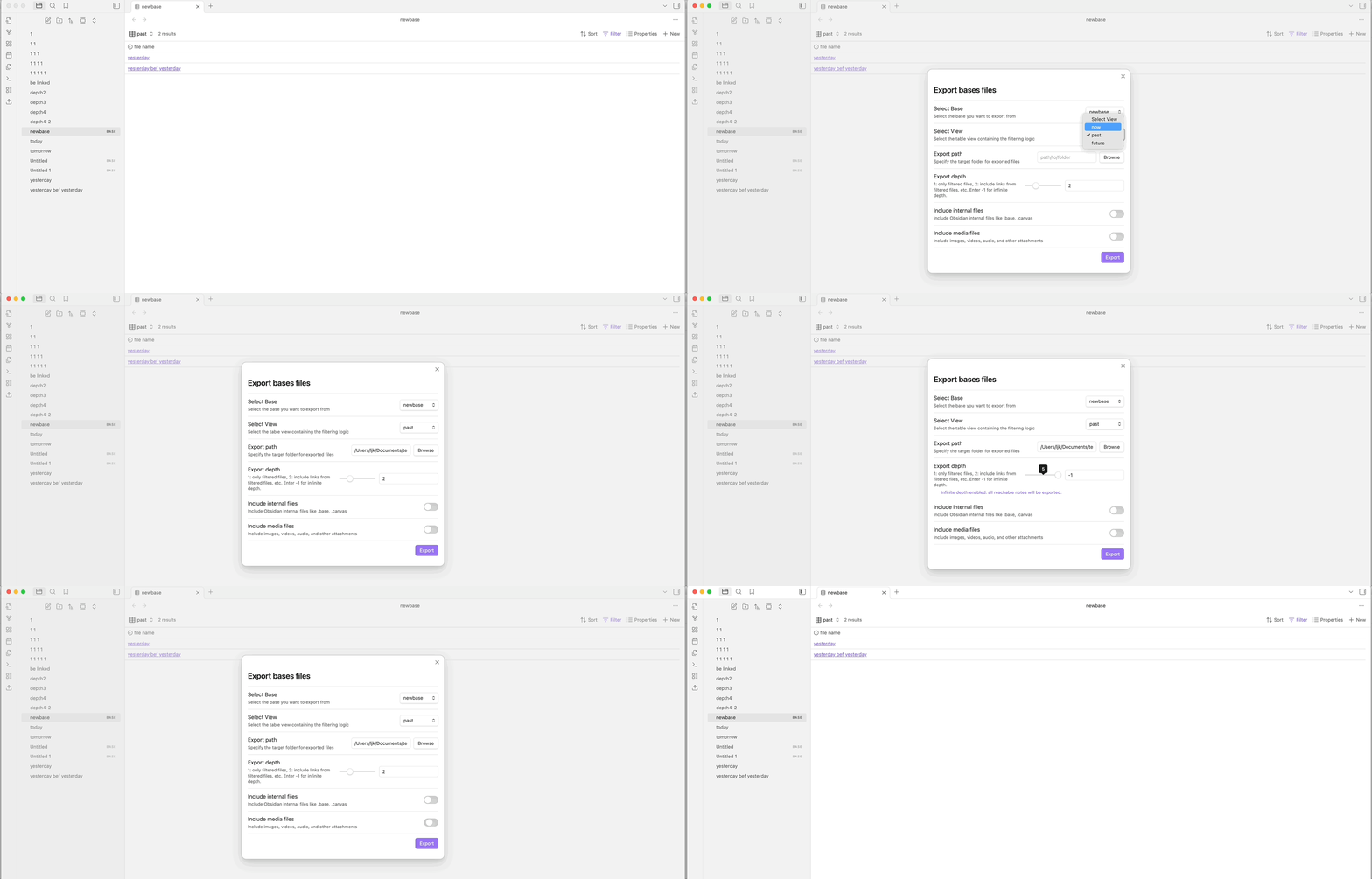
Export-Bases-Files is an Obsidian plugin designed to bridge the gap between Obsidian's powerful internal Bases feature and your external file system. It allows you to export a specific set of files—filtered by your Bases Table Views—to any folder on your computer with just a few clicks.
🚀 Installation
As this plugin is not yet available in the official Obsidian Community Plugins gallery, you can install it using the BRAT plugin or manually.
Via BRAT (Recommended)
- Install the Obsidian 42 - BRAT plugin from the Community Plugins gallery.
- Open Settings > BRAT > Add Beta plugin.
- Paste the URL of this repository:
https://github.com/ljklonepiece/obsidian-export-files-by-bases - Click Add Plugin.
- Enable Export-Bases-Files in Settings > Community Plugins.
Manual Installation
- Download the latest
main.js,manifest.json, andstyles.cssfrom the Releases page. - Create a folder named
obsidian-export-by-bases-plugininside your vault's.obsidian/plugins/directory. - Move the downloaded files into that folder.
- Reload Obsidian and enable the plugin in Settings > Community Plugins.
📖 How to Use
- Open the Interface: Click the Upload/Export icon in the ribbon or use the command palette (
Cmd/Ctrl + P) and search forExport-Bases-Files: Open Export Interface. - Select your Base: Choose the
.basefile that contains the data you want to export. - Select your View: Pick the specific Table View that has the filters you want to apply.
- Choose Destination: Click Browse... to select where on your computer you want the files to go.
- Optional Settings: You can choose to include or exclude specific file types:
- Include Internal Files: Toggling this on will include Obsidian-specific files like
.baseand.canvasif they are linked. - Include Media Files: Toggling this on will include images, audio, video, and archive files found in your export scope.
- Include Internal Files: Toggling this on will include Obsidian-specific files like
- Export: Hit the Export button. A notice will appear once the process is complete!
For Developers
If you want to build the plugin from source:
- Clone the repository.
- Run
npm install. - Run
npm run buildto generate themain.js. - Run
npm testto verify the logic with our unit test suite.
Support
If you find this plugin helpful, you can support my work:

中国用户:

If you encounter any issues or have feature requests, please open an issue on the GitHub repository.
For plugin developers
Search results and similarity scores are powered by semantic analysis of your plugin's README. If your plugin isn't appearing for searches you'd expect, try updating your README to clearly describe your plugin's purpose, features, and use cases.