Shamsi Date Converter
pendingby milad-s5
Automatically converts Gregorian dates to Shamsi (Jalali/Persian) dates. Supports multiple date pairs (start/end dates). Updates automatically when source dates change.
Shamsi Date Converter Plugin for Obsidian
Automatically convert Gregorian dates to Shamsi (Jalali/Persian) dates in your Obsidian notes. Perfect for tracking movie watch dates, reading logs, or any time-based records with both start and end dates!
Features
- ✨ Multiple Date Pairs: Support for start/end dates or any custom date property pairs
- 🔄 Automatic Conversion: Automatically adds Shamsi dates when you add Gregorian date properties
- ♻️ Automatic Updates: When you change source dates, Shamsi dates update automatically
- ⚙️ Customizable Mappings: Add, edit, or remove date pair mappings in settings
- ⚡ High Performance: Optimized with early returns - only processes files with relevant properties
- 🎯 Manual Conversion: Command palette option to convert current file
- 📅 Flexible Date Formats: Support for various Gregorian date formats
- 🎨 Configurable Output: Choose your preferred Shamsi date format
Installation
Manual Installation
- Download the plugin files (
main.jsandmanifest.json) - Create a folder named
shamsi-date-converterin your vault's.obsidian/plugins/directory - Copy the downloaded files into this folder
- Restart Obsidian or reload plugins
- Enable "Shamsi Date Converter" in Settings → Community plugins
From Community Plugins (when published)
- Open Settings → Community plugins
- Search for "Shamsi Date Converter"
- Click Install, then Enable
Usage
Multiple Date Pairs Example
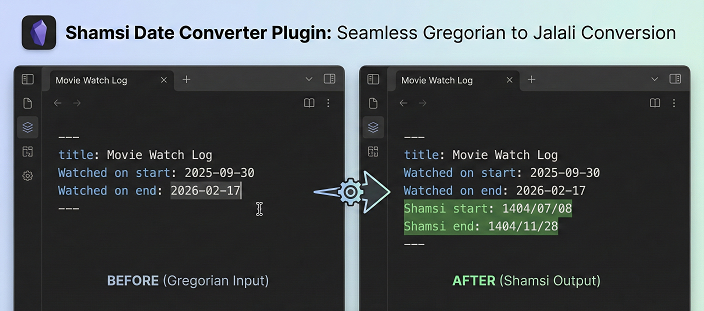
The plugin handles multiple date pairs simultaneously:
Watched on start: 2025-09-30
Watched on end: 2026-02-17
After saving, it automatically adds both Shamsi dates:
Watched on start: 2025-09-30
Watched on end: 2026-02-17
Shamsi start: 1404/07/08
Shamsi end: 1404/11/28
Automatic Updates
Change any source date and the corresponding Shamsi date updates automatically:
Watched on start: 2025-10-15  ← Changed from 2025-09-30
Watched on end: 2026-02-17
Shamsi start: 1404/07/23  ← Automatically updated!
Shamsi end: 1404/11/28
Manual Conversion
- Open a note with date properties
- Open Command Palette (Ctrl/Cmd + P)
- Search for "Convert all date pairs to Shamsi"
- Execute the command
Settings
Access settings via Settings → Shamsi Date Converter:
Basic Settings
- Auto-convert: Enable/disable automatic conversion on file modification
- Date format: Output format for Shamsi dates (YYYY/MM/DD, YYYY-MM-DD, etc.)
Date Pair Mappings
Configure which properties should be converted:
Default Pairs:
Watched on start→Shamsi startWatched on end→Shamsi end
Custom Pairs:
- Click "Add Date Pair" to create new mappings
- Click "Edit" to modify existing pairs
- Click "Delete" to remove pairs you don't need
Example Custom Mappings
For Reading Tracker:
Source: "Started reading"  → Target: "تاریخ شروع"
Source: "Finished reading" → Target: "تاریخ پایان"
For Projects:
Source: "Project start"    → Target: "Shamsi project start"
Source: "Project deadline" → Target: "Shamsi deadline"
For Events:
Source: "Event date" → Target: "تاریخ رویداد"
Supported Date Formats
The plugin accepts various Gregorian date formats:
2024-02-12(ISO 8601 - recommended for best performance)2024/02/12Feb 12, 2024February 12, 2024- Any format parseable by JavaScript Date object
Examples
Example 1: Movie Watching Tracker
---
title: Inception
type: Movie
Watched on start: 2024-01-15
Watched on end: 2024-01-15
Shamsi start: 1402/10/25
Shamsi end: 1402/10/25
rating: 5
---
Example 2: TV Series Tracker
---
title: Breaking Bad
type: TV Series
Watched on start: 2024-06-01
Watched on end: 2024-08-15
Shamsi start: 1403/03/12
Shamsi end: 1403/05/25
seasons: 5
---
Example 3: Book Reading Log
---
title: The Alchemist
Started reading: 2024-03-01
Finished reading: 2024-03-20
Shamsi reading start: 1403/01/11
Shamsi reading end: 1403/01/30
---
Example 4: Persian Date Usage
---
title: نوروز
Event date: 2024-03-20
تاریخ شمسی: 1403/01/01
---
How It Works
- File Modification Detection: Monitors when you save or modify files
- Quick Check: Scans if file contains any configured source properties
- Property Extraction: Parses frontmatter and extracts Gregorian dates
- Conversion: Converts dates using Persian calendar algorithm
- Smart Update: Only writes to file if Shamsi dates are missing or outdated
Troubleshooting
Dates not converting?
- ✓ Check that auto-convert is enabled in settings
- ✓ Verify property names match your settings exactly
- ✓ Ensure dates are in valid format (try YYYY-MM-DD)
- ✓ Try the manual conversion command
- ✓ Check console (Ctrl/Cmd + Shift + I) for errors
Plugin not loading?
- ✓ Files must be in
.obsidian/plugins/shamsi-date-converter/ - ✓ Restart Obsidian completely
- ✓ Check Developer Console for error messages
Advanced Usage
Empty/Missing Dates
If a source property exists but has no value:
Watched on start:
The plugin will skip it (no Shamsi date added until you fill in the source).
Mixed Date Pairs
You can have files with different combinations:
- Some with only start dates
- Some with both start and end
- Some with neither
The plugin handles all cases gracefully!
Development
Want to contribute or customize?
- Clone the repository
- Modify
main.js - Test in your vault's plugin folder
- Submit pull requests!
License
MIT License - feel free to use and modify as needed.
Support
If you encounter issues:
- Check the troubleshooting section
- Check Developer Console for specific errors
- File an issue with example files and error messages
Credits
- Shamsi calendar conversion algorithm based on standard Persian calendar calculations
- Built with ❤️ for the Obsidian community
- Special thanks to all users providing feedback and feature requests!
Support
This project is offered for free so everyone can use it without restrictions. If you found this tool useful, you can support its continuous development and improvement through donations.

Enjoy seamless Gregorian ↔ Shamsi date conversion! 🎉📅
For plugin developers
Search results and similarity scores are powered by semantic analysis of your plugin's README. If your plugin isn't appearing for searches you'd expect, try updating your README to clearly describe your plugin's purpose, features, and use cases.