PostgreSQL Browser
pendingby Yannick
Browse PostgreSQL schemas, preview table data, and run SQL queries.
PostgreSQL Browser for Obsidian
A desktop-only Obsidian plugin that connects to PostgreSQL databases and provides a sidebar interface for browsing schemas, previewing table data, and running SQL queries.
Features
- Multiple named connections with OS keychain encryption (Obsidian v1.11.4+; falls back to plaintext on older versions)
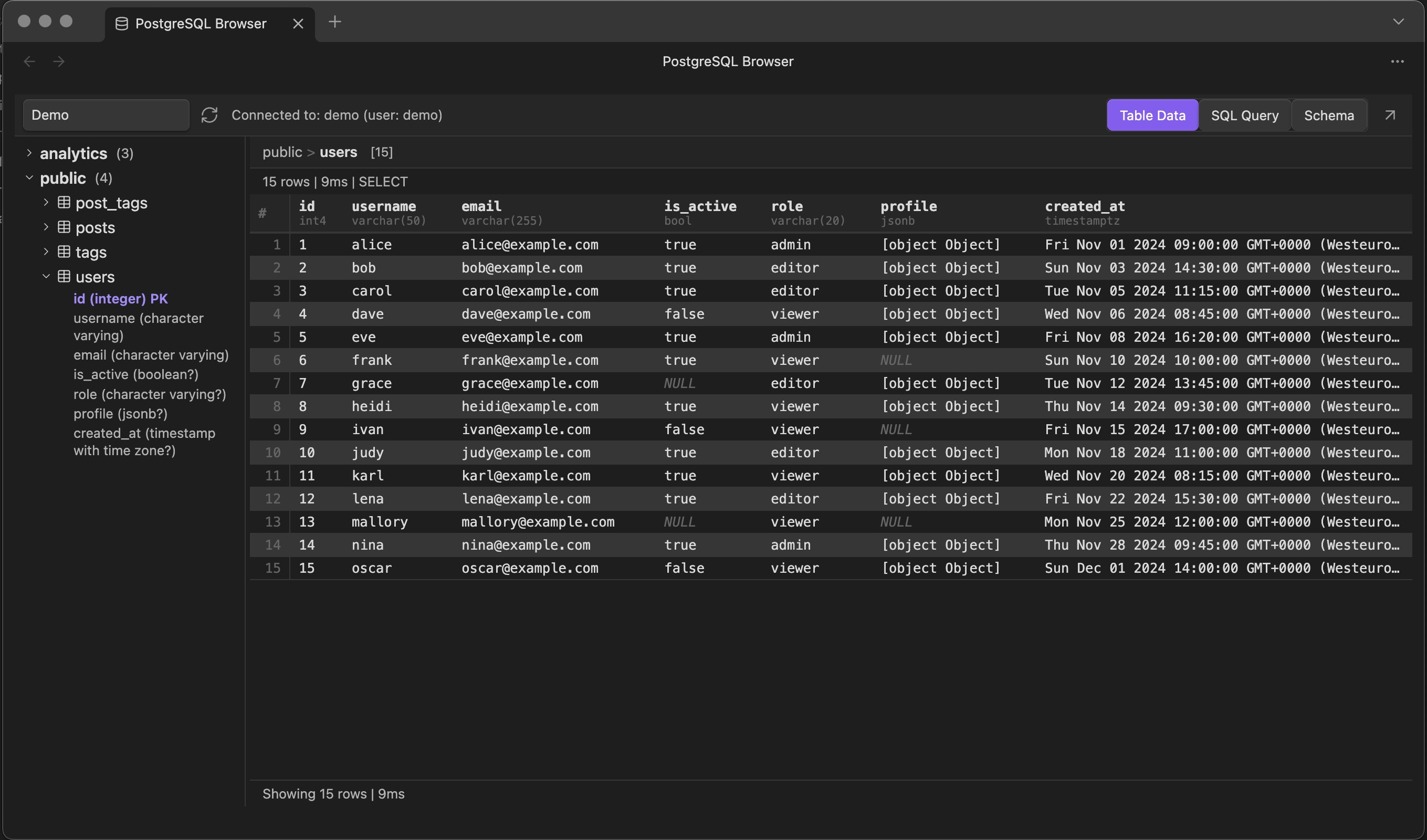
- Schema tree browser -- collapsible hierarchy showing schemas, tables, views, and columns with types, PK/FK badges
- Three-mode UI -- switch between Table Data, SQL Query, and Schema tabs via the toolbar
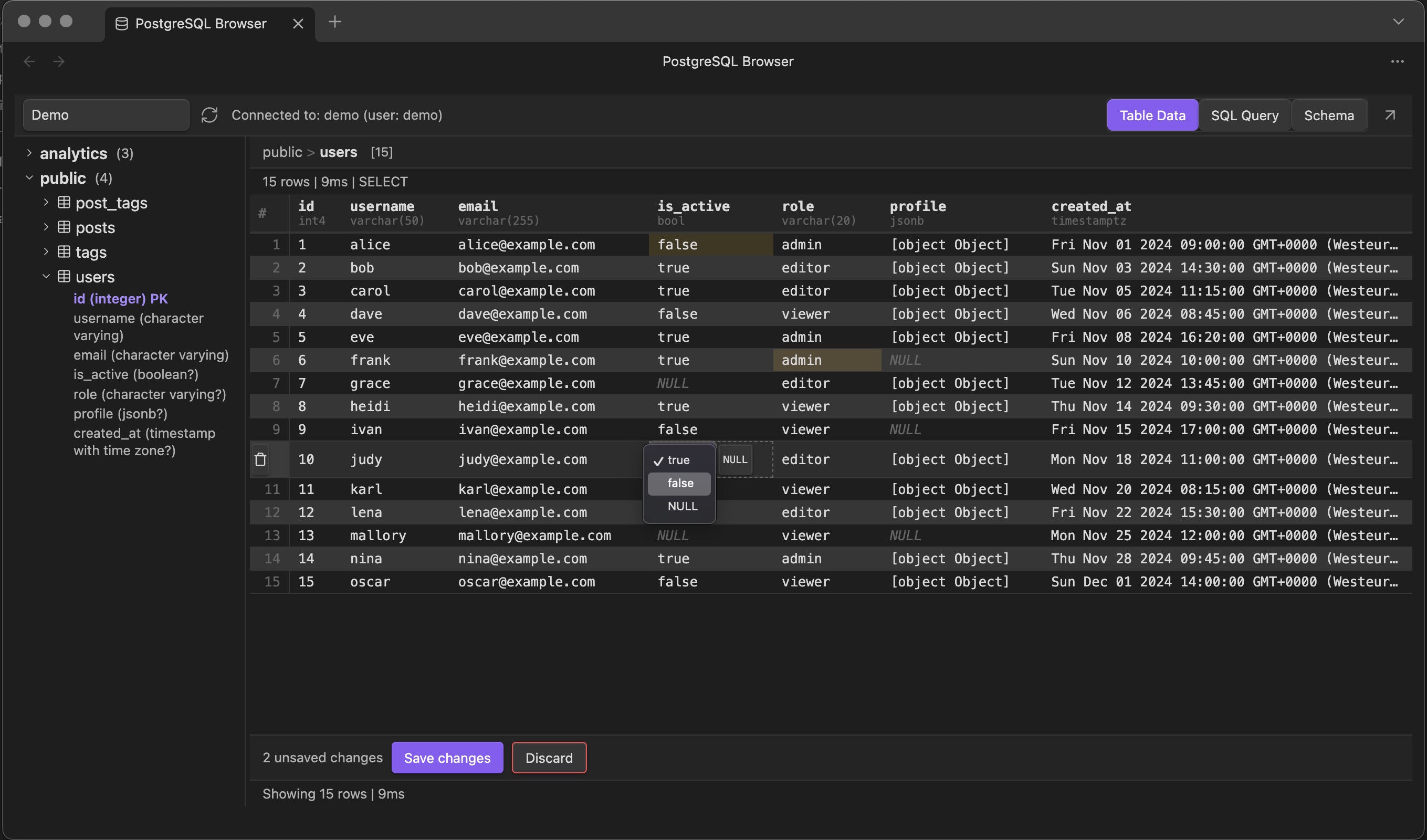
- Table data preview with inline cell editing -- type-aware editors for boolean, enum, JSON, date, and numeric columns
- Pending changes tracking -- edited cells are highlighted; batch save or discard via a floating action bar
- Row deletion -- multi-select rows and delete with a confirmation prompt
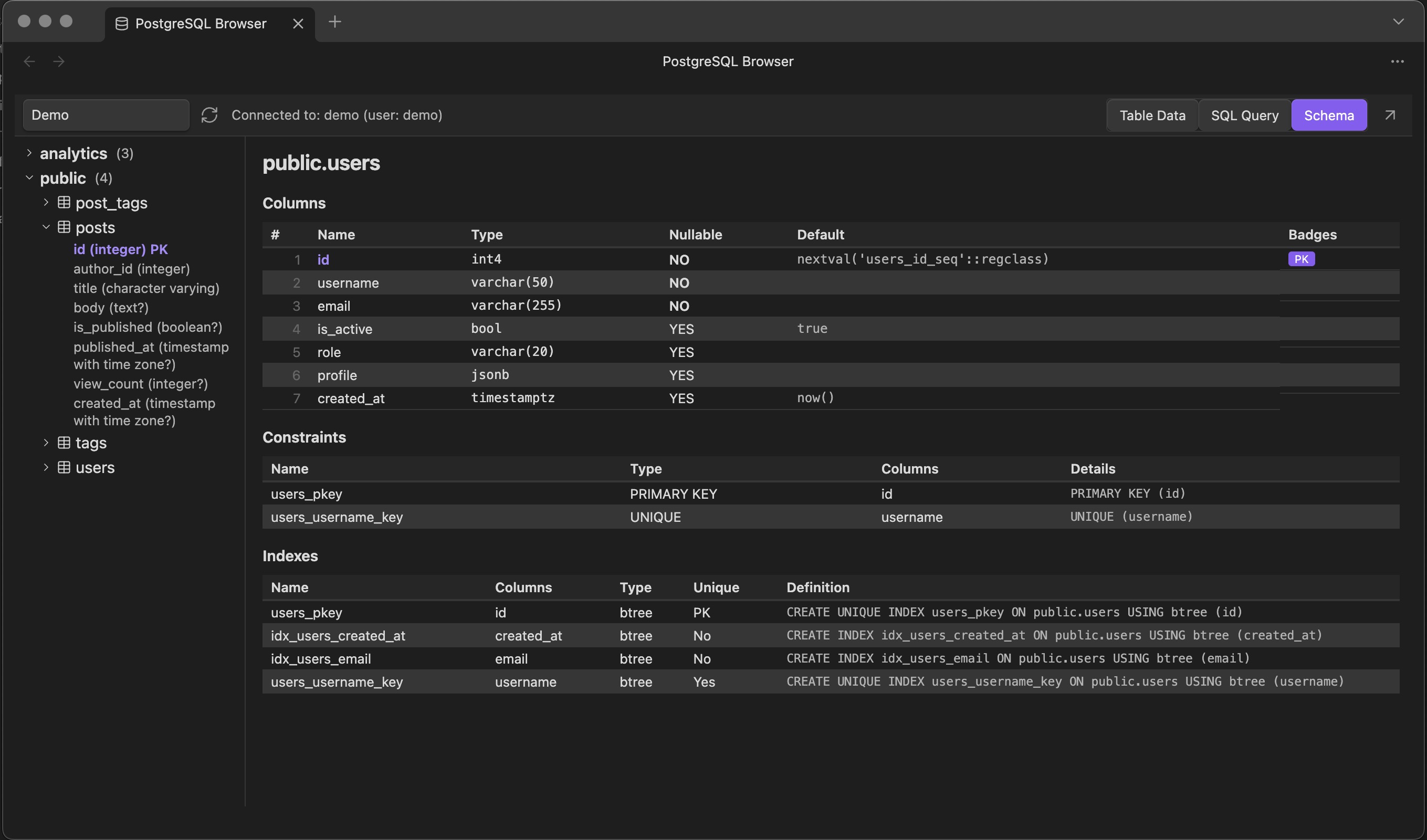
- Schema detail view -- columns, constraints, indexes, foreign key relationships, and estimated row count for any table
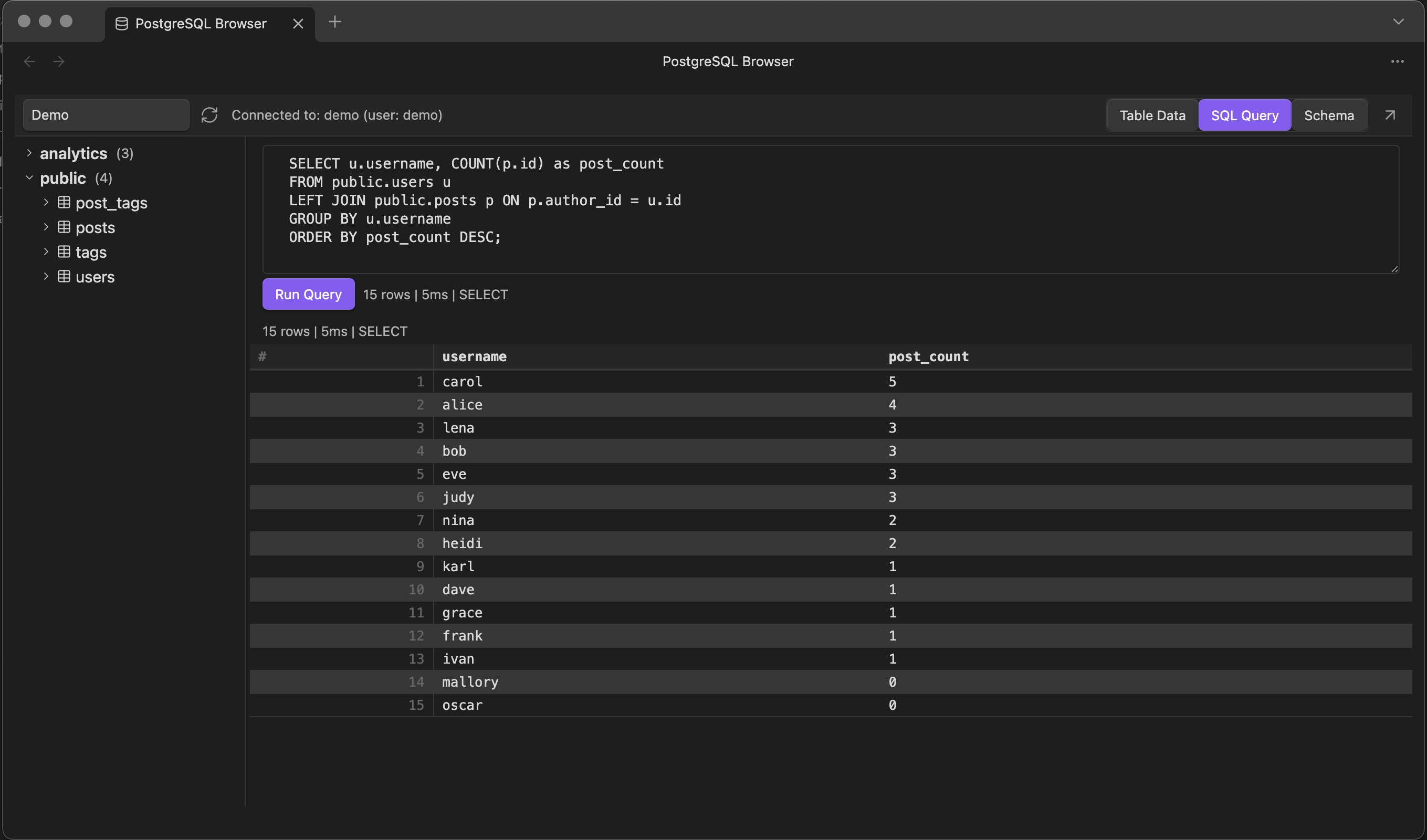
- SQL query editor -- write and execute arbitrary SQL with Ctrl/Cmd+Enter
- Results table -- scrollable results with sticky headers, row counts, and query duration
- Resizable sidebar + popout to a separate window
- Error display -- PostgreSQL error codes, details, and hints rendered inline
Architecture
┌──────────────────────────────────────────────────────────────┐
│ Obsidian (Electron)                                          │
│                                                              │
│  main.ts                                                     │
│  ├── Plugin lifecycle (onload / onunload)                    │
│  ├── Registers sidebar view, settings tab, ribbon icon       │
│  │                                                           │
│  ├── settings.ts          (connection CRUD, global prefs)    │
│  ├── secret-storage.ts    (OS keychain encryption)           │
│  │                                                           │
│  ├── db/                                                     │
│  │   ├── connection-manager.ts   (pool lifecycle, SSL/TLS)   │
│  │   ├── schema-introspection.ts (information_schema queries)│
│  │   └── query-executor.ts       (queries, cell updates,     │
│  │                                 row deletion)             │
│  │                                                           │
│  └── views/                                                  │
│      ├── database-view.ts      (main ItemView, orchestrator) │
│      ├── toolbar.ts            (connection selector + tabs)  │
│      ├── connection-selector.ts (dropdown sub-component)     │
│      ├── schema-tree.ts        (collapsible tree)            │
│      ├── data-view.ts          (table data tab)              │
│      ├── query-view.ts         (SQL query tab)               │
│      ├── query-editor.ts       (textarea + run button)       │
│      ├── schema-detail-view.ts (schema inspection tab)       │
│      ├── results-table.ts      (HTML table + inline editing) │
│      ├── cell-editor.ts        (type-aware cell editors)     │
│      └── resize-handle.ts      (sidebar resize + popout)     │
│                                                              │
│  [postgres npm package] ──TCP/TLS──> PostgreSQL server       │
└──────────────────────────────────────────────────────────────┘
The plugin uses the postgres npm package (porsager/postgres), a pure-JavaScript PostgreSQL client with zero native dependencies. It connects directly to PostgreSQL over TCP/TLS using Node.js net and tls modules provided by Obsidian's Electron runtime. All dependencies are bundled into a single main.js file via esbuild; Node.js built-in modules are externalized and resolved at runtime.
This means no middleware server is needed -- the plugin talks directly to your PostgreSQL database.
Why desktop-only?
Obsidian mobile (iOS/Android) runs in a webview without Node.js. The net and tls modules required for TCP connections to PostgreSQL are unavailable there. The plugin's manifest.json sets isDesktopOnly: true to prevent installation on mobile.
Installation
From source
cd /path/to/this/repo
npm install
npm run build
This produces three files needed by Obsidian:
main.js(bundled plugin code, ~97KB)manifest.json(plugin metadata)styles.css(sidebar styles)
Loading into Obsidian
- Copy
main.js,manifest.json, andstyles.cssinto your vault at:<vault>/.obsidian/plugins/postgres-browser/ - Open Obsidian and go to Settings > Community plugins
- If prompted, enable community plugins
- Find PostgreSQL Browser in the list and enable it
Development mode
npm run dev
This starts esbuild in watch mode. Changes to src/ are automatically recompiled. Use Obsidian's "Reload app without saving" (Ctrl/Cmd+R) to pick up changes, or install the Hot Reload plugin.
Configuration
Open Settings > PostgreSQL Browser to configure:
Connections
- Add Connection -- creates a new named connection
- Connection name -- a display label (e.g., "Production", "Local Dev")
- Connection string -- standard PostgreSQL URI format:
The field is masked by default (password input).postgresql://user:password@host:port/database - Test Connection -- verifies the connection works (runs
SELECT 1) - Delete -- removes the connection and closes any active pool
Global settings
- Preview row limit -- maximum rows fetched when clicking a table (default: 100)
- Query timeout -- not yet enforced at the query level (default: 30s, reserved for future use)
Security note
On Obsidian v1.11.4+, connection strings are encrypted via the OS keychain (macOS Keychain, Windows Credential Manager, or Linux Secret Service) using secret-storage.ts. On older Obsidian versions the plugin falls back to storing connection strings in plaintext in your vault's .obsidian/plugins/postgres-browser/data.json. Be mindful of this if your vault is synced or version-controlled.
Usage
- Click the database icon in the left ribbon (or use the command palette: "Open PostgreSQL Browser")
- Select a connection from the dropdown at the top of the sidebar
- The schema tree loads automatically -- expand schemas and tables to see columns
- Use the toolbar tabs to switch between modes:
Table Data tab
- Click a table in the schema tree to preview its rows
- Double-click a cell to edit it inline (editors adapt to the column type: toggle for booleans, dropdown for enums, JSON editor for JSON columns, etc.)
- Edited cells are highlighted; a Save / Discard bar appears at the bottom to batch-commit or revert changes
- Select rows with checkboxes and click Delete to remove them (with confirmation)
SQL Query tab
- Write SQL in the query editor textarea
- Press Ctrl+Enter (Cmd+Enter on Mac) or click Run Query to execute
- Results appear in the scrollable table below, with row count and duration
Schema tab
- Click a table to see its full schema detail: columns with types and defaults, constraints, indexes, foreign key relationships, and estimated row count
Project structure
postgres/
├── manifest.json              # Plugin metadata
├── versions.json              # Version compatibility
├── package.json               # Dependencies and scripts
├── tsconfig.json              # TypeScript config
├── esbuild.config.mjs         # Build config
├── styles.css                 # Plugin styles (Obsidian CSS vars)
├── main.js                    # Built output (gitignored)
└── src/
    ├── main.ts                # Plugin entry point
    ├── types.ts               # All TypeScript interfaces
    ├── constants.ts           # View type ID, default settings
    ├── settings.ts            # Settings tab UI
    ├── secret-storage.ts      # OS keychain credential encryption
    ├── db/
    │   ├── connection-manager.ts    # Connection pool lifecycle, SSL/TLS
    │   ├── schema-introspection.ts  # Schema/table/column/constraint queries
    │   └── query-executor.ts        # Query execution, cell updates, row deletion
    └── views/
        ├── database-view.ts         # Main sidebar (ItemView orchestrator)
        ├── toolbar.ts               # Connection selector + mode tabs
        ├── connection-selector.ts   # Connection dropdown (toolbar sub-component)
        ├── schema-tree.ts           # Collapsible schema tree
        ├── data-view.ts             # Table Data tab container
        ├── query-view.ts            # SQL Query tab container
        ├── query-editor.ts          # SQL textarea + run button
        ├── schema-detail-view.ts    # Schema tab (columns, constraints, indexes)
        ├── results-table.ts         # Results HTML table + inline editing
        ├── cell-editor.ts           # Type-aware inline cell editors
        └── resize-handle.ts         # Sidebar resize handle + popout
Known limitations and potential issues
Connection errors
- SSL/TLS failures: Many hosted PostgreSQL providers require SSL. The plugin defaults to
ssl: "prefer"(opportunistic). If your server requires strict SSL or uses a self-signed certificate, you may see connection failures. Per-connection SSL configuration is not yet exposed in the settings UI. - Network/firewall issues: The plugin connects directly from your machine. Corporate firewalls, VPNs, or cloud provider IP allowlists may block the connection.
- Connection hangs on shutdown: The
postgrespackage'ssql.end()can occasionally hang if the server disconnects unexpectedly. The plugin uses a 5-second timeout to mitigate this, but in rare cases Obsidian may take a moment to fully unload the plugin.
Query execution
- No query timeout enforcement: The
queryTimeoutSecondssetting is reserved but not yet wired toSET statement_timeout. A long-running query will block the UI until it completes or the connection drops. - Large result sets: Fetching thousands of rows renders them all as HTML table rows, which can slow down the sidebar. The preview row limit helps, but custom queries have no automatic limit.
- DDL and write queries: The Table Data tab supports inline cell editing (PK-based
UPDATE) and row deletion. The SQL Query tab usessql.unsafe()and will execute any valid SQL includingINSERT,UPDATE,DELETE,DROP, etc. There is no read-only mode for the query editor.
Schema introspection
- Databases with many schemas/tables: The schema tree loads all schemas and their tables eagerly on connection. Very large databases (hundreds of schemas or thousands of tables) may cause a slow initial load.
- Columns loaded lazily: Column details for each table are fetched on first expand, which adds a small delay per table.
Platform restrictions
- Desktop only: Will not install on Obsidian mobile.
- Sandboxed Linux: Flatpak/Snap versions of Obsidian may restrict Node.js module access, potentially breaking TCP connections.
Credential storage
- On Obsidian v1.11.4+, connection strings are encrypted via the OS keychain. On older versions, they are stored as plaintext JSON in the vault's plugin data directory.
Next steps
Potential improvements for future development:
- Query timeout enforcement -- prepend
SET statement_timeout = 'Xs'to user queries or useAbortControllerto cancel long-running requests - SSL configuration UI -- expose per-connection SSL options (require, reject unauthorized, custom CA) in the settings tab
- Result pagination -- add OFFSET/LIMIT-based paging instead of rendering all rows at once
- CodeMirror SQL editor -- replace the textarea with a CodeMirror 6 editor using
@codemirror/lang-sqlfor syntax highlighting and autocompletion (Obsidian bundles CM6 core, butlang-sqlwould need to be bundled separately) - Export results -- copy as CSV/JSON or insert as a markdown table into the current note
- Read-only mode -- option to restrict the query editor to SELECT-only statements
- Saved queries -- persist frequently-used queries per connection
- Table row count in tree -- show approximate row counts next to table names using
pg_stat_user_tables
For plugin developers
Search results and similarity scores are powered by semantic analysis of your plugin's README. If your plugin isn't appearing for searches you'd expect, try updating your README to clearly describe your plugin's purpose, features, and use cases.