Lazy Album
pendingby SomehowItWorks
Render images as a masonry gallery.
lazy-album 懒人相册
⚠️The coding of this plugin is assisted by Google Gemini. If Ai programming upsets you, please think twice before installing it.
ℹ️This plugin does not include a built-in lightbox feature (nothing happens when clicking an image). For the best image viewing experience, it is highly recommended to use it alongside plugins such as Image Toolkit.
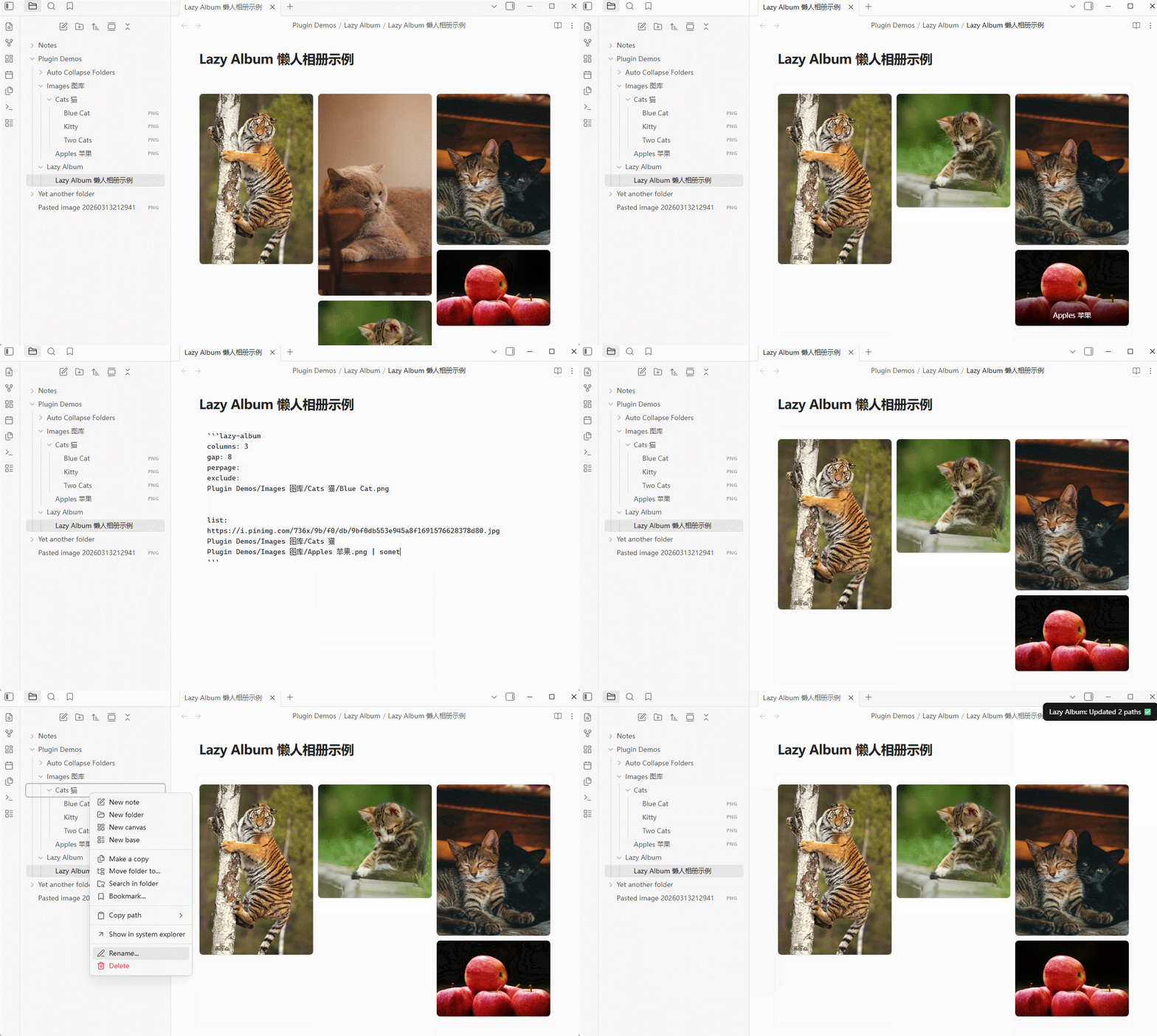
This is an Obsidian plugin that displays images in a Masonry (Waterfall) Layout. It supports mixing multiple image sources:
-
Web images by direct URLs.
-
Local images by individual file paths within your vault.
-
Local folders by their relative paths (automatically loads all images within).
A few customizable stuff
-
columns: Adjust the number of columns.
-
exclude: Selectively hide specific images from a folder.
-
gap: Customize the spacing between images.
-
perpage: Enable pagination by setting the maximum number of images per page.
-
Captions: Use the format "Path | Caption". Captions appear on hover (by default, it would show filename for local files).
-
Auto Path Repair: Automatically updates the code block if you rename or move image files/folders within Obsidian.
ℹ️If you are new to Obsidian, it is highly recommended to familiarize yourself with Code Blocks and Templates first.
Template
Paste this block into your note to get started. Add your sources under the "list:" part
columns: 2
gap: 8
perpage:
exclude:

list:
An Example Would be
columns: 3
gap: 8
perpage: 6 # Set a number for pagination; leave empty for infinite waterfall
exclude:
# Files to hide

list:
# Local image: Shows filename on hover, or custom text after '|'
Plugin Demos/Images/Apples.png | Delicious Red Apple

# Local folder: Bulk import. Shows filenames on hover.
Plugin Demos/Images/Cats

# Web image: Supports custom captions.
https://i.pinimg.com/736x/9b/f0/db/9bf0db553e945a8f1691576628378d80.jpg | A Climbing Tiger
⚠️这个插件的代码是由Google Gemini协助生成的。如果你很难接受AI生成的程式,请谨慎下载。
ℹ️本插件目前不包含灯箱功能(即点击图片不会有任何事情发生)。欲获得最佳体验,推荐与 Image Toolkit 等插件配合使用。
这是一个 Obsidian 插件,可以将图片以 瀑布流 (Masonry) 形式呈现,并支持混合多种图片来源,如:
- 网络图片链接
- 库内单个图片的路径
- 库内文件夹的相对路径,会自动加载文件夹中所有图片
主要功能
- columns: 改变展示列数。
- exclude: 选择性剔除文件夹中不想展示的图片。
- gap: 改变图片间距。
- perpage: 拟定每页最多展示的图片数,开启分页。
其他可自定义的功能包括
- 标题: 通过 地址 | 标题 的格式自定义标题,在鼠标悬停时显示(本地图片默认显示文件名)。
- 自动路径修复: 当您在库内重命名或移动图片/文件夹时,相册代码块会自动更新路径。
提示: 如果您刚开始使用 Obsidian,推荐优先了解代码块与模板功能。
模板代码
启用插件后,您可以把下面这段代码直接粘贴到你的文本中。在 list: 下添加图片来源即可。
columns: 2
gap: 8
perpage:
exclude:

list:
示例
columns: 3
gap: 8
perpage: 6 # 指定数字后可以翻页,不指定则瀑布流全量显示
exclude:
# 希望隐藏的图片文件清单

list:
# 本地单张图片示例:默认悬停显示文件名,可用 | 替换自定义标题
Plugin Demos/Images 图库/Apples 苹果.png | Delicious Red Apple

# 本地文件夹示例:批量导入图片,悬停显示文件名
Plugin Demos/Images 图库/Cats 猫

# 网络图片示例:支持添加标题
https://i.pinimg.com/736x/9b/f0/db/9bf0db553e945a8f1691576628378d80.jpg | A Climbing Tiger
打赏
如果觉得这个插件好用,可以请我喝瓶水支持后续开发,非常感谢!:'3

For plugin developers
Search results and similarity scores are powered by semantic analysis of your plugin's README. If your plugin isn't appearing for searches you'd expect, try updating your README to clearly describe your plugin's purpose, features, and use cases.