Google Calendar by Viewday
pendingby viewdayapp
The official Viewday integration. Real-time sync, multi-account support, and one-click meeting notes. No API keys required.
Viewday Official
This is the official plugin maintained by the Viewday team, designed to turn Obsidian into the ultimate visual planner and relational time database.
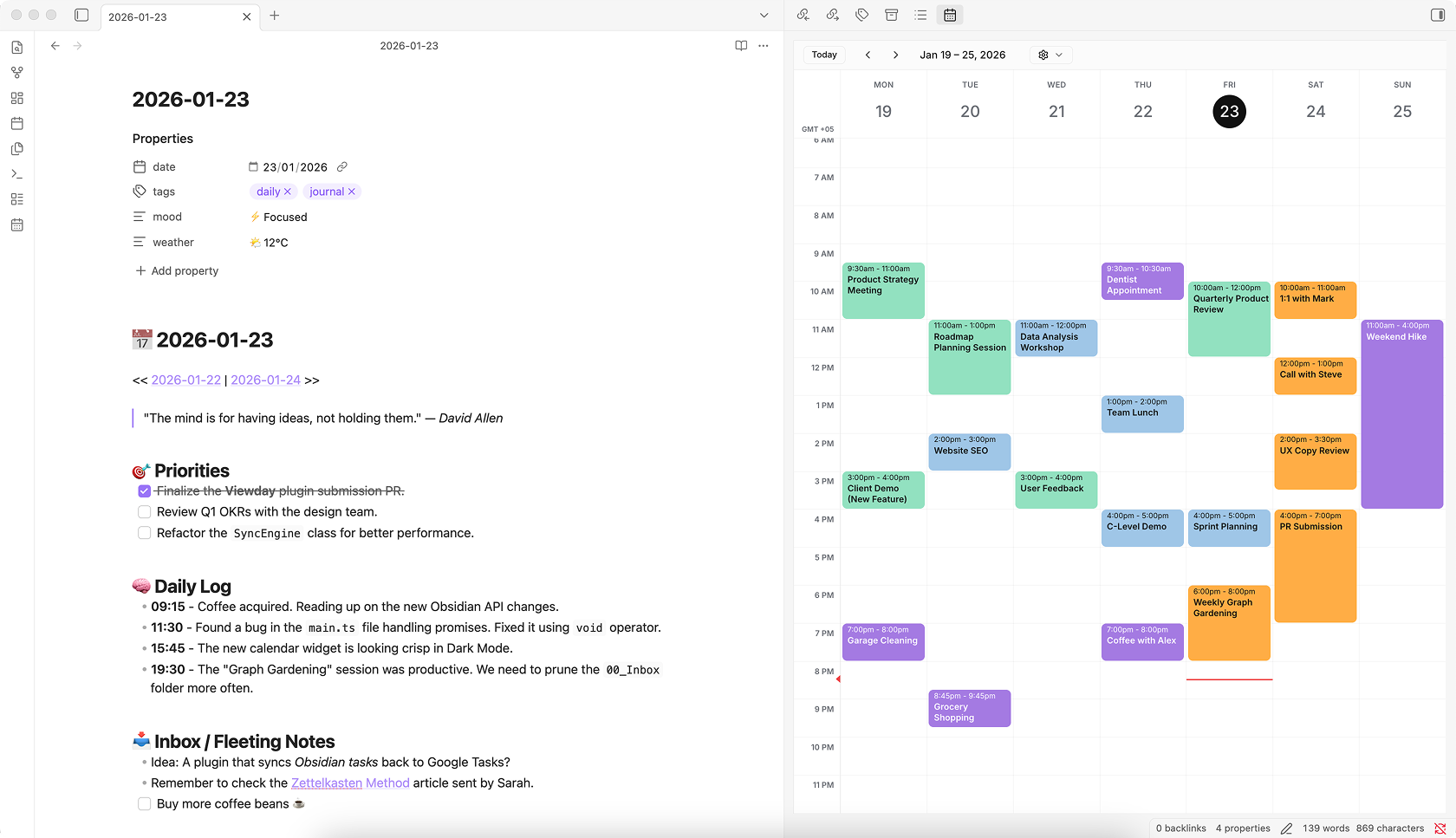
Viewday is a Universal Calendar Layer that seamlessly blends your real-time Google Calendar meetings with your local Obsidian notes and tasks. No manual API key setup required.
Note: This plugin requires an account with Viewday. A free tier is available (which includes Drag-and-Drop local time blocking), while advanced features like multi-account Google merging require a subscription.
🌟 Highlights
Relational Time (Linked Notes) & Graph Integration Don't just view meetings, prep for them. Click the "Link note" button on any event (Google or Local) to natively fuzzy-search your vault and associate existing files (like agendas, client CRMs, or project specs). For local events, Viewday intelligently injects native [[Wikilinks]] into your YAML frontmatter - ensuring your linked calendar blocks automatically populate your Obsidian Graph View and never break when you rename a file.
The Unscheduled Backlog ("The Hopper") Have notes or tasks with no date? Open the Unscheduled Sidebar to view all your floating ideas. Drag an unscheduled note directly onto the calendar grid, and Viewday will instantly write the date and time to that file's YAML frontmatter.
Drag-and-Drop Time Blocking Manage your vault visually. Drag existing local tasks to new days or times, and Viewday will automatically update the underlying markdown file. It natively respects your duration frontmatter to block out the exact right amount of time.
Daily Note Navigation Your calendar grid is now a navigation hub. Click any date header on the grid (e.g., "Mon 23") to instantly jump to that day's Daily Note. If it doesn't exist, Viewday automatically generates it in the background using your core Daily Notes plugin settings.
The Creation Engine Don't just view your schedule, build it. Click any empty slot on the grid to instantly generate a new Markdown file. Viewday will drop it in your vault and automatically inject the correct date/time into your frontmatter properties.
Secure Google "Write-Back" Need to schedule a Google Meeting? Click the grid to securely launch a pre-filled Google Calendar event. Viewday handles the scheduling without ever asking for invasive "Delete/Edit" permissions to your entire Google account.
Smart Meeting Notes Jumpstart your note-taking with one click. Viewday automatically captures attendees, agenda, location, and links into a Dataview-ready format so you can focus on capturing minutes and ideas.
✨ Features at a Glance
- Interactive Legend: A beautiful, drag-and-drop pill bar sits above your grid. It provides instant visual clarity: Google Calendars display as solid color dots (
●), while Local Obsidian properties display as sleek hollow rings (○). Click any pill to toggle its visibility instantly. - Unified Event Details: Clicking any event, whether it is a remote Google Meeting or a local Vault Task, opens a unified, clean popover command center where you can open the source file or link supplementary notes.
- Universal Sources: Mix and match local project deadlines (Obsidian) with shared team events (Google Calendar) in a single, unified view.
- Folder-Based Color Coding: Organize visually by folder. Target specific folder paths (like
/Video Scriptsor/Newsletters) and automatically assign them distinct colors on your calendar grid - no custom tags, emojis, or file naming hacks required. - Real-time Sync: Your Google calendar updates instantly in Obsidian. Local file changes are reflected on the grid with zero latency.
- De-Google Friendly: You can use Viewday with zero Google accounts connected, relying 100% on your local vault via our Local Rules Engine.
- Join Meetings: Launch Google Meet, Zoom, or Teams calls directly from your sidebar with one click.
- Theme Awareness: Automatic dark/light theme switching that matches your vault perfectly.
🚀 Getting Started
- Sign Up: Create a free account at viewday.app.
- Configure Sources: Connect your Google Calendar(s) and define your "Local Rules" (e.g., scan for the
do_dateproperty). - Generate a View: Create a new View in the dashboard to get your unique View ID.
- Install & Paste: Install this plugin, then paste your View ID into the Viewday Plugin settings in Obsidian.
- Open: Click the calendar icon in your ribbon (left sidebar) to open your command center.
🛠️ Technical Details
This plugin acts as a highly optimized, secure wrapper for the Viewday web engine.
- Privacy: The plugin only stores your
View IDand folder preferences locally. - Security: All Google Calendar data is handled via Viewday's encrypted backend. We use a Secure Deep Link architecture for creating events, meaning we never request full write access to your Google Calendar.
- Local First: Local markdown file parsing happens entirely on your machine.
- Performance: Optimized with targeted file caching and debounced updates to ensure zero impact on your vault's speed.
📈 Pricing
Viewday is a Freemium service designed to grow with your vault.
-
Free Plan: Everything you need to build a unified daily planner.
- 1 Google Calendar connection
- 1 Local Obsidian Source (e.g., your main
/Tasksfolder) - Drag-and-drop local time blocking & the Unscheduled Hopper
- Relational Time: Link your notes directly to your events
- Clickable Date Headers & the Interactive Legend
-
Pro Plan ($3.50/mo): For power users who manage multiple timelines.
- Unlimited Google Calendar accounts (seamlessly merge Work & Personal calendars into one view)
- Unlimited Local Obsidian Sources (color-code and filter unlimited specific folder paths)
- Premium Agenda layouts
- Zero Viewday branding on your calendar views
🤝 Support & Feedback
- Website: viewday.app
- Dashboard: viewday.app/dashboard
- Feature Requests: viewday.app/feature-requests
- Privacy Policy: viewday.app/privacy
- Terms of Service: viewday.app/terms
- Trust Center: viewday.app/security
- Contact: viewday.app/contact or email us at hello@viewday.app
Built with ❤️ for the Obsidian community.
For plugin developers
Search results and similarity scores are powered by semantic analysis of your plugin's README. If your plugin isn't appearing for searches you'd expect, try updating your README to clearly describe your plugin's purpose, features, and use cases.