Prisma Calendar
pendingby Real1tyy
A feature-rich, fully configurable calendar. Manage events across multiple calendars with support for recurring events, templates, and folder-based scanning.
Prisma Calendar



The Ultimate Temporal Visualization Engine for Obsidian.
Prisma Calendar is a schema-agnostic visualization layer that turns any Obsidian note with a date into a first-class citizen on your timeline. No rigid schemas, no predefined fields — just your data, your rules, your filters, rendered exactly how you need it.
It's not just a calendar. It's a way to see your entire vault through time.
Every setting is configurable. Every change is reactive. Every action is undoable.
Four dedicated views — four ways to understand time. Calendar for scheduling, Timeline for sequencing, Heatmap for patterns, and Gantt for dependencies. Each reveals a different perspective, and together they turn Prisma into a complete temporal visualization engine.
A full scripting API. External integrations sync. Recurring events that generate real notes. Batch operations, undo/redo history, and time-based analytics across multiple series.
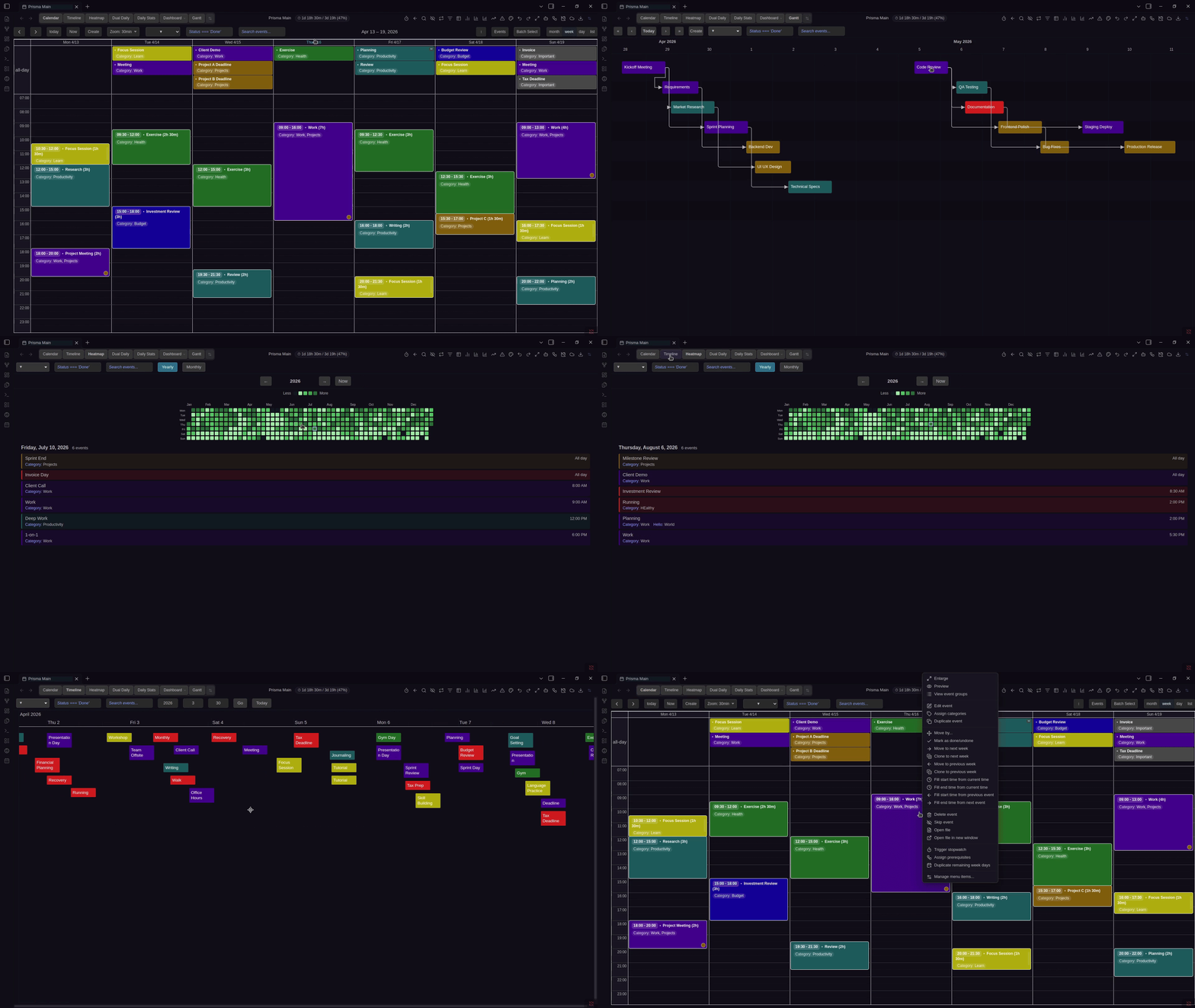
The Missing Piece for Your Obsidian Workflow
Other Obsidian calendar plugins give you a basic view. Prisma Calendar gives you a complete event management platform — with the depth of a standalone app and the seamless integration only a native plugin can offer.
The core challenge for power users is simple: how do you visualize entirely disparate records — sharing only a timestamp — in a single, cohesive view? Prisma solves this by stepping beyond the definition of a "calendar." It is a visualization layer that takes any data with a time parameter and renders it using your custom rules, properties, and filters. Projects, habits, meetings, tasks, people — if it has a date, Prisma displays it.
Prisma is fundamentally different from any conventional calendar. Tools like Google Calendar lock you into predefined fields that rarely fit complex needs. Platforms like Notion lack the seamless database visualization required for advanced workflows. Prisma breaks free from both.
It takes any data with a time parameter and projects it onto a unified, fully customizable timeline. For Obsidian users managing thousands of heavily customized markdown files, Prisma flawlessly renders those individual properties onto a single cohesive view — turning your vault into a full enterprise resource planning system. Plan projects, track habits, manage people, schedule tasks — all powered by the frontmatter you already write.
Prisma is production-ready, fully featured, and built for users who demand absolute freedom over how their information is visualized.
🎬 The Complete Encyclopedia
Every feature systematically broken down from A to Z: views, event management, recurring events, time tracking, categories, color rules, batch operations, filtering, integrations, AI, the programmatic API, and every setting explained. This is both a full walkthrough and a long-term reference — the definitive video for Prisma Calendar.
YouTube Playlist → — All Prisma Calendar videos.
📸 Gallery
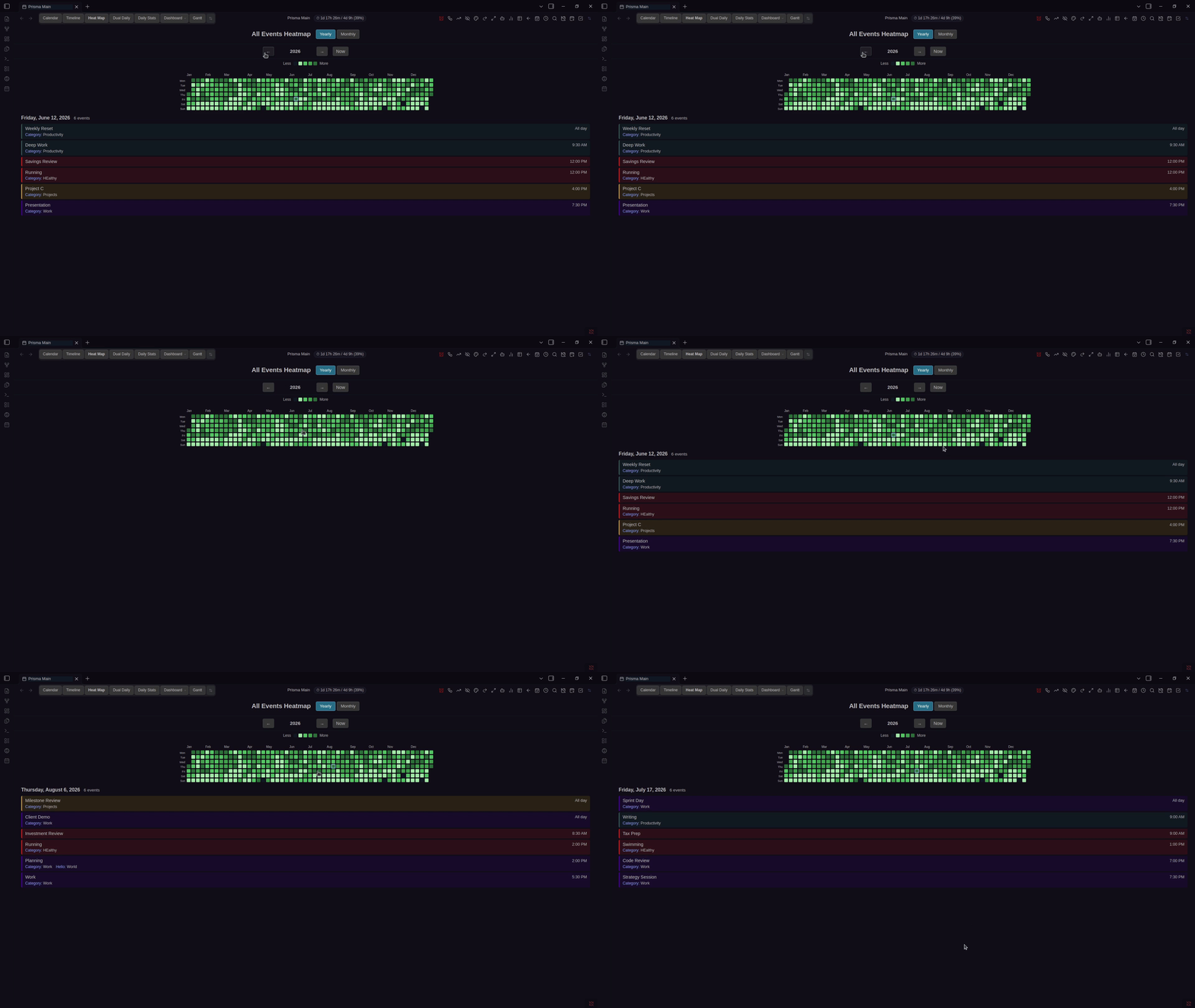
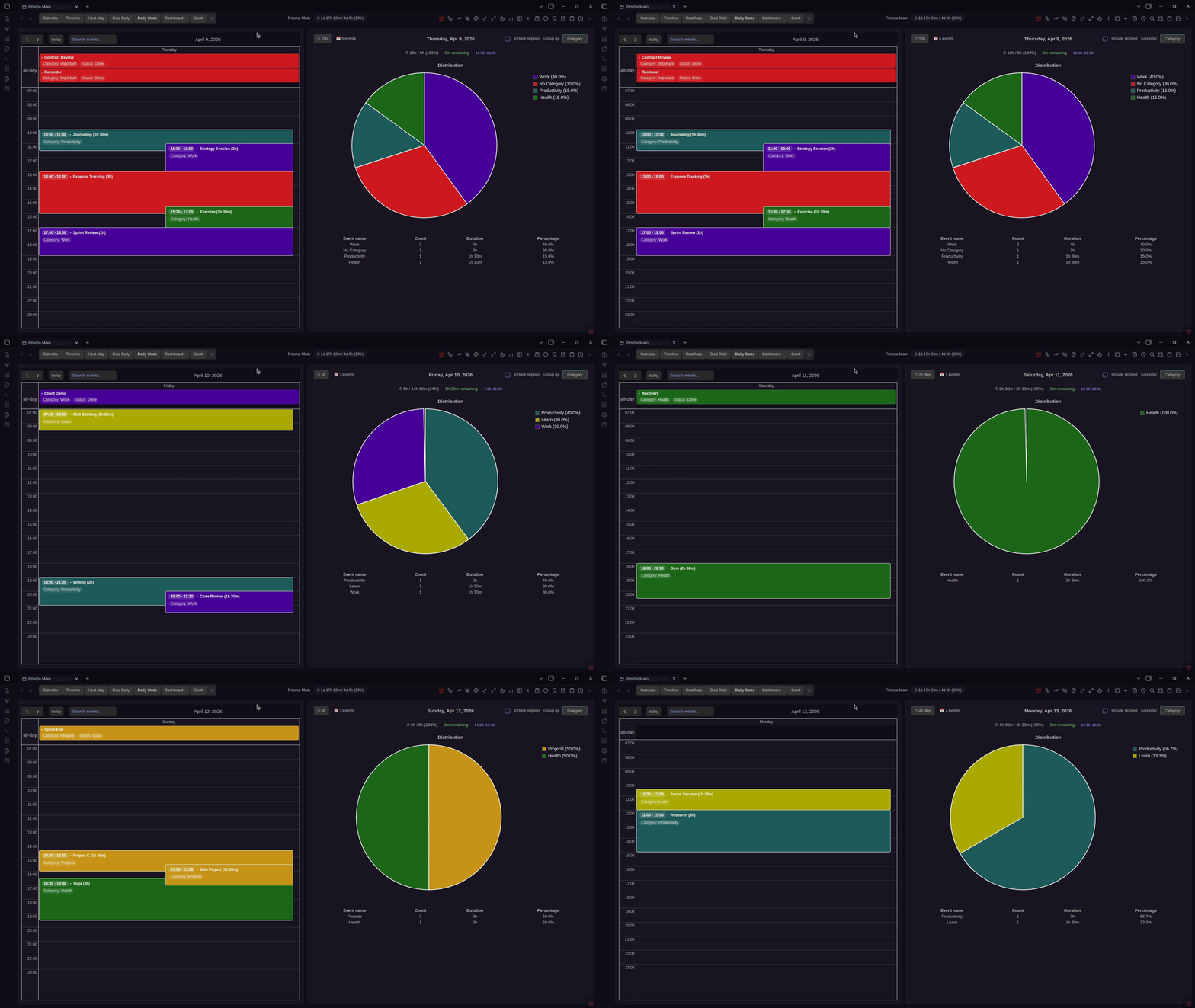
Check out the full gallery in the documentation for more visuals.
📚 Documentation
Quick Links:
Why Prisma Calendar?
Configure Literally Everything
Prisma Calendar adapts to you, not the other way around. Map your own frontmatter properties, define JavaScript-powered color rules, set up advanced filters, customize the calendar appearance down to event text, icons, and density — and manage multiple independent calendars, each with their own settings and folder scope.
Fully Reactive — Changes Propagate Instantly
There's no "restart Obsidian to apply changes" here. Every setting change, every color rule tweak, every filter adjustment takes effect immediately. Edit a note's frontmatter and watch the calendar update in real time. This isn't a static display — it's a live, reactive system.
Undo and Redo Everything
Every action you take — creating, editing, moving, deleting, batch operations — is tracked in a full memento history. Made a mistake? Hit undo. Changed your mind? Redo. You'll see exactly what's being reversed ("Undo Batch Delete", "Undo Move Event") so you're always in control.
Recurring Events That Actually Work
Define a source node with a frequency (daily, weekly, bi-weekly, monthly, ...), and Prisma generates real Obsidian notes for each instance — fully linked back to the source. Virtual previews let you see future instances without cluttering your vault. Navigate between instances with one click, and view statistics about your recurring series at a glance.
Batch Operations at Scale
Select multiple events and delete, duplicate, move, clone, skip, or open them — all at once. Shift entire weeks of events forward or backward. When you're managing a busy schedule, this isn't a nice-to-have — it's essential.
Smart Categories with Title Autocomplete
Define categories with color coding, then let Prisma auto-assign them based on event names. Title autocomplete suggests matching names as you type, keeping naming consistent and preventing typos. Categories also power event group aggregation, giving you a bird's-eye view of related events across your calendar.
Statistics and Time Insights
Track how you spend your time with visual statistics — pie charts, breakdowns by category, and detailed tables — all filterable by time horizon. See where your hours go across days, weeks, or months. Recurring event series get their own statistics too, so you can track consistency and trends.
Built-in Notifications
Set up reminders for your events and get notified directly inside Obsidian. Never miss an important event without needing an external tool.
Time Tracker
Start and stop a timer directly from any event modal. Track actual time spent on tasks, compare it against planned durations, and build a real picture of how your time is used.
Event Presets and Templates
Create reusable event presets so you can spin up new events with pre-filled frontmatter in seconds. Pair with Templater integration for even more powerful template-driven workflows.
Scriptable via Programmatic API
Prisma Calendar exposes a programmatic API, so you can create, modify, and query events from scripts, Templater templates, or other plugins. Automate event creation, build custom workflows, and integrate your calendar into your broader Obsidian setup.
CalDAV and ICS Integration
Sync events from external CalDAV servers (Fastmail, Nextcloud, iCloud, and more) or import/export .ics files — compatible with Google Calendar, Microsoft Outlook, and any service that supports the ICS standard. Synced events become real Obsidian notes with full frontmatter. Connect multiple sources to different calendars with configurable auto-sync intervals.
Tabbed Views
Switch between Calendar (month/week/day/list), Timeline, Daily+Stats, and Dual Daily views — all in a persistent tabbed container. Tabs can be reordered, renamed, and hidden. Pro adds Heatmap (GitHub-style contribution view), Gantt (dependency-aware timeline), and Dashboard (pie charts, stat cards, sortable tables). Zoom into time slots from 1 to 60 minutes. Display frontmatter properties inside event chips. Filter with complex expressions.
55+ Header Actions
One-click shortcut buttons for event creation, search, statistics, category highlighting, undo/redo, AI chat, and more — all customizable. Reorder, rename, change icons and colors, or hide actions via the gear button.
Capacity Tracking
See at a glance how full your calendar is. A compact indicator shows today's used vs total hours (e.g., "7h 30m / 11h (68%)") with remaining time and inferred boundaries. No configuration needed — boundaries are detected automatically from your earliest and latest events.
Global Event Management
Browse, search, and manage all events across all your calendars from a single unified interface. Auto-group events by recurring rule, category, or name with the Event Series Modal. View series statistics, timelines, and heatmaps from one place.
📱 Mobile Support
Core features work on mobile without any problems. The design is responsive, and I'm continuously tightening up the mobile experience based on feedback to make it rock solid. If you run into anything, please open a GitHub issue.
📦 Installation
Install via BRAT, the Obsidian Community Plugin store, or manually from GitHub Releases.
Free vs Pro
Prisma Calendar is free and fully-featured out of the box. No account, no trial — just install and go.
Learn more about Free vs Pro →
What you get for free
Tabbed view navigation (Calendar, Timeline, Daily+Stats, Dual Daily), 55+ customizable header actions, up to 3 independent calendars, up to 2 event presets, recurring events (9 types + custom intervals with real note generation), 50-action undo/redo, 10+ batch operations, built-in time tracker, capacity tracking, statistics dashboard, event groups, JavaScript color rules, advanced filtering with saved presets, desktop notifications, holidays (50+ countries), title autocomplete, auto-assign categories, untracked events inbox, ICS import/export, and 60+ hotkeys.
What Pro adds
AI Chat (Claude & GPT), Heatmap View, Dashboard, Gantt View, Bases Calendar View, Prerequisite Connections, CalDAV & ICS URL Sync, Programmatic API, Custom Category Presets, Unlimited Calendars, Unlimited Event Presets, and Priority Support.
Support & Sponsorship
The best way to support Prisma Calendar is by purchasing the Advanced Features license. You get powerful pro capabilities, priority support, and you directly fund the continued development of the plugin — allowing me to dedicate my time to maintaining and improving it.
You can also support the project through a donation:
Every contribution, no matter the size, is greatly appreciated!
Third-Party Independence
Prisma Calendar is developed by Matej Vavro and is an independent, third-party product. We are not affiliated with, endorsed by, or sponsored by Obsidian (Dynalist Inc.). Prisma Calendar is a third-party community plugin. All references to "Obsidian" are for descriptive and compatibility purposes only.
Privacy & Telemetry
Prisma Calendar does not include any client-side telemetry or analytics — no vault content, file names, or personal data is ever transmitted. The only server communication happens during Pro license verification, which sends basic device and version info for activation seat management. If you only use the free features, no data is collected at all.
Privacy Policy · Terms of Service · Legal Notice
License
Credits & Acknowledgments
Prisma Calendar is built using FullCalendar, a powerful and flexible JavaScript calendar library. FullCalendar provides the robust calendar rendering engine that powers Prisma Calendar's views and interactions. We're grateful to the FullCalendar team for creating such an excellent foundation.
For plugin developers
Search results and similarity scores are powered by semantic analysis of your plugin's README. If your plugin isn't appearing for searches you'd expect, try updating your README to clearly describe your plugin's purpose, features, and use cases.