Read-it Stack
pendingby yeh35
Visualize your reading progress as a stack of book spines.
Read-It Stack
Visualize your reading progress as a beautiful stack of book spines in Obsidian.
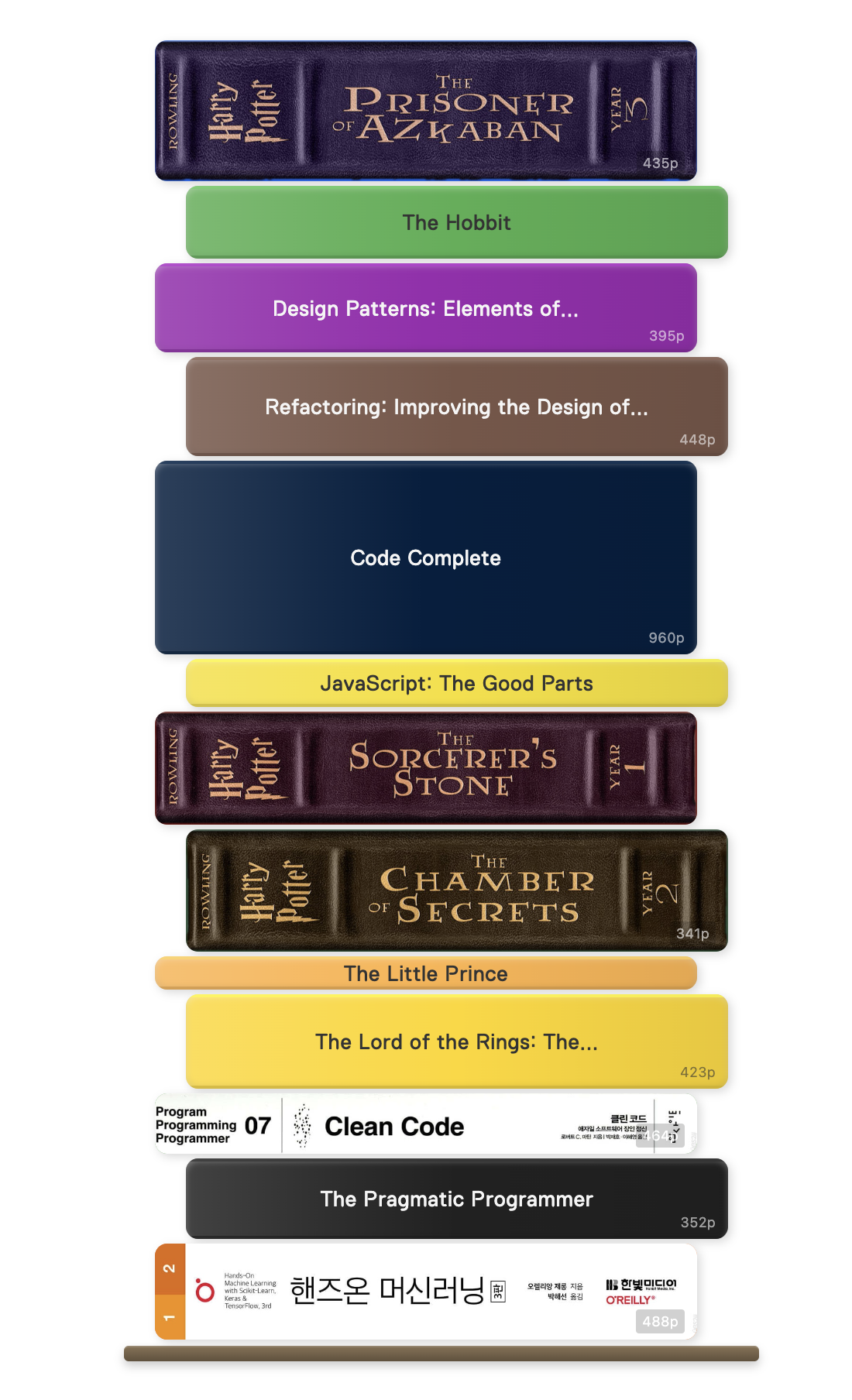
Features
- Visual book spine display based on page count
- Automatic pastel color assignment
- Custom spine colors and images
- Filter by folder, tag, or reading status
- Multiple sorting options
- Click to open book notes
- Responsive design with hover effects
Installation
From Obsidian Community Plugins
- Open Obsidian Settings
- Go to Community Plugins and disable Safe Mode
- Click Browse and search for "Read-It Stack"
- Install and enable the plugin
Manual Installation
- Download the latest release from GitHub
- Extract to your vault's
.obsidian/plugins/read-it-stack/folder - Enable the plugin in Obsidian settings
Quick Start
- Create a note for each book with frontmatter:
---
title: "Clean Code"
author: "Robert C. Martin"
pages: 464
status: done
---
- Add a code block to display your book stack:
```read-it-stack
folder: Books
```
Usage
Basic Code Block
```read-it-stack
```
Filter by Folder
```read-it-stack
folder: Books/Fiction
```
Filter by Status
```read-it-stack
status: reading
```
Filter by Tag
```read-it-stack
tag: fiction
```
Sort and Limit
```read-it-stack
status: done
sortBy: dateFinished
sortOrder: desc
limit: 10
```
Code Block Options
| Option | Description | Values | Default |
|---|---|---|---|
folder | Filter by folder path | Any path | (all files) |
tag | Filter by tag | Tag name | (none) |
status | Filter by reading status | reading, done, to-read, abandoned | (all) |
sortBy | Sort field | title, pages, dateFinished, rating | title |
sortOrder | Sort direction | asc, desc | asc |
limit | Maximum books to show | Number | (unlimited) |
titleFormat | Custom title template | Template string | {{title}} |
Frontmatter Fields
| Field | Required | Description | Example |
|---|---|---|---|
pages | Yes | Page count (determines spine thickness) | 320 |
title | No | Book title | "Clean Code" |
author | No | Author name | "Robert C. Martin" |
status | No | Reading status | reading |
color | No | Custom spine color | "#4CAF50" or "gold" |
spine | No | Custom spine image path (see below) | "[[spine.png]]" |
rating | No | Your rating | 5 |
dateFinished | No | Completion date | 2024-01-15 |
Status Values
| Status | Aliases |
|---|---|
reading | "reading", "in progress", "in-progress" |
done | "done", "finished", "complete", "completed", "read" |
to-read | "to-read", "to read", "want to read", "tbr" |
abandoned | "abandoned", "dnf" |
Named Colors
Supported named colors: red, blue, green, yellow, orange, purple, pink, brown, gray, grey, black, white, gold, navy, teal, maroon
Custom Spine Images
You can use custom spine images instead of colored backgrounds:
---
title: "Harry Potter"
pages: 309
spine: "[[assets/spines/harry-potter.png]]"
---
Tips for spine images:
- Use vertical/portrait-oriented images for best results
- Recommended aspect ratio: tall and narrow (matching book spine proportions)
- Supported formats: PNG, JPG, JPEG, WebP
- Store images in your vault (e.g.,
assets/spines/folder) - Use Obsidian's wiki-link format:
"[[path/to/image.png]]"
Title Format Templates
Customize how titles appear on spines:
```read-it-stack
titleFormat: {{title}} - {{author}}
```
Available variables: {{title}}, {{author}}, {{pages}}, {{rating}}, {{status}}, {{filename}}, {{dateFinished}}, {{tags}}
Settings
Configure the plugin in Settings > Read-It Stack:
- Spine Width: Width of each book spine (100-400px)
- Border Radius: Rounded corners (0-20px)
- Font Family: Choose from bundled and system fonts
- Font Size: Text size on spines (8-18px)
- Show Page Count: Toggle page count display
- Open in New Tab: Open book notes in new tab on click
Thickness Settings
- Base Thickness: Minimum spine thickness in pixels
- Pixels Per Page: Additional pixels per page
- Max Thickness: Maximum spine thickness
Examples
See the examples folder for:
- Sample Vault - Test vault with 12 sample books
- Basic Usage - Getting started guide
- Filtering Options - All filter and sort options
- Custom Styling - Colors, images, and templates
- Advanced Queries - Complex usage patterns
Development
# Install dependencies
npm install

# Build
npm run build

# Development mode
npm run dev
License
MIT License
Contributing
Contributions are welcome! Please feel free to submit a Pull Request.
For plugin developers
Search results and similarity scores are powered by semantic analysis of your plugin's README. If your plugin isn't appearing for searches you'd expect, try updating your README to clearly describe your plugin's purpose, features, and use cases.