Quick Zoom
中文说明
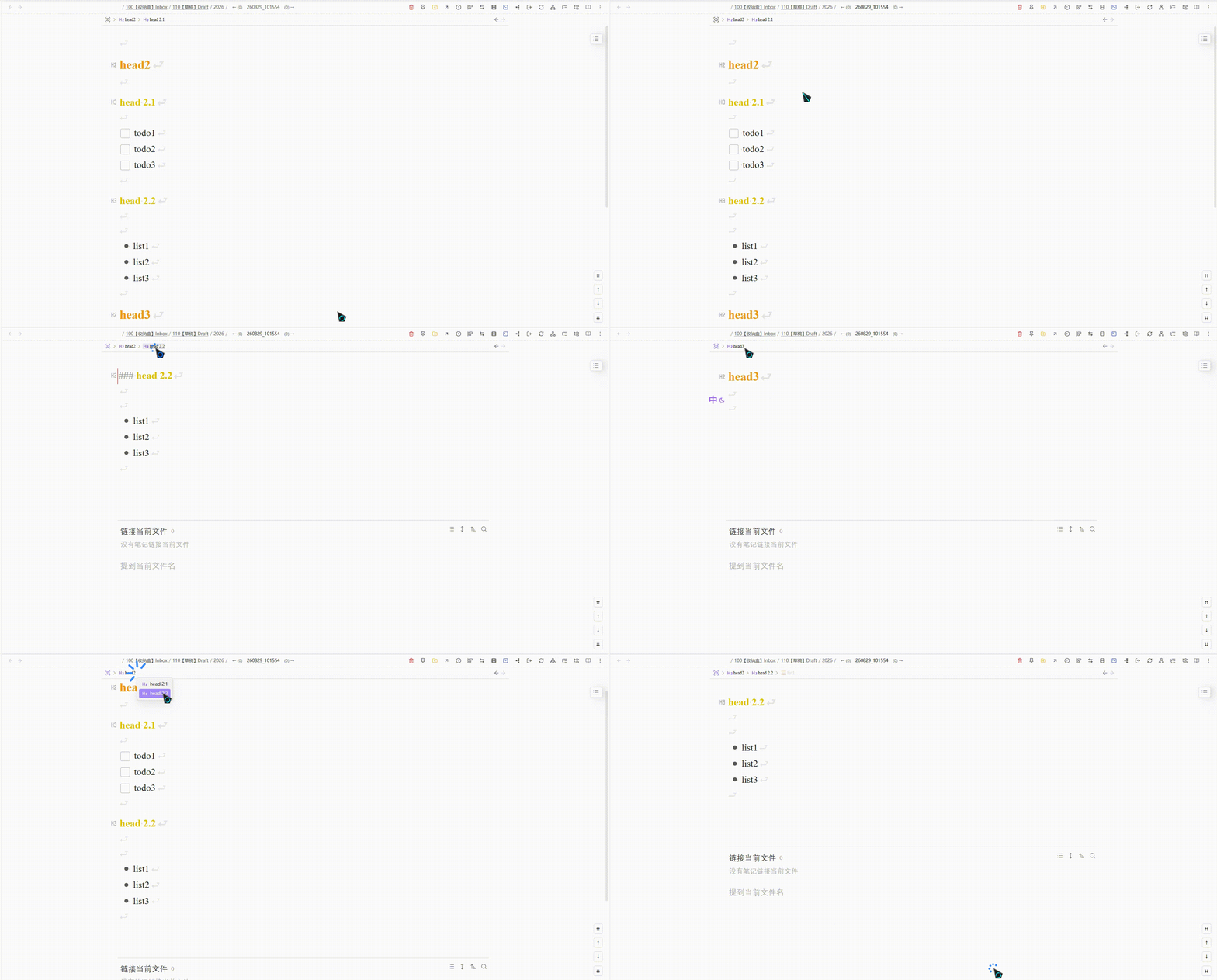
Quick Zoom 支持快速缩放到标题与列表,提供顶部粘性导航栏、大纲菜单,以及父节点 / 同级 / 标题等快捷键导航。
参考来源
本插件基于 Viacheslav Slinko 的 Obsidian Zoom 二次开发。
演示
安装
使用 BRAT(推荐)
- 安装社区插件 Obsidian42 - BRAT
- 打开 设置 → BRAT → Beta Plugin List → Add Beta plugin
- 填入仓库地址:
https://github.com/PandaNocturne/obsidian-quick-zoom - 在 设置 → 第三方插件 中启用 Quick Zoom
手动安装
从 最新发布 下载 main.js、manifest.json、styles.css,放入:
<vault>/.obsidian/plugins/quick-zoom/
在 设置 → 第三方插件 中启用 Quick Zoom。
需在 设置 → 编辑器 中启用 折叠标题 与 折叠缩进。
功能
核心缩放
- 缩放到标题、列表、段落或选区,隐藏其余内容
- 点击列表标记缩放(可关闭)
- 缩放前进 / 后退历史(仅在缩放状态间跳转,不会退出缩放)
导航栏
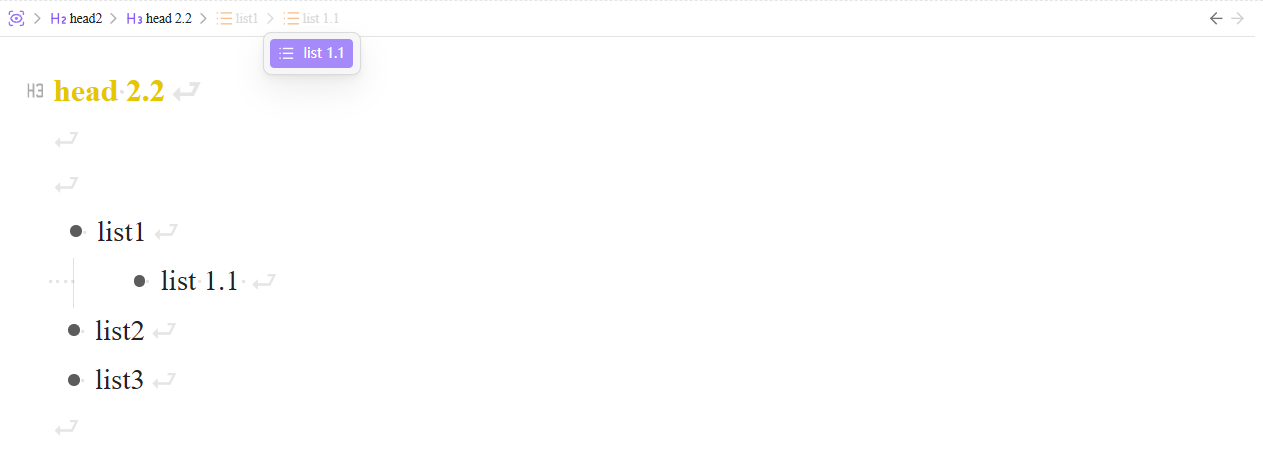
- 缩放时顶部粘性面包屑;可选默认模式显示
- 大纲子菜单浏览同级与子级
- 缩放时跟踪光标(低于缩放根的层级虚色显示)
- 可配置导航栏宽度、标题最大宽度与 Markdown 渲染
大纲列表
- 识别无序、有序、任务列表(可分别开关)
缩放状态记录
- 按笔记保存最近一次缩放范围到插件目录
data/zoom-state.json - 可选:打开笔记时自动恢复上次缩放
- 可配置最大记录笔记数(默认 200,超出淘汰最旧;已删除笔记自动清理)
- 设置中可一键重置全部记录
导航命令
| 命令 | 默认快捷键 |
|---|---|
| 放大 | Ctrl/Cmd + Shift + . |
| 退出全部缩放 | Ctrl/Cmd + Shift + / |
| 缩放过中后退 / 前进 | — |
| 缩放到上 / 下一个标题 | — |
| 缩放到父节点 | — |
| 缩放到上 / 下一个同级 | — |
在 设置 → 快捷键 中搜索 “Zoom” 自行绑定。
设置
打开 设置 → Quick Zoom。页面底部标注了原插件来源。
许可
MIT — 见 LICENSE。
基于 Obsidian Zoom(MIT)。
English
Quickly zoom into headings and lists in Obsidian, with a sticky top navigation bar, outline menus, and keyboard commands for parent / sibling / heading navigation.
Source
This plugin is a fork of Obsidian Zoom by Viacheslav Slinko.
Demo
Install
Via BRAT (recommended)
- Install the community plugin Obsidian42 - BRAT
- Open Settings → BRAT → Beta Plugin List → Add Beta plugin
- Enter:
https://github.com/PandaNocturne/obsidian-quick-zoom - Enable Quick Zoom under Settings → Community plugins
Manual install
Download main.js, manifest.json, and styles.css from the latest release, then place them in:
<vault>/.obsidian/plugins/quick-zoom/
Enable Quick Zoom under Settings → Community plugins.
Requires Fold heading and Fold indent under Settings → Editor.
Features
Core zoom
- Zoom into a heading, list, paragraph, or selection — hide everything else
- Click a list bullet to zoom (optional)
- Zoom back / forward history (stays zoomed; does not exit zoom mode)
Navigation bar
- Sticky top breadcrumbs while zoomed; optional breadcrumbs in default mode
- Outline submenu for siblings and children
- Track cursor while zoomed (dimmed levels below zoom root)
- Configurable bar width, title max width, and Markdown rendering
Outline lists
- Recognize unordered, ordered, and task lists (each toggleable)
Zoom state
- Persist the last zoom range per note under the plugin folder
data/zoom-state.json - Optionally restore that zoom when reopening a note
- Cap how many notes are kept (default 200; oldest dropped; missing notes cleaned up)
- Reset all saved records from Settings
Navigation commands
| Command | Default hotkey |
|---|---|
| Zoom in | Ctrl/Cmd + Shift + . |
| Zoom out | Ctrl/Cmd + Shift + / |
| Zoom back / forward | — |
| Zoom to previous / next heading | — |
| Zoom to parent | — |
| Zoom to previous / next sibling | — |
Assign hotkeys under Settings → Hotkeys (search “Zoom”).
Settings
Open Settings → Quick Zoom. A link to the original plugin is shown at the bottom.
License
MIT — see LICENSE.
Based on Obsidian Zoom (MIT).
For plugin developers
Search results and similarity scores are powered by semantic analysis of your plugin's README. If your plugin isn't appearing for searches you'd expect, try updating your README to clearly describe your plugin's purpose, features, and use cases.