by Jaeger Zhang
Turn your vault into an interactive 3D concept network: render cmap blocks and build concept pages from your notes.
3D Concept Map
中文简介:把 Obsidian 笔记变成立体概念网络的插件。在任意笔记里写 cmap 代码块,就能得到一张可旋转、可缩放、可点开的 3D 知识图谱;再点一下「构建概念网络」,插件会扫描全库、自动生成概念页与概念索引。
- 安装:设置 → 第三方插件 → 浏览 → 搜索 3D Concept Map(或用 BRAT 填
jaegerzhang001-max/3d-concept-map) - 用法:写
cmap代码块 → 点节点聚焦 → 拖动旋转 → 右键平移 - 构建:设置里填分类规则(
文件夹=概念),点左侧「构建概念网络」
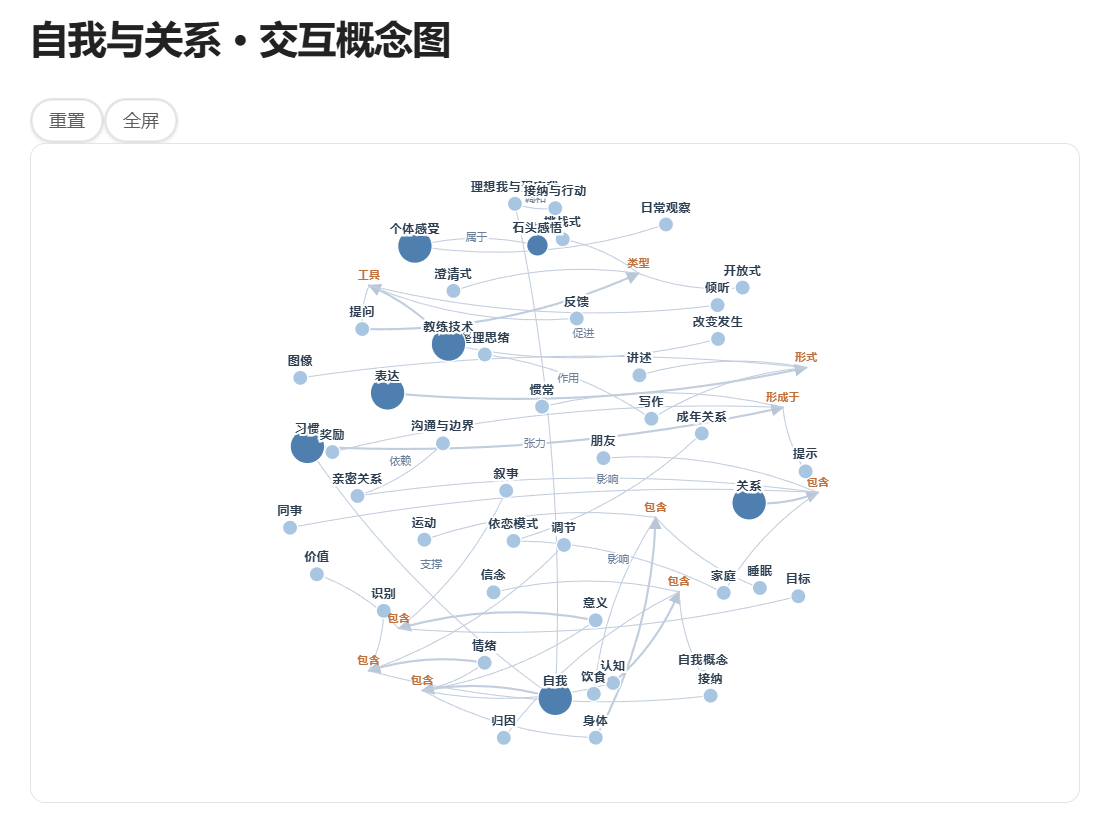
Turn your vault into an interactive 3D concept network. Write cmap blocks to get a rotatable, zoomable concept graph, and use the built-in builder to turn your notes into concept pages.
Installation
From the community directory
- Open Settings → Community plugins and turn off Restricted mode.
- Click Browse and search for 3D Concept Map.
- Click Install, then Enable.
Manual
- Download
main.js,manifest.json, andstyles.cssfrom the latest release. - Put them in
.obsidian/plugins/three-d-concept-map/. - Reload Obsidian and enable the plugin in Community plugins.
BRAT (beta)
- Install the BRAT plugin.
- Run
BRAT: Add a beta pluginand enterjaegerzhang001-max/3d-concept-map.
Usage
Write a cmap code block in any note:
[L1]Language --split into--> Japanese, German, Korean
[L2]Speaking --needs--> phonetics, chunks
[L3]Chunks --support--> [L2]Speaking
Syntax:
| Syntax | Meaning |
|---|---|
[L1] [L2] [L3] | Level, controls node size and color |
A --relation--> B, C | One-to-many, rendered as a fan-out with a labeled station |
A --relation--> B | Direct relation |
Interactions:
| Action | Result |
|---|---|
| Click a node | Focus it and its two-hop neighbors |
| Click empty space | Restore the full graph |
| Drag (left) | Rotate the sphere |
| Drag (right / Shift) | Pan |
| Wheel | Zoom |
| Reset / Fullscreen | Reset the view / fill the window |
Building a concept network
- Go to Settings → 3D Concept Map and set Classification rules (
folder=concept, one per line). - Click the Build concept network ribbon icon, or run the command with the same name.
- The plugin creates
Concept/<name>.mdpages and aConcept index.md.
Settings
- Concept folder
- Node size
- Show relation labels
- Auto-rotate
- Auto-link notes that are not in the network yet
- Classification rules
中文说明
把 cmap 代码块渲染成可交互的 3D 概念网络;内置构建器可扫描全库生成概念页与概念索引。
安装:设置 → 第三方插件 → 浏览 → 搜索 3D Concept Map → 安装 → 启用。
用法:在笔记中写 cmap 代码块(见上表语法),即可得到 3D 图;点节点聚焦、拖动旋转、右键平移、滚轮缩放。
构建概念网络:设置里填 文件夹=概念 的分类规则,点左侧「构建概念网络」图标。
License
MIT © Jäger Zhang
For plugin developers
Search results and similarity scores are powered by semantic analysis of your plugin's README. If your plugin isn't appearing for searches you'd expect, try updating your README to clearly describe your plugin's purpose, features, and use cases.