Tiny Habits
approvedby nazoadiego
Habit tracking in a calendar table

Tiny-Habits
An Obsidian plugin for keeping track of your habits
Explore the docs »
View Demo
·
Report Bug
·
Request Feature



Table of Contents
Tiny Habits
An Obsidian Plugin built with Svelte to track different habits.
All the entries are stored inside your notes frontmatter. Everything stays local and within your markdown notes.
Features:
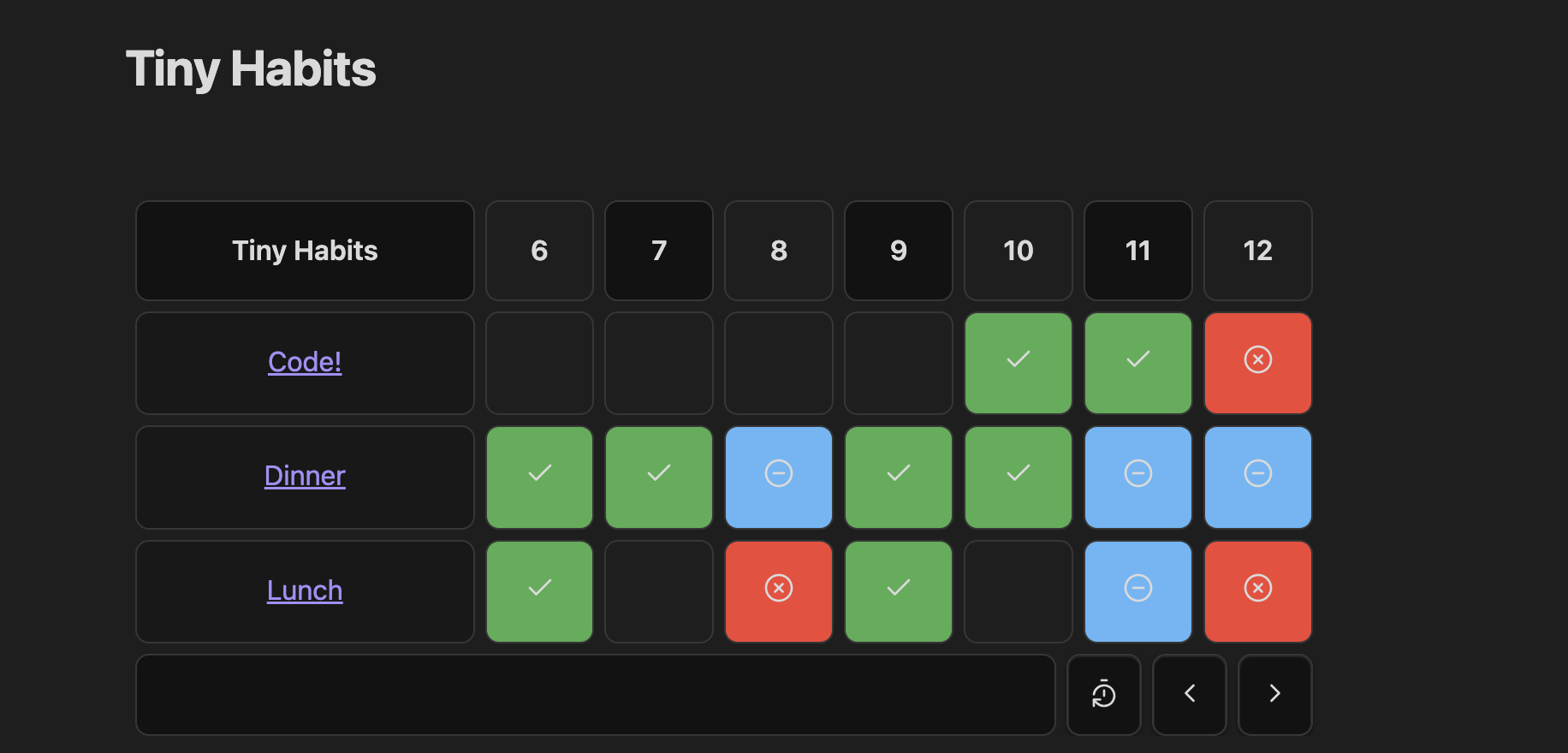
- Mark habits as completed, failed, skipped, or not started.
- A table of your habit entries, in the beloved format of a heatmap we see in Github or Anki.
- Keyboard navigation support
- Navigation both to future and past entries.
Preview:
Usage
-
Make a code block with
habitsin the first line -
Open brackets and indicate the folder path. Make sure you write the full folder path, otherwise it won't work.
-
Create a note in that folder to see the new habit in your habits table.
-
Voila!
```habits
{
  "folderPath": "Areas/Habits/Tiny - Morning"
}
```
You can use as many markdown blocks as you like in the same file. And if they get too big, you can collapse them by clicking the table header.
Keyboard support
You can navigate both with arrows and the hjkl keys. To mark a habit entry, you can do so by focusing on the entry and pressing enter.
To mark an entry with an specific status these are the shortcuts:
- Completed - 1
- Failed - 2
- Skip - 3
- Not started - 4
Scheduling a habit by weekday
A habit doesn't have to apply every day. Click a habit's name (on a phone, press and hold it) to open its editor, and pick the weekdays it applies on. The editor also has a link to open the habit's note. The choice is saved in that habit's own note as a schedule property, which you can also edit by hand:
schedule: [wed]
Days outside the schedule show as a paler skip. Nothing is written to the note for them, and you can still mark them like any other day. A habit with no schedule, or with none of the weekdays chosen, applies every day. You never have to set one.
Weekly and monthly tables
A table is made of days, weeks or months, and every habit in it follows. Set it with cadence in the habits block, which is day when left out:
```habits
{
  "folderPath": "Areas/Habits/Monthly",
  "displayName": "Monthly",
  "cadence": "month"
}
```
A weekly table has one column per week (weeks start on Monday), the last 6 with the current one on the right. A monthly table has one column per month, the last 6 likewise. Marking a cell once means you did it for that whole week or month. The entry is stored under the first day of the period, like 2026-11-02: completed for the week starting Monday, November 2. The arrow buttons move by one week or month, and on a phone the table shows the current one.
The weekday schedule above only applies to daily tables. A habit's cadence is its table's, so the form has no Repeats choice: pick the table when adding a habit, and an existing habit can only move to a table with the same cadence.
Selecting several entries
Hold Shift and click entries to select them, across any habits and days in the table. Shift+click a selected entry to unselect it. You can also hold Shift and drag over entries to select them all; a drag that starts on a selected entry unselects instead.
From the keyboard, Shift+arrows (or Shift+hjkl) select the entry you are on and the one you move to.
With a selection, every status change applies to all selected entries:
- 1 to 4 set all of them to that status.
- Enter, Space or a click on a selected entry moves all of them to the next status of that entry, so they end up with the same status.
Press Escape to clear the selection. Clicking an entry outside the selection, or moving to other dates, clears it too.
Options
```habits
{
  "folderPath": "Areas/Habits/Tiny - Morning", // the absolute path to the folder containing your habits
  "displayName": "Morning", // (optional) To customize the name that appears in the table
  "cadence": "day" // (optional) "day" (default), "week" or "month": what each column of the table is
}
```
How to run it locally
If you are a developer and you wish to run it locally, follow these steps:
- Clone this repo.
- Make sure your NodeJS is at least v16 (
node --version). pnpm ito install dependencies.pnpm run devto start compilation in watch mode.
Running it in a browser, without Obsidian
pnpm run dev:web serves the habit tables on http://localhost:5173 with seeded, in-memory habits (they reset on reload). It runs the same code as the plugin; only the host is swapped.
Obsidian sits behind the Platform interface in platform/Platform.ts. The plugin uses platform/obsidian/ObsidianPlatform.ts, and the dev page and tests use platform/memory/InMemoryPlatform.ts. Importing obsidian anywhere else is a lint error.
Manually installing the plugin
- Copy over
main.js,styles.css,manifest.jsonto your vaultVaultFolder/.obsidian/plugins/your-plugin-id/.
Tests
Run with pnpm run test
Linting
Run with pnpm run lint
Making a release
Start from a clean, up-to-date master branch and run one of:
pnpm release patch
pnpm release minor
pnpm release major
pnpm release 1.2.3
The command synchronizes package.json, manifest.json and versions.json, builds and validates the plugin, commits the version files, creates an annotated tag, and pushes the commit and tag. GitHub Actions then publishes the GitHub Release automatically with main.js, manifest.json and styles.css. Update minAppVersion in the manifest before releasing if the required Obsidian version changes.
The command is safe to retry when the version and tag already point to the same commit. In that case it starts the release repair workflow. It refuses to move a tag that points to another commit.
To only bump the version files without committing, tagging or pushing, run pnpm version:new <major|minor|patch|x.y.z>.
To repair a missing release or release asset without making a new version, run:
gh workflow run release.yml --ref master -f version=1.2.3
The repair workflow reuses an existing tag or creates a missing tag from master after verifying that the version metadata matches. The generated main.js is ignored by Git and is not a release source.
Support
If you like the extension feel free to buy me a coffee! https://buymeacoffee.com/nzoadiego
Hope this extension makes your life a little easier.
Credits
Special thanks to zincplusplus https://github.com/zincplusplus/habit-tracker for the original idea, and an extension that I found so useful it motivated me to build my own.
API Documentation
For plugin developers
Search results and similarity scores are powered by semantic analysis of your plugin's README. If your plugin isn't appearing for searches you'd expect, try updating your README to clearly describe your plugin's purpose, features, and use cases.