Mermaid Circular Layout
unlistedby Andrew Broz
Adds a circular layout for mermaid flowcharts: set layout: circular in a diagram's frontmatter and cycles render as rings.
Mermaid Circular Layout for Obsidian
An Obsidian plugin that draws mermaid flowcharts as circles.
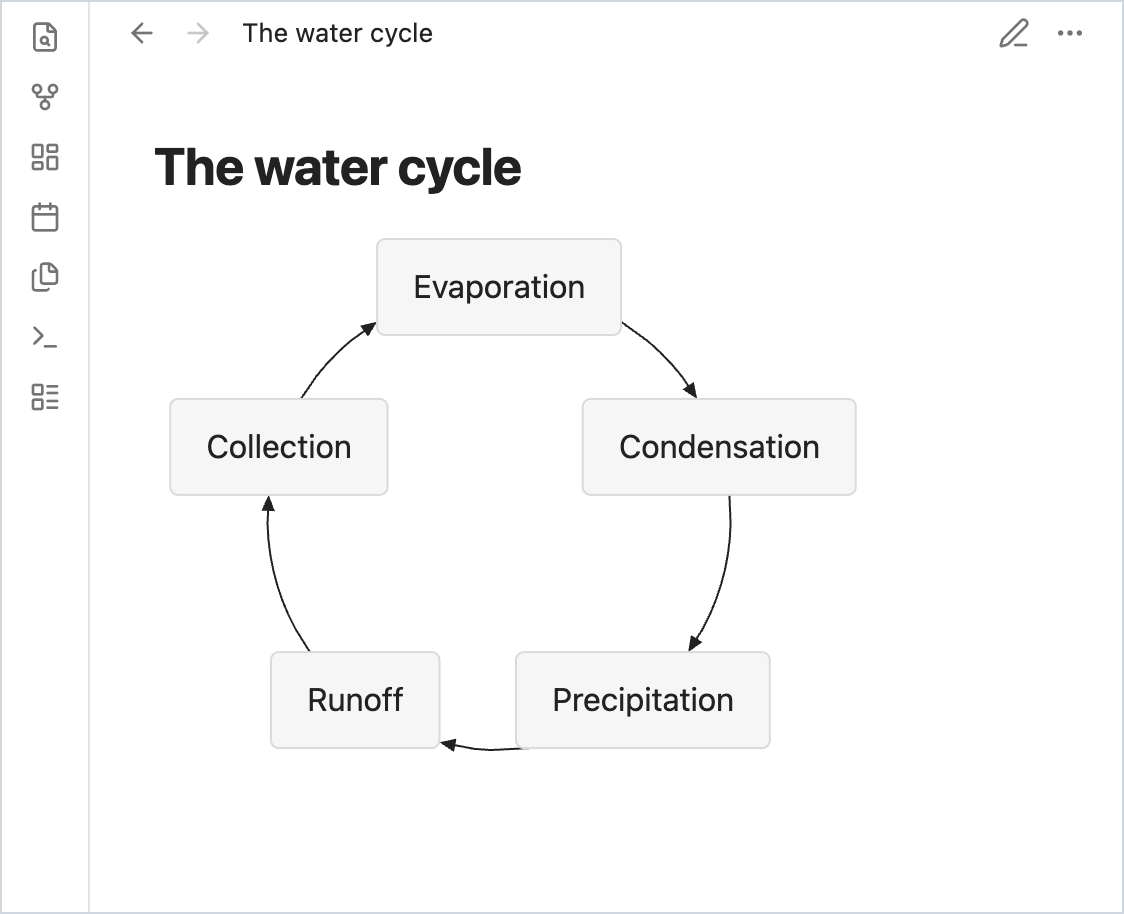
Obsidian is a note-taking app. It draws diagrams written in mermaid, a language for describing diagrams as text. mermaid lays out flowcharts in rows, so a cycle comes out as a line with one arrow looping back. With this plugin, a flowchart that asks for it is drawn on a circle. Each arrow follows the circle to the next node.
A layout is where each box goes and the path each arrow takes. This one also comes as packages for web pages, listed under Which package to use.
Usage
Add a frontmatter block, the settings between two --- lines, at the
top of the diagram. In it, set layout: circular:
```mermaid
---
config:
  layout: circular
---
flowchart LR
  Evaporation --> Condensation --> Precipitation --> Runoff --> Evaporation
```
layout: circular starts at the top and runs clockwise.
layout: circular-ccw runs counter-clockwise instead. Obsidian draws
diagrams without either setting as before.
Install
Until the plugin is in Obsidian's community catalog, install it with BRAT, a plugin that installs other plugins from GitHub.
- Install and enable BRAT from Obsidian's community plugins.
- Run the command "BRAT: Plugins: Add a beta plugin for testing", and
paste
AndrewBroz/obsidian-mermaid-circular. - Enable Mermaid Circular Layout under Settings, Community plugins.
To install it by hand instead:
- Download
main.jsandmanifest.jsonfrom the latest release, or build them yourself (below). - Copy both into
<your vault>/.obsidian/plugins/mermaid-circular/. - In Obsidian, enable the plugin under Settings, Community plugins.
Requires Obsidian 1.15 or later.
Straight edges
By default, an arrow between two neighbors on the circle is curved
along it. Set flowchart.curve to linear to draw straight lines
instead, so the ring becomes a polygon.
An arrow between two nodes that are not neighbors is called a chord. A chord is always a straight line across the circle. When two straight arrows join the same two nodes, they are drawn as parallel lines, each with its label on its own side.
| Curved arrows (the default) | curve: linear |
|---|---|
 |  |
The diagram on the right:
```mermaid
---
config:
  layout: circular
  flowchart:
    curve: linear
---
flowchart LR
  W[Wake] -->|coffee| Wk[Work]
  Wk -->|lunch| M[Meetings]
  M -->|escape| F[Focus]
  F -->|dusk| Hm[Home]
  Hm -->|sleep| W
  Wk -.->|skip the day| Hm
```
Groups
A subgraph (a group of nodes) keeps its members next to each other on the circle. A group is drawn as a tight box when one fits, however much of the circle it covers. The circle turns, if needed, so the box clears every other node. Where the top of a box has no room for its title, the title may go below the box instead. A group becomes a band, a strip that follows the circle, only when no box fits. On the right, any box around Core would cover Registry. When arrows cross the top of a box, its title moves to the bottom.
| A group a box can clear: a box | A group no box can clear: a band |
|---|---|
 |  |
More shapes
The plugin finds these shapes in an ordinary flowchart. A hub is one node linked to most of the others, and it goes in the middle. The ring is the circle the nodes sit on. A cycle that hangs off the ring gets its own smaller circle. Two cycles that share one node make a figure-eight.
 A hub goes in the middle |  A wheel: a ring around a hub |
 A cycle off the ring gets its own circle |  Two cycles sharing a node: a figure-eight |
Each picture's source, and more examples, are in the gallery. Its pictures are drawn by Pele, the program Obsidian uses to draw diagrams, so they match what you see in your notes.
What carries over
Circular diagrams follow your theme, accent color, font, and light or
dark mode, like every other diagram. Like any diagram in Obsidian, they
ignore mermaid's theme: and look: settings. Layout options such as
hub can't be set in Obsidian yet.
Limits
The layout's limits are listed under Limits in the pele-layout-circular README.
How it works
Since version 1.15, Obsidian draws diagrams with Pele, its own diagram renderer. Pele has its own layout and no way to plug in another. So this plugin carries a private copy of Pele's flowchart, with the circular layout added. It steps in only for diagrams that ask for a circular layout. Obsidian's Pele draws every other diagram, exactly as before.
The layout comes from pele-layout-circular, which uses layout-circular for the placement math.
The hand-off relies on pele.mount, which Obsidian uses internally
but does not document for plugins. A future Obsidian release could
move it. If that happens, the plugin says so in a notice and leaves
your diagrams to Pele. Disabling the plugin also hands circular
diagrams back to Pele.
Which package to use
The same circular layout comes in four packages. Pick the one that matches how you draw diagrams.
| You draw diagrams with | Use |
|---|---|
| mermaid, in a web page or app | mermaid-layout-circular |
| Pele, in a web page or app | pele-layout-circular |
| Obsidian, in your notes | this plugin |
| your own code | layout-circular, the shared placement math |
The first three use layout-circular to decide where each node goes. They place nodes the same way. They differ in how boxes and text are drawn.
Building from source
npm install
npm run build
This bundles Pele's flowchart and the circular layout into a minified
main.js of about 210 KB (about 83 KB gzipped). During development,
npm run dev rebuilds on change.
To check a change in a real Obsidian, run a sandboxed instance with the
notes in sandbox-fixtures/. It doesn't touch your own app or vaults.
bash scripts/obsidian-sandbox/obsidian-sandbox.sh start
License
MIT
For plugin developers
Search results and similarity scores are powered by semantic analysis of your plugin's README. If your plugin isn't appearing for searches you'd expect, try updating your README to clearly describe your plugin's purpose, features, and use cases.