ObsiMap
unlistedby Creative781
A powerful keyboard-centric mind map plugin with bi-directional link support.
ObsiMap is a powerful, keyboard-centric mind map plugin for Obsidian. It bridges the gap between structured thought and hierarchical writing by allowing you to transform your notes into interactive nodes. Build complex structures with lightning speed using fully customizable hotkeys, and "compile" your mind map into a unified Markdown document or a clean outliner when you're ready to write.
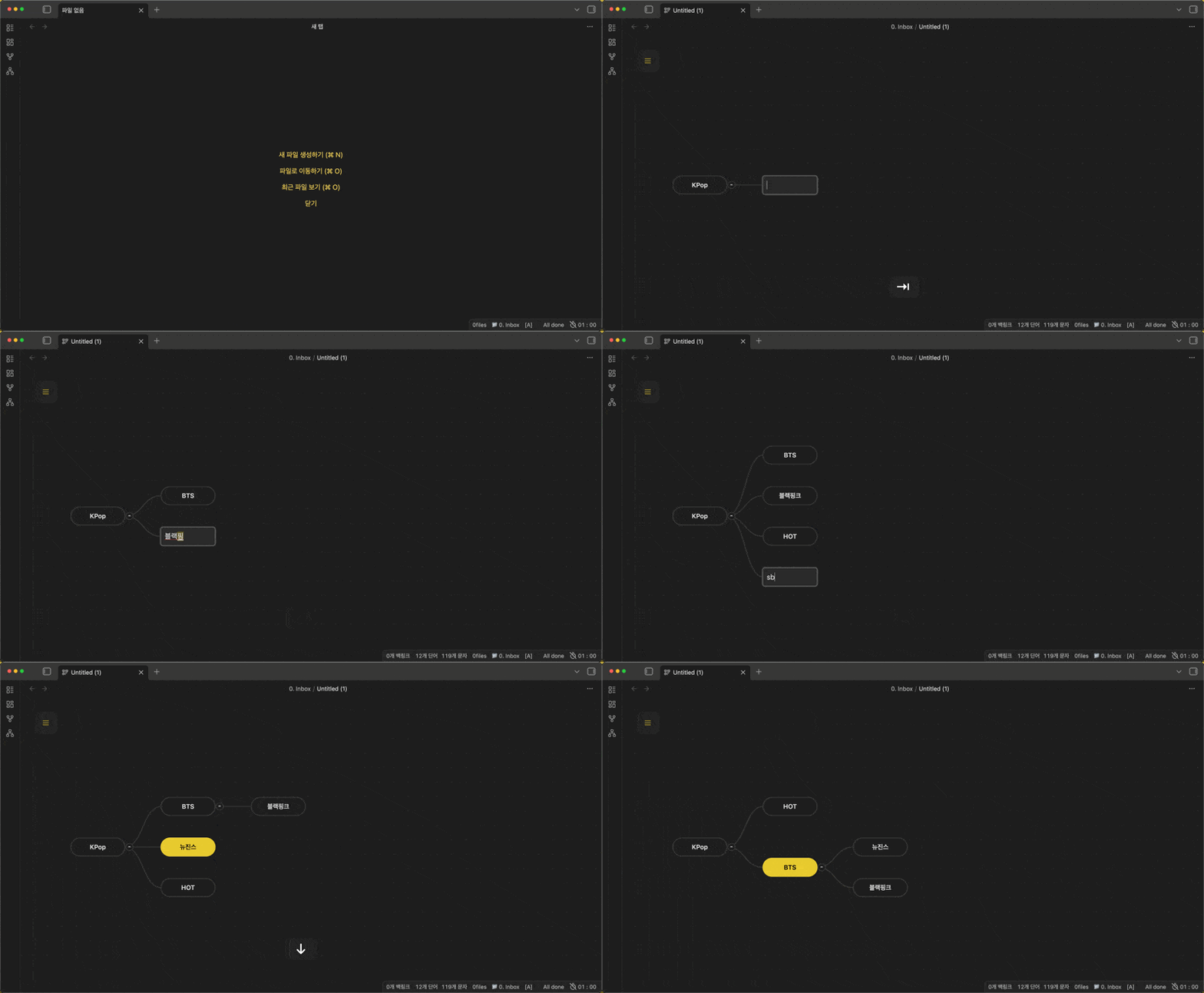
✨ Key Features
- 🚀 Hotkey-Centric Workflow: Perform every action—from node creation to reordering—without ever leaving your keyboard.
- 🔗 Bi-directional Note Integration: Seamlessly link existing notes to nodes or create new notes directly from your mind map.
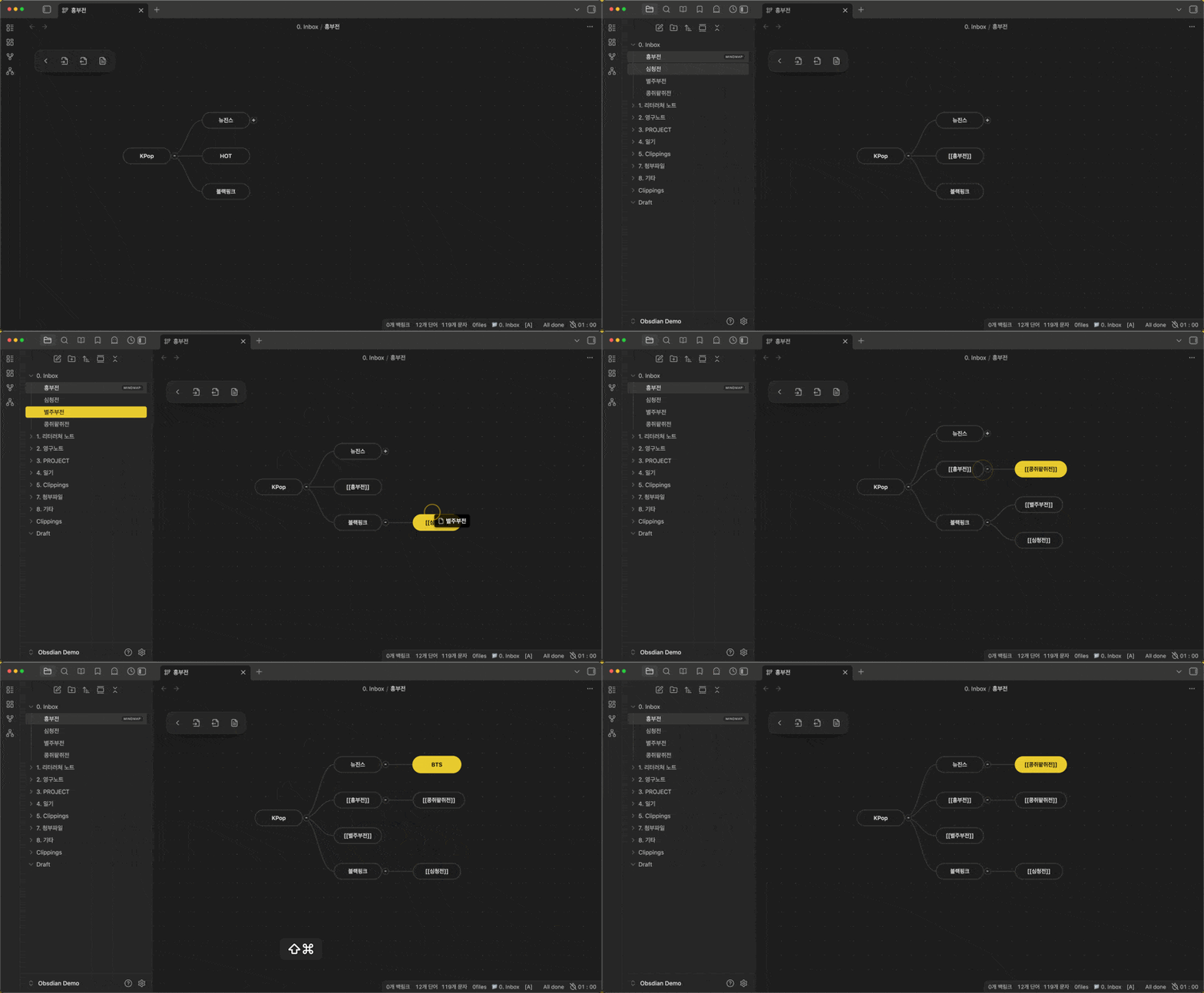
- 🏗️ Document Compiler: Automatically gather and merge all linked note contents into a single, structured Markdown document (inspired by Scrivener’s Compile).
- 📝 Outliner Export: Instantly transform your visual map into a clean, hierarchical Markdown list.
- 🎨 Premium Visuals: Choose between "Pill" or "Rectangle" styles and "Vibrant" or "High Contrast" themes to suit your workspace.
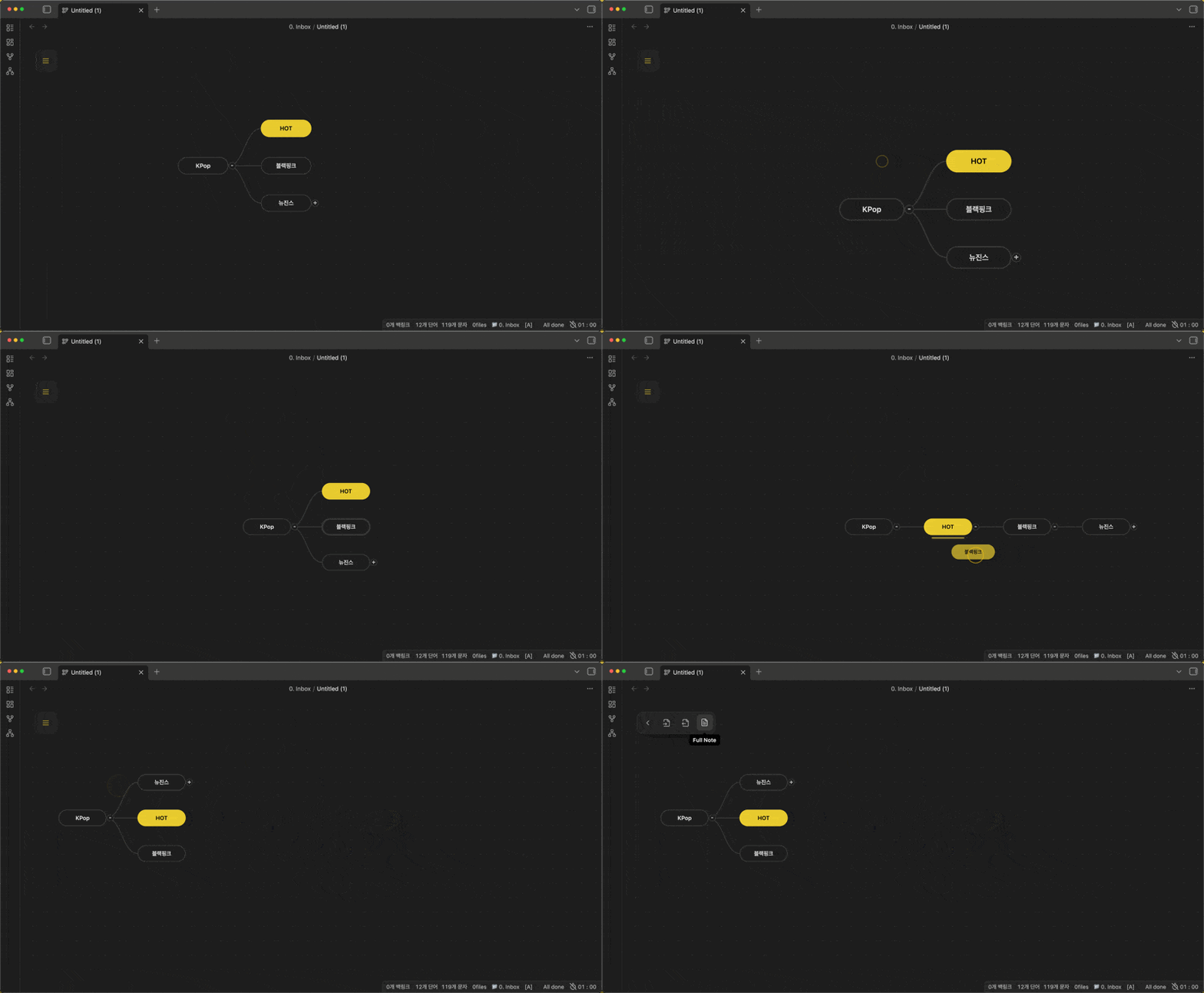
- 🖱️ Intuitive Drag & Drop: Effortlessly reorder nodes or move entire subtrees with smooth visual feedback.
⌨️ Default Hotkeys
Node Operations
| Action | Hotkey |
|---|---|
| Add Child Node | Tab |
| Add Sibling Node | Enter |
| Delete Node | Delete |
| Edit/Rename Node | Shift + Enter |
| Search & Link Note | Ctrl + Shift + Enter |
| Create Note from Node | Ctrl + Shift + N |
| Open Linked Note | Ctrl + Shift + L (or Double Click) |
Navigation & Movement
| Action | Hotkey |
|---|---|
| Move Selection | Arrow Keys |
| Multi-node Select | Ctrl / Cmd + Arrow Keys |
| Reorder Node (Up/Down) | Shift + Arrow Up/Down |
| Promote/Demote Node | Shift + Arrow Left/Right |
| Fold/Unfold Subtree | Ctrl + / |
🚀 Installation
Using BRAT (Recommended)
- Install the BRAT plugin.
- Go to
Settings->BRAT->Add Beta plugin. - Paste the URL:
https://github.com/Creative781/obsimap
Manual Installation
- Download
main.js,manifest.json, andstyles.cssfrom the Latest Release. - Create a folder
obsimapin your vault's.obsidian/plugins/directory. - Move the downloaded files into that folder and enable it in Obsidian settings.
📄 License
MIT
☕ Support & Connect
If ObsiMap helps you think better, consider supporting the developer!

- YouTube: Creative781 Tutorials
- Blog: Official Blog
ObsiMap (한국어)
ObsiMap은 키보드 중심의 사용자 경험을 극대화한 옵시디안용 마인드맵 플러그인입니다. 마인드맵의 시각적 구조와 서술형 글쓰기 사이의 간극을 좁히기 위해 설계되었습니다. 모든 작업을 커스텀 단축키로 신속하게 처리하고, 시각적으로 정리된 아이디어를 클릭 한 번으로 완성된 마크다운 문서나 개요(Outliner)로 '컴파일' 하세요.
✨ 주요 기능
- 🚀 단축키 기반 워크플로우: 노드 생성부터 위치 이동, 트리 구조 변경까지 키보드만으로 모든 작업을 수행할 수 있습니다.
- 🔗 양방향 메모 연동: 보관함의 기존 메모를 노드에 연결하거나, 노드에서 즉시 새로운 메모를 생성하여 연동할 수 있습니다.
- 🏗️ 문서 컴파일러: 마인드맵에 연결된 모든 메모의 내용을 수집하여 마인드맵 구조에 따른 하나의 통합 문서로 병합합니다 (Scrivener의 Compile 기능 영감).
- 📝 아웃라이너 내보내기: 마인드맵의 시각적 구조를 텍스트 중심의 깔끔한 계층형 목록(마크다운)으로 즉시 변환합니다.
- 🎨 고품격 디자인: "Pill" 혹은 "Rectangle" 노드 스타일과 "Vibrant", "Contrast" 등 테마를 선택하여 몰입 환경을 조성하세요.
- 🖱️ 직관적인 드래그 앤 드롭: 마우스로 노드 위치를 바꾸거나 하위 트리를 이동할 때 부드러운 애니메이션과 피드백을 제공합니다.
⌨️ 기본 단축키
노드 조작
| 기능 | 단축키 |
|---|---|
| 자식 노드 추가 | Tab |
| 형제 노드 추가 | Enter |
| 노드 삭제 | Delete |
| 노드 편집/이름 변경 | Shift + Enter |
| 노트 검색 및 연결 | Ctrl + Shift + Enter |
| 노드에서 새 노트 생성 | Ctrl + Shift + N |
| 연결된 노트 열기 | Ctrl + Shift + L (또는 더블 클릭) |
탐색 및 이동
| 기능 | 단축키 |
|---|---|
| 노드 간 이동 | 방향키 |
| 다중 노드 선택 | Ctrl / Cmd + 방향키 |
| 순서 변경 (위/아래) | Shift + 방향키 위/아래 |
| 상위/하위 레벨 이동 | Shift + 방향키 왼쪽/오른쪽 |
| 하위 트리 접기/펴기 | Ctrl + / |
🚀 설치 방법
BRAT 사용 시 (권장)
- BRAT 플러그인을 설치합니다.
Settings->BRAT->Add Beta plugin으로 이동합니다.- 다음 주소를 입력하세요:
https://github.com/Creative781/obsimap
수동 설치
- 릴리즈 페이지에서
main.js,manifest.json,styles.css를 다운로드합니다. - 보관함의
.obsidian/plugins/obsimap폴더를 생성하고 파일을 넣습니다. - 옵시디안 설정에서 플러그인을 활성화합니다.
📄 라이선스
MIT
☕ 지원 및 소통
ObsiMap이 마음에 드셨다면 개발자를 응원해주세요!
- 유튜브: Creative781 튜토리얼
- 블로그: 공식 블로그
For plugin developers
Search results and similarity scores are powered by semantic analysis of your plugin's README. If your plugin isn't appearing for searches you'd expect, try updating your README to clearly describe your plugin's purpose, features, and use cases.