Timeline DSL
unlistedby keroway
Render .tdsl timeline DSL code blocks as SVG previews in Obsidian.
obsidian-tdsl




An Obsidian plugin that renders Timeline DSL (tdsl) code blocks as interactive SVG timelines in the live preview.
日本語版: README.ja.md
Preview
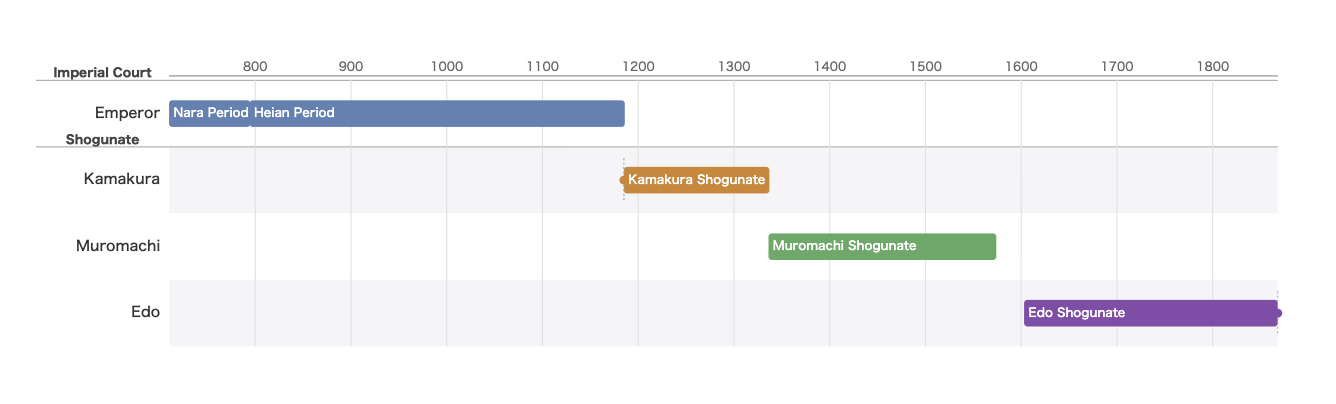
Features
- SVG timeline preview —
tdslcode blocks are rendered as SVG directly in the Obsidian live preview / reading view - Inline syntax errors — Parse and semantic errors are shown with line/column numbers inside the note, without leaving the editor
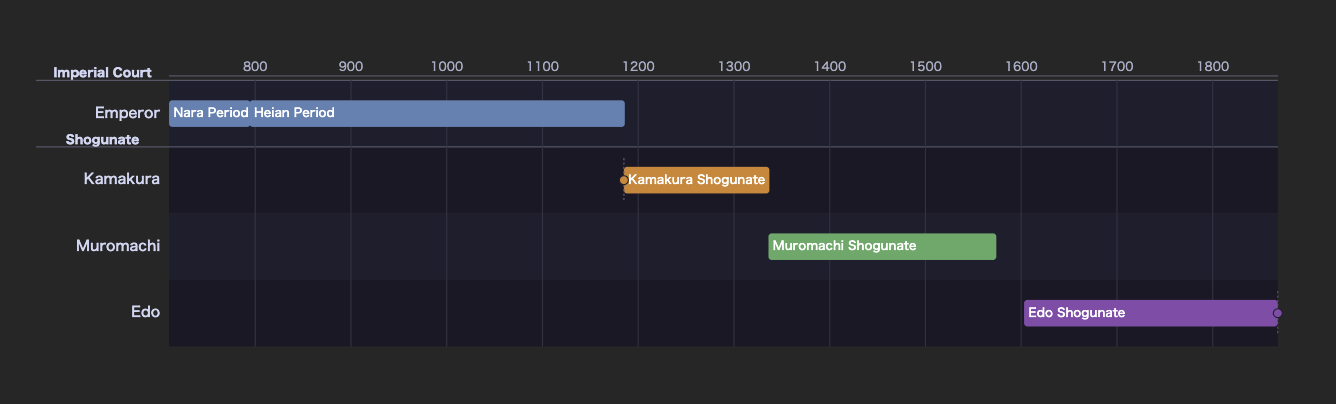
- Dark mode support — Automatically follows Obsidian's
body.theme-darkclass; colour palette adapts to Catppuccin-style dark colours - XSS-safe SVG insertion — SVG output is parsed via
DOMParserand inserted withdocument.adoptNode; noinnerHTML, no script execution - Pan/zoom & fullscreen — Wheel-zoom, drag-pan, and a Fullscreen button on every rendered timeline. Enabled by default; composes with
//! scale: fitand horizontal scrolling. Toggle in the settings tab. - Export toolbar — Every rendered timeline gets a toolbar with Copy SVG, Copy standalone HTML, Copy PNG, and Save as file actions
- Mobile-enabled —
isDesktopOnly: false; the plugin is not blocked from running on Obsidian Mobile, but has not yet been extensively verified on iOS/Android. Feedback via GitHub Issues is welcome. - Zero network requests — The Timeline DSL WASM renderer is bundled inline; no external calls at render time
Usage
Write a tdsl fenced code block in any note:
```tdsl
timeline "Heian Period" {
  unit year;
  range 781..1185;
}

lane "Emperor" as emperor {}

span emperor 781..806 "Kanmu" {};
span emperor 806..809 "Heizei" {};
span emperor 809..823 "Saga" {};
```

> **Syntax notes:** every property inside the `timeline { … }` block ends with `;`,
> ranges use `start..end` (not `start to end`), and each `span` / `event` /
> `event_range` statement ends with a trailing `;` after its `{ … }` block.
> `lane` and `group` declarations take **no** trailing `;`.
Supported DSL features in Obsidian
The following DSL constructs work fully inside Obsidian:
timeline block
Declares the title, time unit, display range, and colour mappings.
timeline "Chinese Dynasties" {
    title "Chinese Dynasties";
    unit year;
    range -500..2000;
    calendar proleptic_gregorian;
    color_map {
        dynasty: "#3366cc";
        war:     "#cc0000";
    }
}
unit accepts year, month, day, hour, minute, or second.
calendar is optional and accepts proleptic_gregorian (default) or julian.
It affects how date literals are interpreted; omitting it is equivalent to proleptic_gregorian.
For sub-day units, write the bounds as ISO 8601 date-times. A UTC offset (or
Z) goes inside the literal — there is no separate timezone property on the
timeline block:
timeline "Launch day" {
    unit hour;
    range 2026-01-01T00:00:00+09:00..2026-01-02T00:00:00+09:00;
}
lane declaration
Defines a vertical category. Use as to assign an internal ID used by span / event.
lane "Han" as han { kind dynasty; order 20; }
group block
Groups multiple lanes with a shared label and visual boundary.
group "Ancient China" {
    lane "Qin" as qin { kind dynasty; order 10; }
    lane "Han" as han { kind dynasty; order 20; }
}
span / event / event_range
Three types of time elements attached to a lane:
// Duration (start..end) — note the trailing ; after the block
span han -206..220 "Han Dynasty" { tags ["dynasty"]; };

// Point event
event han -209 "Dazexiang Uprising" {};

// Range event (wars, disasters, etc.)
event_range han 184..204 "Yellow Turban Rebellion" { tags ["war"]; };
now — open-ended ranges
span and event_range accept now as the end of a range to mean "still
going". It is not valid as the start, and event (a point in time) does not
take it:
span main 2010..now "Ongoing project" {};
event_range main 2020..now "Still running" {};
now resolves at render time to the current year (UTC), so pair it with
unit year. With unit day and date literals such as 2026-03-01..now the end
still resolves to the year, which produces a "start > end" warning.
Open-ended items also get the tdsl-item-open-ended class, so a snippet in your
vault's CSS can style them (a fading edge, a dashed border) — and their tooltip
shows the end as "in progress" rather than a number.
note / link / color block options
span, event, and event_range blocks accept three extra options (they are
not available on lane / group, which only take kind and order):
span main 1603..1868 "Edo period" {
    note "Sakoku era";
    link "https://en.wikipedia.org/wiki/Edo_period";
    color "#8b5cf6";
};
| Option | Value | Effect |
|---|---|---|
id | identifier string | stable identifier for the item. The Fix lint issues in current tdsl block command adds missing ids automatically |
note | string | extra line in the item's tooltip / accessible label |
link | http:// or https:// URL | shown as a line in the tooltip — not clickable; the renderer emits no <a> element. Any other scheme is a compile error |
color | #RGB / #RGBA / #RRGGBB / #RRGGBBAA, or a plain CSS colour keyword | overrides the item's fill, taking precedence over the lane colour and color_map. Other values (e.g. rgb(), url()) are rejected |
source | string | source or provenance note. In the SVG renderer this appears as text in the tooltip / accessible label; it does not become a clickable link |
origin | string | describes where the item came from (e.g. manual vs import) |
note and link are surfaced through the item's <title>, aria-label and
data-tdsl-tooltip attributes, so they show up as a native browser tooltip on
hover and are announced by screen readers.
Rendering options (//! directives)
Because Obsidian only passes the code-block body to the renderer, per-diagram
options are written as //! comment lines (ordinary DSL comments the compiler
ignores). Place them anywhere in the block:
//! scale: 3
//! grid: decade
//! orientation: vertical
//! layout_style: gantt
//! events: on
timeline "Demo" { unit year; range 0..100; }
lane "Main" as main {}
span main 10..50 "An era" {};
| Directive | Values | Effect |
|---|---|---|
scale | positive number, or fit | pixels per year. Higher = wider / more readable. fit shrinks the timeline to the note width (no horizontal scroll). Omit for auto. |
grid | none, decade, year, month | gridline density |
theme | default, dark, print, pastel | built-in colour theme |
orientation | horizontal, vertical | layout direction |
layout_style | timeline, gantt, group-bands, zigzag | renderer layout style. Unknown values are ignored. Omit for the renderer default. |
events | on / off | show labels next to event / event_range items |
table | on / off | render the accompanying item-listing table (drawn natively in the SVG) |
legend | on / off | render a static legend panel showing lane and tag colors |
lane_height | positive integer | vertical pixels per lane. Omit (or 0) for the renderer default (60 px). |
The timeline renders at its natural size; if it is wider than the note column it
scrolls horizontally rather than shrinking (which would make labels unreadable).
Use a numeric scale to make a sparse timeline span a wider area, or
//! scale: fit to shrink it to the note width for an at-a-glance view (labels
scale down with the graphic).
Default options (settings tab)
Settings → Community plugins → Timeline DSL lets you set vault-wide defaults so you don't repeat the same directive in every block:
| Setting | Values | Default |
|---|---|---|
| Default theme | auto, default, dark, print, pastel | auto (follow Obsidian light/dark via plugin CSS) |
| Default grid | none, decade, year, month | none |
| Default scale | auto, fit, or a positive number | auto |
| Show event labels by default | on / off | off |
| Default orientation | horizontal, vertical | horizontal |
| Default layout style | auto, timeline, gantt, group-bands, zigzag | auto (renderer default) |
| Show table by default | on / off | off |
| Show legend by default | on / off | off |
| Default lane height | empty / 0, or a positive integer (px) | 0 (renderer default, 60 px) |
| Enable pan/zoom | on / off | on |
Resolution order is block //! directive > settings default > built-in.
Changes apply immediately to every open note — no need to reopen anything.
Commands
In addition to the Markdown code-block preview, the plugin adds three commands to the Obsidian command palette:
| Command | Where it works | What it does |
|---|---|---|
Format current tdsl block | Cursor inside a ```tdsl block | Re-formats the current block's DSL body using the WASM formatter. Requires the cursor to be inside the block. |
Fix lint issues in current tdsl block | Cursor inside a ```tdsl block | Applies auto-fixable lint rules (such as missing_id) to the current block. Does nothing if there are no fixable issues. Requires the cursor to be inside the block. |
Insert timeline template | Anywhere in the note | Opens a picker that inserts a starter timeline (Historical eras, Project plan, Life of a person, or Reading log) at the cursor position. No existing block is needed. |
Timeline toolbar
Every rendered timeline shows a toolbar (role="toolbar") with these actions:
| Button | What it does |
|---|---|
Fullscreen | Opens the timeline in a fullscreen modal, giving pan/zoom more room to work in. Hidden when pan/zoom is disabled. |
Copy SVG | Copies the rendered SVG markup to the clipboard |
Copy standalone HTML | Copies a self-contained HTML document embedding the timeline |
Copy PNG | Copies a rasterized PNG of the timeline to the clipboard |
Save as file | Saves the rendered SVG as a file in the vault |
Pan/zoom (wheel-zoom, drag-pan) is enabled by default and can be turned off in
the settings tab; it composes with //! scale: fit and horizontal scrolling.
Full example
timeline "Japanese History" {
    title "Nara to Edo";
    unit year;
    range 710..1868;
    color_map {
        dynasty: "#8b5cf6";
        war:     "#ef4444";
    }
}

group "Imperial Court" {
    lane "Emperor" as emperor { kind dynasty; order 1; }
}

group "Military Government" {
    lane "Kamakura Shogunate" as kamakura { kind dynasty; order 2; }
    lane "Muromachi Shogunate" as muromachi { kind dynasty; order 3; }
    lane "Edo Shogunate"       as edo      { kind dynasty; order 4; }
}

span emperor 710..794 "Nara Period" { id "nara"; tags ["dynasty"]; };
span emperor 794..1185 "Heian Period" { id "heian"; tags ["dynasty"]; };

span kamakura  1185..1336 "Kamakura Shogunate" { id "kamakura-shogunate"; tags ["war"]; };
span muromachi 1336..1573 "Muromachi Shogunate" { id "muromachi-shogunate"; tags ["war"]; };
span edo       1603..1868 "Edo Shogunate" { id "edo-shogunate"; tags ["war"]; };

event kamakura 1185 "Minamoto no Yoritomo appointed Shogun" { id "yoritomo-appointed"; };
event edo      1868 "Meiji Restoration" { id "meiji-restoration"; };
Limitations
The following Timeline DSL features require network access or server-side processing and are not supported inside Obsidian:
| Feature | Reason |
|---|---|
import wikidata | Wikidata HTTP requests cannot be made from the browser renderer |
map blocks | Depend on resolved import wikidata data |
template / apply syntax | Depend on resolved import wikidata data |
If a tdsl block contains import wikidata, the plugin displays a notice and renders only the static items (span / event / event_range) defined in the source.
For full Wikidata integration, use the tdsl CLI or the WebUI to pre-render to SVG/HTML.
Installation
Community Plugin (coming soon)
The plugin is not yet listed in the Obsidian Community Plugin directory. Once published, it will be installable from Settings → Community plugins → Browse by searching for Timeline DSL.
Manual installation (GitHub Release)
-
Go to the Releases page and download the latest release assets:
main.jsmanifest.jsonstyles.css
-
Create the plugin directory in your vault (if it does not exist):
mkdir -p <vault>/.obsidian/plugins/timeline-dsl/ -
Copy the three downloaded files into that directory.
-
In Obsidian: Settings → Community plugins → Installed plugins → enable Timeline DSL
Requires Obsidian ≥ 1.4.0.
Manual installation (development build)
-
Clone this repository
-
Install dependencies and build:
pnpm install pnpm run build -
Copy the three output files into your vault:
# replace <vault> with your actual vault path cp main.js manifest.json styles.css <vault>/.obsidian/plugins/timeline-dsl/ -
In Obsidian: Settings → Community plugins → Installed plugins → enable Timeline DSL
Requires Obsidian ≥ 1.4.0.
Development
pnpm install          # install dependencies
pnpm run dev          # watch mode (rebuilds on save)
pnpm run build        # production build → main.js
pnpm run lint         # Biome lint
pnpm run typecheck    # tsc --noEmit
CI classifies the changed files and runs only the affected checks among test (pnpm run test:coverage, enforcing coverage thresholds), lint (pnpm run format:check and pnpm run lint), typecheck, build (also verifies that main.js is produced), and audit (pnpm audit --audit-level high). See CONTRIBUTING.md for a full guide.
Related projects
| Project | Description |
|---|---|
| keroway/timeline-dsl | The Timeline DSL compiler (Rust + WASM). CLI, WebUI, GitHub Actions integration |
| WebUI | Real-time browser editor — full Wikidata support |
| Landing page | Overview and feature tour |
| VS Code extension | Syntax highlighting for .tdsl files |
| @keroway/tdsl-wasm | WASM package used by this plugin |
License
MIT © keroway
Third-party licenses for bundled dependencies are listed in THIRD-PARTY-NOTICES.md.
For plugin developers
Search results and similarity scores are powered by semantic analysis of your plugin's README. If your plugin isn't appearing for searches you'd expect, try updating your README to clearly describe your plugin's purpose, features, and use cases.