Note Gallery
approvedby pashashocky
A masonry gallery that will visualize your notes, similar to Craft note view.
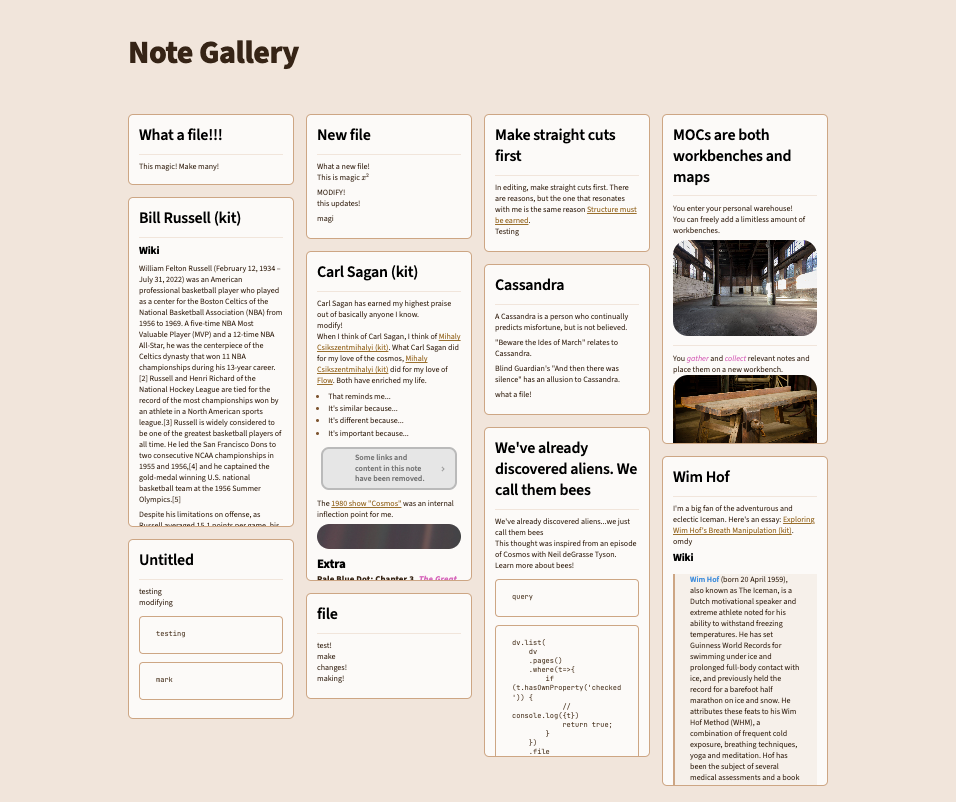
What is it?
Note Gallery is a [super-fast] masonry style note gallery for Obsidian.
- This plugin is currently in early alpha testing. It's functional but may contain some bugs.
- Please feel free to leave any bugs or feature requests in issues.
- I've tested this with a couple thousand notes and so far, I've been getting near-instant previews!


Functionality
Current
- Displays notes or images using a masonry gallery by defining a code block in your note. Similar to "Safari overview mode" or "Craft-like folder view".
- Opimized the loading of markdown cards through caching.
- CRUD operations update the gallery.
- Variety of filtering and searching options
-
querysupports native obsidian search syntax! Only include 1 (one)queryargument in your code block. For example, here are several individual query examples you could use:query: '/(Regex: \d)/'query: 'path: Atlas tag: #mytag'query: 'path: abc/deb OR path: atlas/notes'query: path:abc/deb OR path:atlas/notes- notice the spacing differences without quotes
-
pathcan be used to select an individual folder or recursively collect it
-
- Has options for sorting, limiting # of results and recursively scanning folders.
- Custom breakpoints for gallery columns
Work in Progress
- Actively working through issues.
- Interactive view when clicking on folders in the file switcher.
- Showing currently open tabs as a Masonry gallery.
Quickstart
To get an idea of how syntax works, create a new blank note and copy/paste this entire syntax block into the note. Your masonry layout should show up right away. In this example, it will show your most recent 9 notes. If they do not show up immediately, create a new line in your note outside of the syntax block.
When copying and pasting, be sure to include all 4 ~ characters at the beginning and all 4 ~ characters at the end of the syntax block.
~~~~note-gallery
sort: desc
limit: 9
~~~~
Example Syntax
~~~~note-gallery     #           default | options
query: 'tag:#mytag'  # optional: anything you'd put into an obsidian search query
                     # make sure to wrap into single quotes for any regex e.g.: '/\d/'
debugQuery: false    # optional: false | true - display native search results to debug
path: atlas          # optional: current note folder | path/to/folder - you don't **need**
                     # to use path if you are using query, path will source additional notes
recursive: true      # optional: true | false
limit: 10            # optional: 0 | any number
sort: desc           # optional: desc | asc
sortBy: mtime        # optional: mtime | ctime | name
sortRandom: false    # optional: false | true - randomly sorts the cards, overrides other sorting options
fontSize: 6pt        # optional: 6pt | NUMBERpt | NUMBERpx
showTitle: true      # optional: true | false
breakpoints:         # optional: allows to set breakpoints for number of columns
  default: 4
  100000: 10
  3500: 10
  3100: 9
  2700: 8
  2300: 7
  1900: 6
  1500: 5
  1000: 4
  700: 3
  400: 2
  200: 1
~~~~
Responsive Breakpoints
Different columns can be specified by passing an object containing key's of the window widths and their value as the number of columns. To have a fallback value, use the default key.
breakpoints:
  default: 4,
  1100: 3,
  700: 2,
  500: 1
Installation Instructions
Community Plugin
You can now install Note Gallery from community plugins of Obsidian!
BRAT
- Install BRAT from the Community Plugins in Obsidian 1.1 Enable the BRAT plugin in the settings
- Open the command palette (CMD/CTRL + P) and run the command BRAT:
Add a beta plugin for testing - Enter the following URL:
https://github.com/pashashocky/obsidian-note-gallery - Enable the
Note Galleryplugin in theCommunity Pluginstab in settings - Create a code block similar to the below in any of your notes
For plugin developers
Search results and similarity scores are powered by semantic analysis of your plugin's README. If your plugin isn't appearing for searches you'd expect, try updating your README to clearly describe your plugin's purpose, features, and use cases.