Navigator
unlistedby frsalvador
Track your travels, see visited countries light up on an interactive map, and follow your stats and achievements.
Navigator
A personal atlas of your travels, built inside Obsidian. Keep the places, photos and stories together in your own vault.
0.3.1 beta. Not yet listed in Obsidian Community Plugins. Native desktop and mobile testing is still in progress.
A look inside Navigator
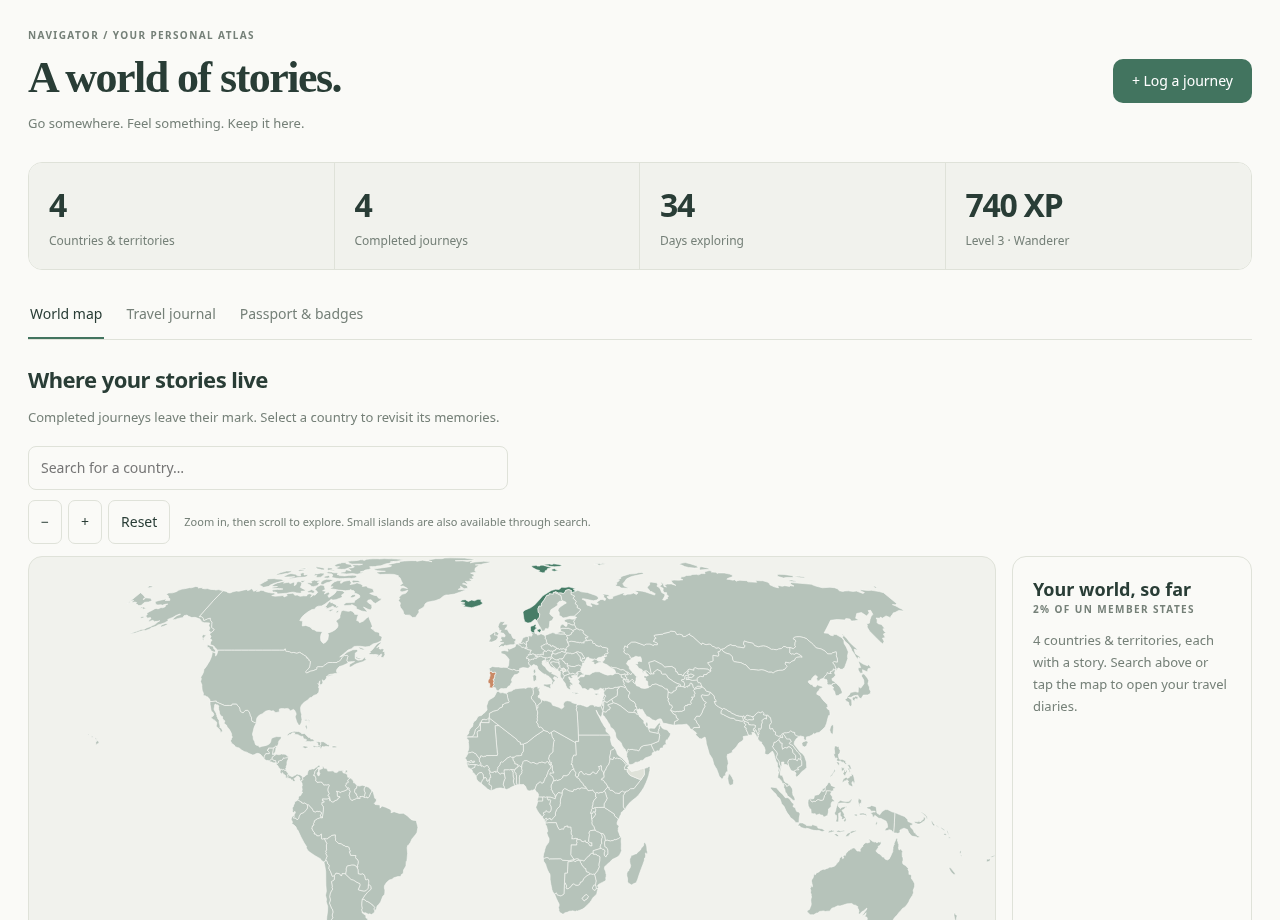
Journal, passport and reading preferences
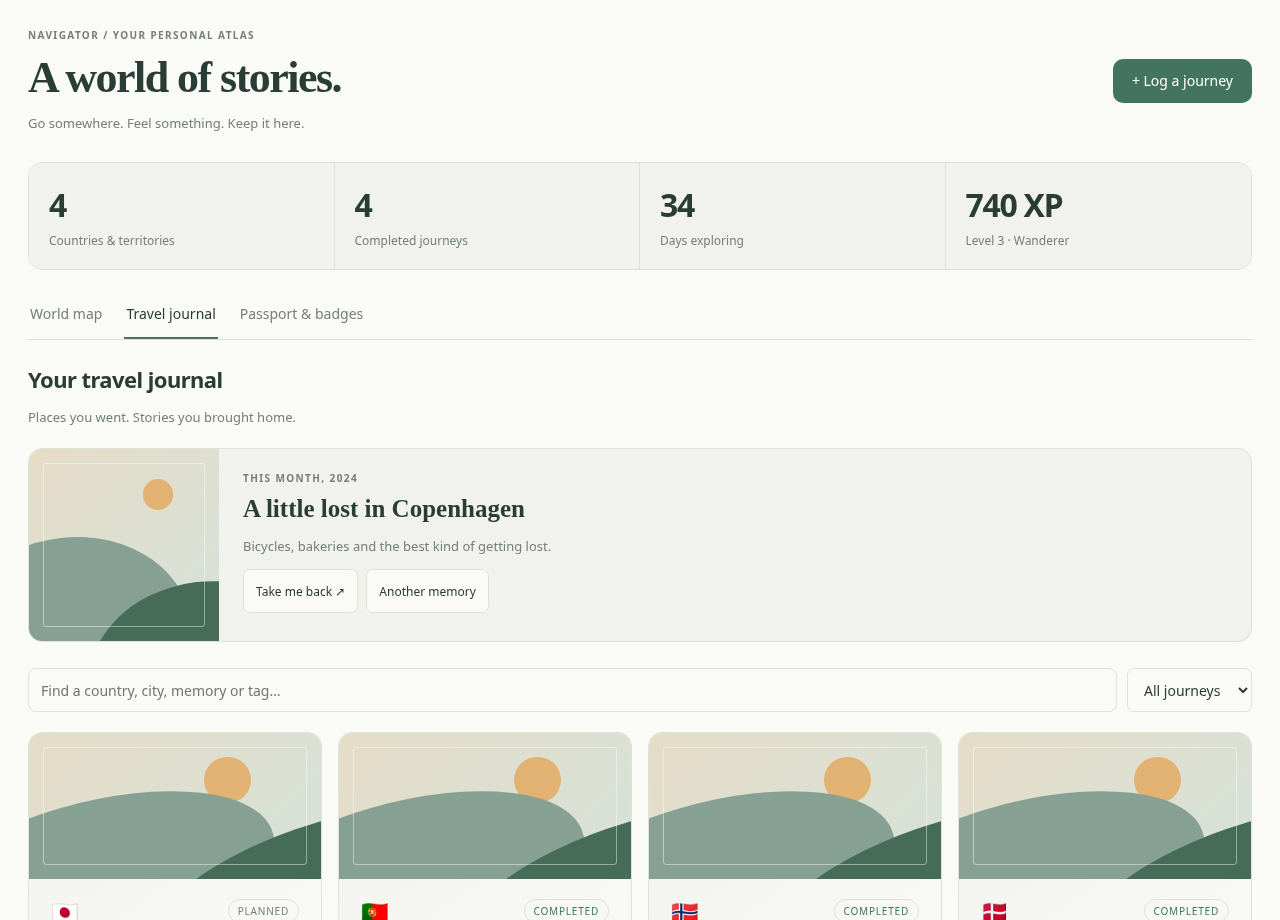
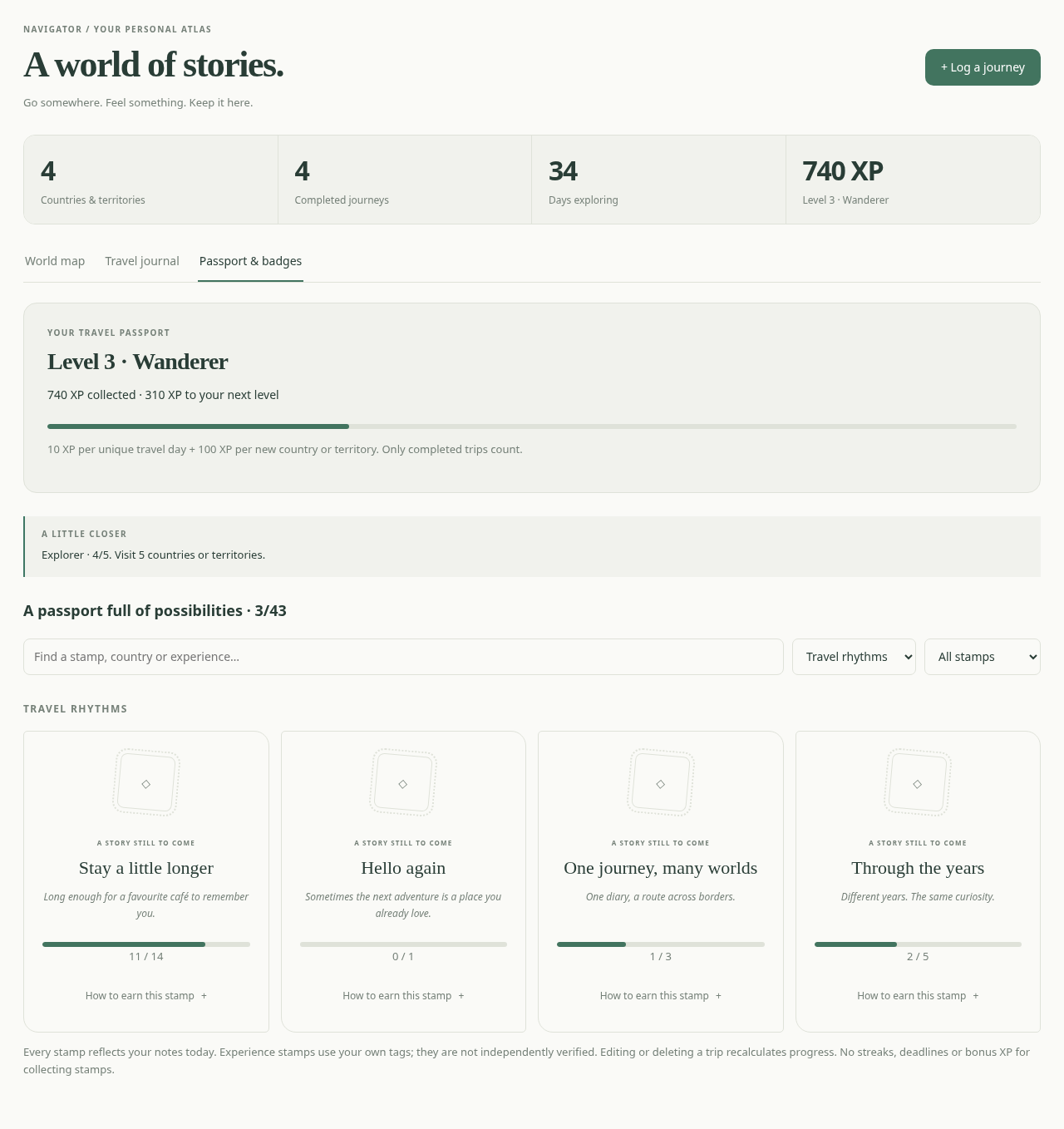
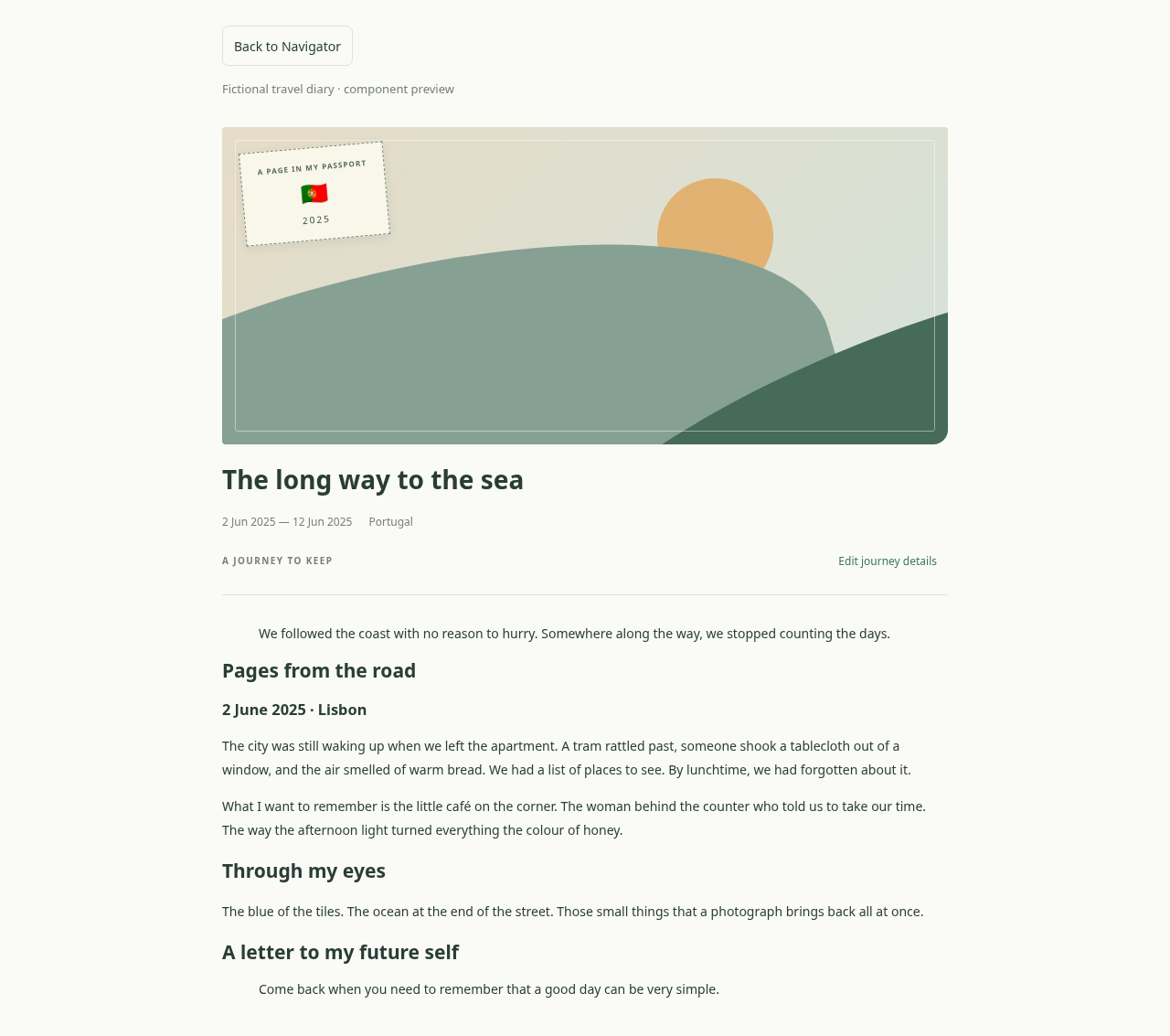
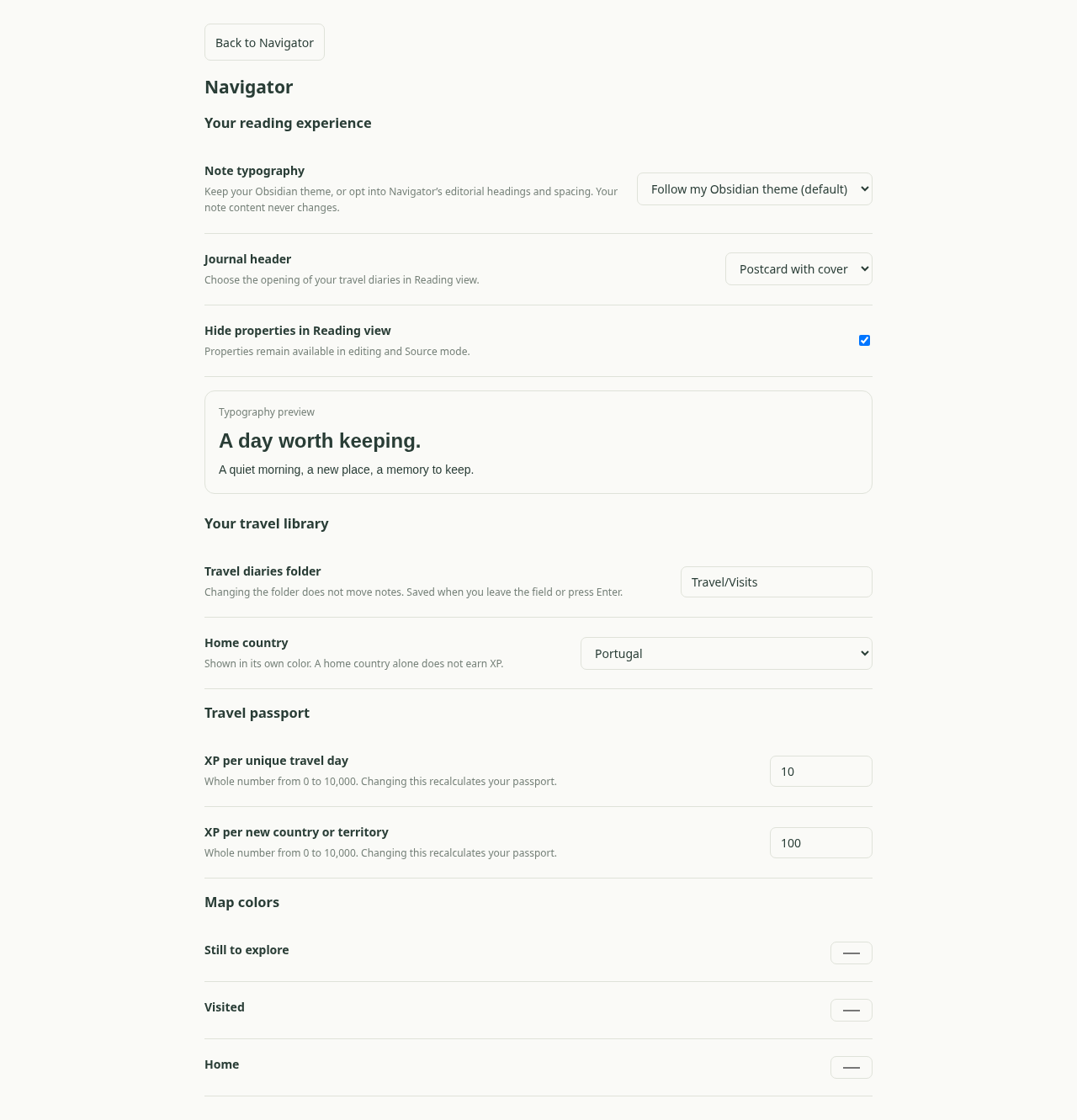
These are component previews with fictional journeys and substituted host APIs/icons, not screenshots from a real vault.
Travel diaries that feel like memories
New notes start with three optional sections: pages from the road, photographs and a letter to your future self. Write freely, delete sections, and use Obsidian's native photos, video, audio and links. Your journal body is never regenerated.
In Reading view, the first H1 gets a live postcard: a local cover photograph (or an illustrated landscape), travel stamp, readable dates, destination list and an expandable itinerary. By default, properties and the duplicate filename title are hidden for notes with cssclasses: [navigator-journal]. Source/editing properties remain available. No special code block or external plugin is required.
Your theme, your choice: notes follow your Obsidian theme by default. In Settings → Navigator, choose optional editorial typography, a postcard/compact/no-header opening, and whether to hide properties in Reading view. A live sample previews typography. Preferences apply without rewriting your memories. The interface, templates and documentation are in English; your diaries can use any language. There is no language selector in this build.
Existing Navigator journals already carrying the CSS class receive the reading style automatically. For older valid travel notes without it, use Navigator: Edit current journey details and save once. Their body, including any old route table, remains unchanged. Native headings and body text remain yours to edit independently of the trip's properties.
Map, journal and passport
- Offline world map: completed countries/territories, English/Portuguese country search, home color, zoom and links to diaries. Small territories missing from the geometry remain available through search.
- Journal cards: covers, title, memory, dates, route and tags; search the body as well as trip details. Filter completed, ongoing and planned trips.
- Cover picker: choose a JPG/PNG/WebP/GIF/AVIF/BMP already in your vault. Covers use vault-relative paths, never external URLs. Missing photos fall back to an illustration. Navigator updates its cover references on vault file/folder renames while enabled.
- Edit journey details: from a card, the reading header, the file context menu or the command palette. Only managed frontmatter fields change; unrelated properties and journal content survive. Conflicting property edits are detected before writing.
- Multi-country trips: each dated stop has a city and country. Countries on the map come from those stops, and one itinerary still counts as one journey.
- 43 passport stamps: destination collections, milestones, travel rhythms and self-reported experiences. Search and filter stamps, see progress and inspect exact requirements. Badge catalog.
- A little trip back: revisit completed journeys, prioritizing travel anniversaries and the same month in earlier years.
- Validation and responsive UI: dates, city ranges and property types are validated for forms and manually edited notes; each issue links to the affected diary with a retry action. Layouts adapt to panel width and touch controls.
Your data
Notes live in Travel/Visits by default, including subfolders. Nothing is sent outside your vault. Media attachments should be included in your chosen vault sync solution.
---
navigator_version: 2
title: The long way to the sea
summary: Three countries, one unhurried journey.
country: Portugal
country_code: PT
start_date: 2025-06-02
end_date: 2025-06-12
cover: Photos/coast.jpg
stops:
  - city: Lisbon
    country_code: PT
    start_date: 2025-06-02
    end_date: 2025-06-06
  - city: Madrid
    country_code: ES
    start_date: 2025-06-06
    end_date: 2025-06-09
  - city: Bordeaux
    country_code: FR
    start_date: 2025-06-09
    end_date: 2025-06-12
tags: [summer, train]
cssclasses: [navigator-journal]
---
title, summary, cover, stops, cities, city_stays, tags, status, navigator_version and cssclasses are optional. Country and trip dates are required. When stops is nonempty, it determines the actual countries/cities visited; the primary country does not automatically earn credit. Country days use the stop ranges. Gaps between stops remain part of the overall trip duration but do not invent a destination.
Legacy notes without stops keep their full single-country range and optional cities / city_stays. Editing an old flat city list does not invent dates. Existing single-country semantics are retained until you create an itinerary crossing into another country. Shared dates are allowed; day totals are deduplicated.
Without status, dates determine planned, ongoing or completed. status: planned stays planned until removed or changed. Even status: completed cannot earn XP before the return date. Dates use the local calendar day.
XP and badge rules
Default: 10 XP per unique completed travel day + 100 XP per distinct visited country/territory. Overlapping and duplicate notes do not multiply day or country XP. Home alone gives no XP. Trip statistics count notes; trip-based badges deduplicate identical date ranges and destination sets. The same city name in different countries counts separately.
Level 2 starts at 250 XP, level 3 at 600 XP; each subsequent level costs 100 XP more. Editing/deleting notes or changing XP settings recalculates progress, including previously earned badges. Stamps give no additional XP.
Experience stamps use the exact tags train, hiking, solo, road-trip, family and food on three distinct completed trips. They are marked self-reported; there is no independent verification or transport inference.
Installation
Via BRAT (recommended while Navigator is in beta)
- In Obsidian, open Settings → Community plugins, find BRAT, then install and enable it.
- Open the command palette and run BRAT's command to add a beta plugin for testing.
- Enter the repository URL:
https://github.com/Salvador1089/navigator. - Wait for the version list to load and select 0.3.1 (prerelease).
- Click Add plugin, then enable Navigator under Community plugins if it is not enabled automatically.
Selecting 0.3.1 pins that version. To try a future beta, change Navigator's selected version in BRAT. See the BRAT documentation for managing installations and updates.
Manual installation
Download main.js, manifest.json and styles.css from the 0.3.1 prerelease, or extract its ZIP. Put those three files in <vault>/.obsidian/plugins/navigator/, reload Obsidian and enable Navigator under Community Plugins. Keep any existing data.json when updating.
Open Navigator: Open Navigator from the command palette, then use Log a journey. In Settings → Navigator, choose the diary folder, home country and reading preferences. No API key or account is needed.
Development
npm ci
npm test
npm run build
Copy main.js, manifest.json and styles.css into <vault>/.obsidian/plugins/navigator/, replacing the previous plugin files, then reload Obsidian. Notes and data.json are not part of the installation ZIP. Open Navigator: Open Navigator, Navigator: New visit or Navigator: Edit current journey details from the command palette.
npm run dev watches changes. node scripts/preview.mjs builds a local preview at /tmp/navigator-preview/index.html, using fictional journeys and a minimal host adapter. It never accesses a real vault.
Optional browser QA, if Playwright and a browser are installed:
node scripts/preview.mjs
node tests/browser-qa.cjs
Set NAVIGATOR_PLAYWRIGHT to an external module path and NAVIGATOR_BROWSER to a browser executable when needed. Tests write preview screenshots to docs/screenshots/. The reading-view preview uses the real enhancer around simulated native Markdown DOM; icons and host APIs are substituted. It does not replace testing inside Obsidian, Android or iOS.
See roadmap, product review and verification notes. If a cover was moved outside Obsidian while Navigator was disabled, select it again. Existing diary text and titles are intentionally not overwritten when frontmatter changes.
Attribution and license
Navigator is released under the MIT license. The offline map is derived from Natural Earth via World Atlas. See geographic data attribution and third-party notices.
Contributing
Issues and pull requests are welcome. Include your Obsidian version, device, theme and reproduction steps when reporting a problem. Use fictional examples instead of sharing private travel diaries. See verification notes for the current testing limits.
Support
If Navigator is useful to you, consider buying me a coffee.
For plugin developers
Search results and similarity scores are powered by semantic analysis of your plugin's README. If your plugin isn't appearing for searches you'd expect, try updating your README to clearly describe your plugin's purpose, features, and use cases.