Weekly Routine Planner
approvedby lylaminju
Plan weekly routines with a timetable-style editor. - This plugin has not been manually reviewed by Obsidian staff.
Weekly Routine Planner
An Obsidian plugin for planning weekly routines with a timetable-style editor and a fenced weekly-routine block.
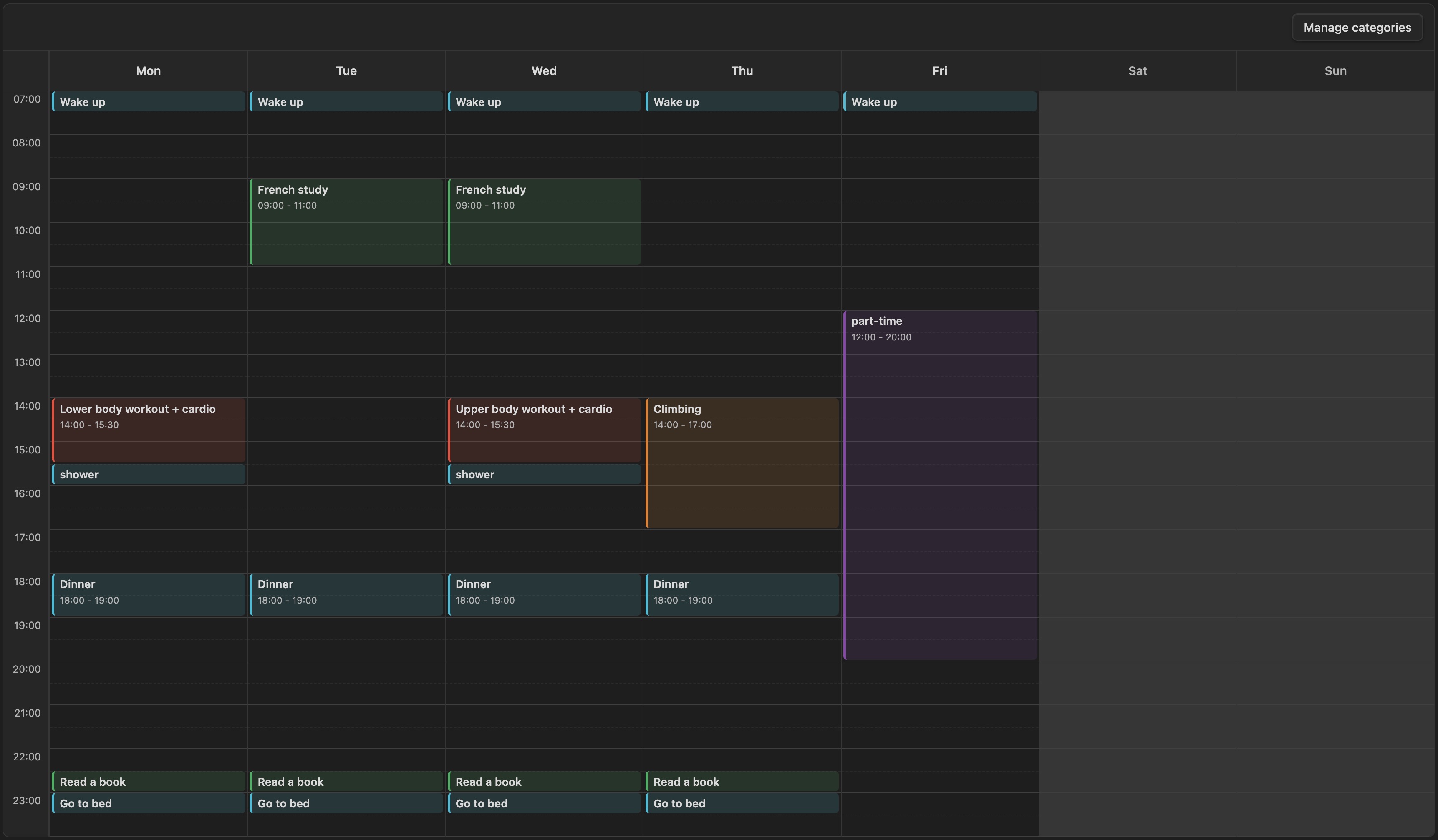
It is meant for recurring weekly structure, not dated calendar events or one-off schedules. The plugin is currently desktop-only.
Start hour, end hour, and hour height are configured in the plugin settings.
Note Format
```weekly-routine
```
<!-- weekly-routine:start -->
- [s-1] Monday 08:00-08:30 | Wake up | #daily-routine
-
<!-- weekly-routine:end -->
The fenced code block marks the note as a weekly routine planner note.
The plugin only writes inside the region between <!-- weekly-routine:start --> and <!-- weekly-routine:end -->, so the rest of the note stays untouched.
Each routine line is stored as:
- [event-id] Day HH:MM-HH:MM | Title | #category-tag
Category Management
Categories are managed by the user from the timetable UI:
- Click
Manage categoriesin the timetable toolbar. - Add, rename, recolor, or delete categories.
The same category manager is also available while creating or editing a routine.
Category definitions are saved in the plugin's data/settings, not directly in the note.
Inside the note, a routine only stores the selected category as a tag such as #daily-routine.
The category id is generated from the category name, so Daily Routine becomes #daily-routine.
If you rename a category, the plugin updates matching tags in the managed routine block.
If you delete a category, the plugin removes that category tag from affected routines.
Installation
You can install this plugin directly from the Obsidian Community Plugins directory:
- Open Obsidian Settings → Community plugins.
- Turn off Safe Mode if you haven't already.
- Click Browse and search for Weekly Routine Planner.
- Click Install and then Enable.
Manual Installation
If you prefer to install the plugin manually from this repository:
- Clone or download this repository.
git clone https://github.com/lylaminju/weekly-routine-planner.git - Locate your vault's plugin folder. It is at
<your-vault>/.obsidian/plugins/. Create thepluginsdirectory if it does not exist. - Copy
main.js,manifest.json, andstyles.cssfrom the cloned repository into a new folder:mkdir -p <your-vault>/.obsidian/plugins/weekly-routine-planner cp main.js manifest.json styles.css <your-vault>/.obsidian/plugins/weekly-routine-planner/ - Add
"weekly-routine-planner"to the array in<your-vault>/.obsidian/community-plugins.json. If the file does not exist, create it with:["weekly-routine-planner"] - Restart Obsidian (or reload without cache:
Ctrl/Cmd + Shift + Ron desktop). - Go to Settings → Community plugins, find Weekly Routine Planner in the list, and enable it.
For plugin developers
Search results and similarity scores are powered by semantic analysis of your plugin's README. If your plugin isn't appearing for searches you'd expect, try updating your README to clearly describe your plugin's purpose, features, and use cases.