by Toni López
A beautiful, minimal start page for your notes. Instant fuzzy search, real recent history, and a warm greeting.
Your notes, one quiet starting point.
A minimal, personal home screen for Obsidian.
Open a new tab, find what matters, and pick up where you left off.
Download · Installation · Features · Español



Most start pages want to be a dashboard. Foyer is simply a place to begin.
It replaces Obsidian's empty new tabs with a welcoming space that feels like a natural part of your vault. There are no widgets to configure, no feeds to follow, and no extra services to connect: just search, recently opened notes, and a little room to breathe.
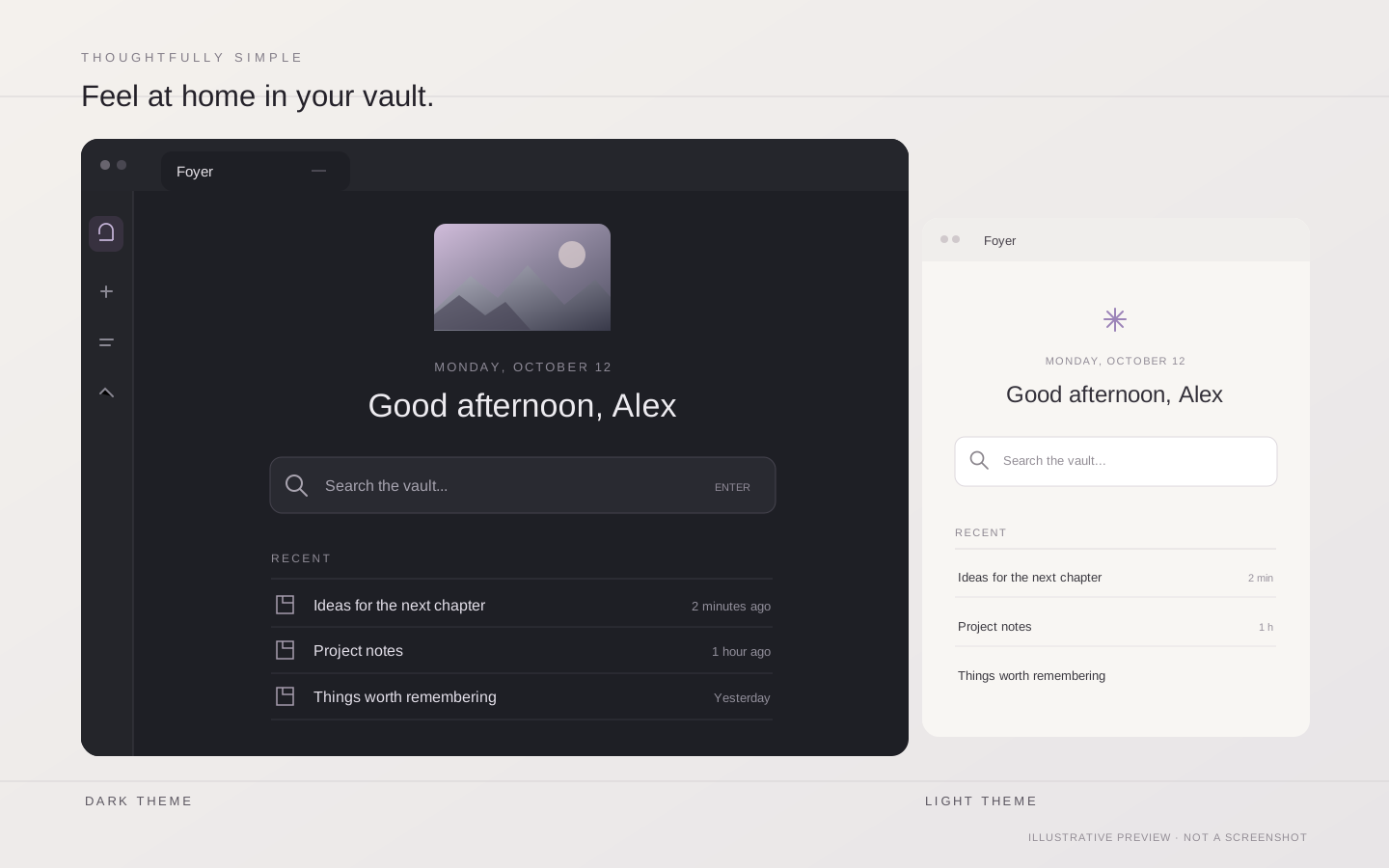
Interface illustration, not an application screenshot. Foyer inherits the colors and typography of your active Obsidian theme.
Features
Find a thought, instantly
Search note titles and file paths with fuzzy matching. Use the keyboard to move between matches, open a note, search within content, or create a new note directly from a query.
Continue where you left off
Your recent notes reflect when you actually opened them, not when they were last edited. Relative timestamps stay fresh while Foyer is open, and history follows notes when you rename or move them.
Make the space yours
A greeting changes with the time of day and can include your name. Add a personal image from your vault or upload one from your computer; leave it unset for a small accent-colored symbol instead.
Fit right into Obsidian
Foyer uses the active theme's colors and typography, works in light and dark modes, and supports English and Spanish. It opens at startup and fills otherwise empty new tabs. Desktop and mobile are supported.
Keyboard shortcuts
| Shortcut | Action |
|---|---|
↑ / ↓ | Move through search results |
Enter | Open the selected note |
Ctrl/Cmd + Enter | Open in a new tab |
Shift + Enter | Search note content with Obsidian's core Search plugin |
If your query does not match an existing note, Foyer also offers to create it in your vault's configured default location for new notes.
Installation
Foyer requires Obsidian 1.8.7 or newer.
Using BRAT
BRAT is an alternative way to install Foyer directly from GitHub, including while its directory review is pending:
- Install BRAT from Obsidian's Community Plugins.
- Run BRAT: Add a beta plugin for testing from the command palette.
- Enter
ToniLopezPhoto/foyer. - Enable Foyer in Settings → Community plugins.
Manual installation
- Open the latest release.
- Download
main.js,manifest.json, andstyles.css. - Create the folder
.obsidian/plugins/foyer/inside your vault. - Place the three files in that folder, reload Obsidian, and enable Foyer in Community plugins.
Obsidian Community directory
Foyer has a public listing in the Obsidian Community directory. Once its release passes the directory's automated review, you can install it directly from Obsidian's Settings → Community plugins → Browse by searching for Foyer.
If the listing's Add to Obsidian button does not work yet, the review or directory synchronization may still be pending. In the meantime, use BRAT or install the release manually as described above.
Personalization
Open Settings → Community plugins → Foyer to adjust:
| Setting | What it does |
|---|---|
| Greeting name | Adds your name to the greeting; optional |
| Language | Follows Obsidian automatically, or uses English or Spanish |
| Hero image | Selects an existing vault image or imports one into your attachments folder |
The hero image supports PNG, JPEG, GIF, WebP, AVIF, and BMP. Its position is shown in the settings preview. Without an image, Foyer displays a subtle symbol in your theme's accent color.
Privacy, by design
Foyer runs locally. It makes no network requests, includes no analytics, and does not send your notes or preferences anywhere.
Settings and a small, local last-opened history (up to 200 entries) are saved in .obsidian/plugins/foyer/data.json inside your vault. Images you import stay in your vault as well.
Development and contributions
Foyer is intentionally lightweight: plain JavaScript and CSS, with no build step or runtime dependencies beyond Obsidian.
# From your test vault
git clone https://github.com/ToniLopezPhoto/foyer.git .obsidian/plugins/foyer

# Check JavaScript syntax
node --check .obsidian/plugins/foyer/main.js
After changing the plugin, reload it in Obsidian to test. Please keep contributions dependency-free and theme-native, using Obsidian's CSS variables for appearance.
Issues, bug reports, and pull requests are welcome via GitHub Issues.
Español
Foyer es una página de inicio minimalista para Obsidian. Sustituye las pestañas vacías por un espacio personal desde el que puedes buscar tus notas y retomar tu trabajo sin distracciones.
- Búsqueda rápida: encuentra notas por nombre o ruta, navega con el teclado y crea notas nuevas cuando lo necesites.
- Recientes de verdad: muestra las notas que has abierto, con tiempos relativos independientes de la última modificación del archivo.
- Un inicio personal: saludo según la hora del día, nombre opcional e imagen de cabecera a tu elección.
- Integración natural: hereda colores y tipografías del tema de Obsidian, funciona en escritorio y móvil, y no necesita conexión a Internet.
Instalación: Foyer ya tiene ficha pública en el directorio de Obsidian. La instalación directa estará disponible cuando supere la revisión automática. Mientras tanto, utiliza BRAT e introduce ToniLopezPhoto/foyer, o descarga main.js, manifest.json y styles.css de la última versión y colócalos en .obsidian/plugins/foyer/.
Los ajustes y el historial de apertura se almacenan únicamente en tu vault. Foyer no recopila telemetría ni envía datos a servicios externos.
License
Foyer is released under the MIT License. Created by Toni López.
For plugin developers
Search results and similarity scores are powered by semantic analysis of your plugin's README. If your plugin isn't appearing for searches you'd expect, try updating your README to clearly describe your plugin's purpose, features, and use cases.