Markdown Minimap
approvedby Nymbo
Add a minimap to your Markdown notes. - This plugin has not been manually reviewed by Obsidian staff.
🗺️ Markdown Minimap
A minimap for your Markdown notes, inside the editor pane. Like the minimap in a code editor, it gives you a scaled-down view of the whole note so you can see its shape and jump anywhere in it.
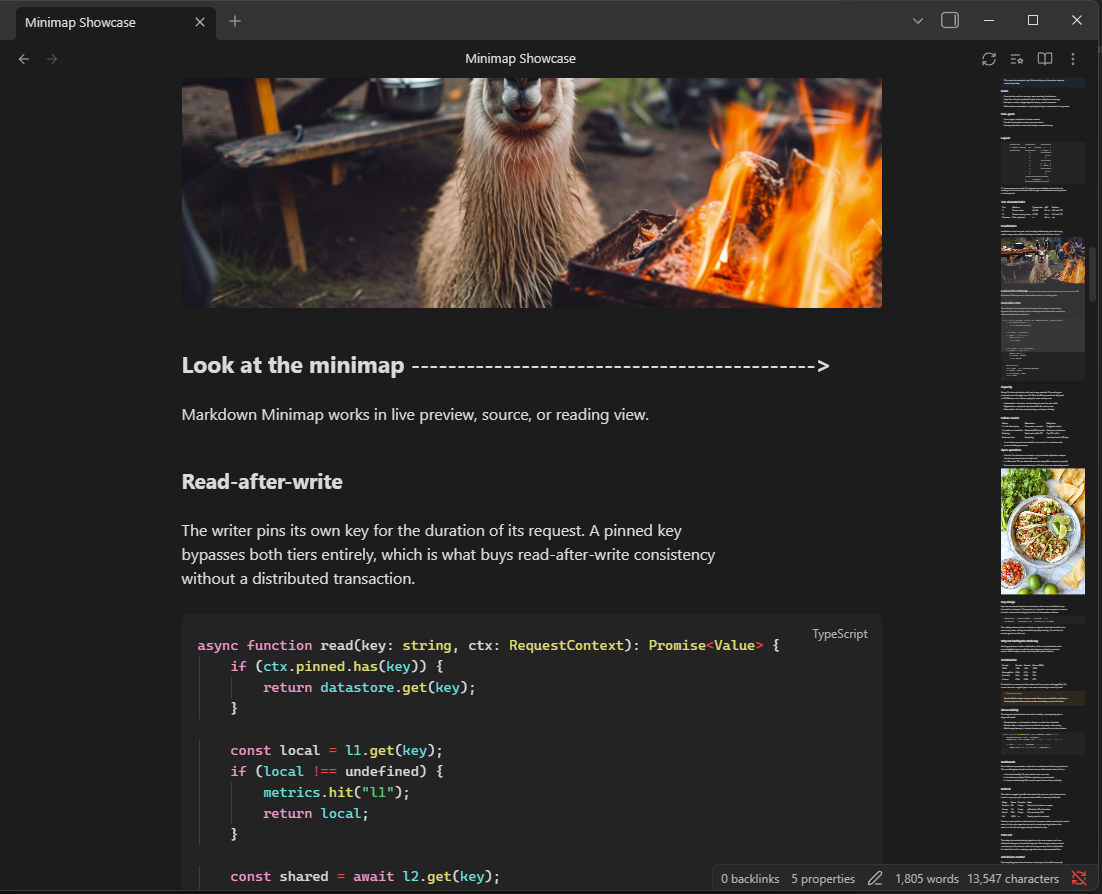
Why this one
Most minimap implementations clone the editor's DOM, which means they only ever capture the part of the note that is currently on screen — Obsidian virtualizes long notes, so past a certain length the minimap stops being a usable scrollbar.
Markdown Minimap renders the whole note independently, and spends most of its effort on a harder problem: making the minimap agree with the note. The panel is laid out at the note's own text width, margins, line height and font, and the scroll position is mapped through anchors shared by both, rather than by scaling the document by a single ratio. On a 14,000-word note that is the difference between the viewport marker landing where you expect and landing 150 pixels away.
✨ Features
- 🔎 Whole-note view at any length, not just the rendered portion
- 🖱️ Click or drag anywhere in the minimap to jump there
- 🖲️ Scroll wheel over the minimap scrolls the note
- 🎯 Mode-aware — Live Preview, Source and Reading each get a faithful map
- 🎨 Code blocks in colour, highlighted by language in every mode
- 🪗 Follows your folds — collapsed sections and properties collapse too
- 🌓 Follows your theme, including custom fonts, heading sizes and snippets
- 🔁 Per-note toggle and refresh, from the note header or the command palette
- 📱 Per-device switch — turn it off on your phone without touching your desktop
- 📏 Resizes with the pane
📦 Installation
From Community Plugins
Settings → Community Plugins → Browse → search for Markdown Minimap →
Install, then Enable.
Manually
Download main.js, manifest.json and styles.css from the
latest release and put
them in <your vault>/.obsidian/plugins/markdown-minimap/.
🧪 Usage
Open any note and the minimap appears at the right edge of the pane.
- Click anywhere on it to jump to that point
- Drag the viewport marker to scroll continuously
- Scroll over it with the wheel to scroll the note
- Toggle it per note with the button in the note header, or bind
Toggle minimap for current noteto a hotkey
The viewport marker has three states, mirroring a code editor: barely visible at rest, legible when the pointer is over the minimap, and strongest while you are dragging it.
⚙️ Settings
| Setting | What it does |
|---|---|
| Disable on this device | Hides the minimap on this device only. Stored outside the synced settings file, so your phone and your desktop can disagree |
| Enable by default | Whether new notes open with the minimap shown |
| Scale | Size of the minimap, 0.05–0.3 of actual size |
| Opacity | Background opacity of the minimap panel |
| Slider opacity | Viewport marker opacity while hovering the minimap; the dragging state scales from it |
| Idle slider opacity | Viewport marker opacity the rest of the time; set it to 0 to hide the marker until you hover |
| Top / bottom offset | Clearance for plugin toolbars or bottom chrome |
| Scrollbar gap | Distance between the minimap and the editor's scrollbar |
| Minimum viewport height | Floor for the viewport marker, so it stays grabbable in long notes |
| Make room for the minimap | Moves the note's text so the space either side of it stays even once the minimap has taken its strip. On by default |
| Center on click | Whether clicking the minimap centres the viewport on that point, or puts it at the top. Dragging the marker is unaffected |
💡 Giving the minimap room
Make room for the minimap is on by default. It measures the gap on either side of the text — from the pane's left edge, and from the text to the minimap — and shifts by half their difference, so the two come out equal at any zoom, font size or screen. There is no number to type in and no unit to get wrong.
The text moves into the file margin as well as the readable line length margin,
and it is never pushed past the pane's own left edge. On a narrow pane there may
not be enough room to make the gaps fully equal; the text moves as far as it can
without being clipped, so it can still end up partly under the minimap. A wider
pane, Settings → Editor → Readable line length, or a smaller Scale
each give it more to work with.
Thanks to @2590812378 for suggesting this, originally as a CSS snippet, and for the follow-ups that led to it being computed rather than typed in by hand and then measured against the pane rather than the text box.
📌 How it works
Most of the work in this plugin is in making the minimap and the note agree. These are the parts worth knowing about.
Whole-note rendering. Obsidian virtualizes long notes, so a minimap built by cloning the editor's DOM only ever sees the visible portion. Markdown Minimap renders the note's full source separately, with no hidden helper views and no iframes.
Faithful layout. The panel uses the note's own text width, top margin, line height and font size, so lines wrap where they wrap in the note rather than at the pane's full width.
Source mode shows source. With Live Preview off, Obsidian prints the file verbatim. The minimap does the same — one element per source line, taking each line's height from CodeMirror itself, rather than rendering Markdown the note isn't showing. Line for line, this mode is exact. Source mode is still highlighted in the editor, so the panel keeps those colours too: headings, links, tags, quotes, code and emphasis all read as themselves. At a tenth of full size the colour is most of what is left to navigate by.
Code blocks are highlighted by language. Reading view colours code by running it through Prism, so the panel runs the same tokenizer over fenced blocks and frontmatter and emits the same classes — meaning Source mode and Reading view show a block in exactly the same colours, from your theme's own palette. A fence with no language, or one Prism has no grammar for, stays plain text as before.
Making room without a transform. The text is moved clear of the minimap with
margins rather than a translateX. A transform makes the note's sizer the
containing block for everything absolutely positioned inside it, and Obsidian's
find-in-note overlay positions its match boxes in coordinates measured against
the scroller — so in Reading view the highlights landed a margin's width away
from the words they were marking. Two equal and opposite margins move the same
box the same distance, leave its width alone, and claim nothing.
Properties. Obsidian's Markdown renderer emits frontmatter as a hidden block and never builds the properties widget, so properties would take up space in the note and none in the minimap. The minimap reproduces them and pins the block to the height they actually occupy — the widget, the raw YAML, or nothing, according to what the note is showing.
Code blocks. A rendered <pre> is inset on both sides while an editor code
line is inset only on the left. Left alone that wraps wide code — ASCII diagrams
especially — one column early, which both scrambles them and inflates the note's
mapped height. The minimap matches the editor's box.
Blank lines. Markdown collapses consecutive blank lines when rendered. They are re-inserted as inert spacers sized from CodeMirror's line blocks, so deliberate whitespace survives.
Collapsed sections. A folded section takes no room in the note, so drawing it would add height the note doesn't have and push everything below it out of step. The minimap reads Obsidian's own fold state and folds to match, in every mode — including Reading view, where the note's own sections are virtualized but the panel's are not. Collapsing the properties works the same way. Folds that don't hang off a heading, such as a list item, aren't mirrored in the rendered modes; Source mode takes every line's height from CodeMirror, so it follows all of them exactly.
The full scroll range. Obsidian lets you scroll past the end of a note, and its own scrollbar covers that space. The minimap mirrors it rather than leaving it out, so the marker reaches the end of its track exactly when the editor does and wheel distance keeps matching marker travel all the way down. That space is scaled by the same ratio the panel achieves on the note's content, so it isn't the one stretch of the panel drawn at a different scale from everything above it — which is what used to make the marker change size on the approach to the end of a long note.
Scroll mapping. Scaling the note by a single ratio assumes the minimap grows at the same rate the note does, which it doesn't — small per-block differences accumulate into hundreds of pixels over a long note. Instead both coordinate spaces are anchored to positions that exist in each, and positions between them are interpolated. If the source headings and rendered ones ever disagree in count, it falls back to the global ratio rather than risk a wrong pairing. Reading view virtualizes its sections, so it uses the global ratio.
🛠️ Development
npm install
npm run build
npm run dev watches and rebuilds main.js. Source lives in src/:
| File | Contents |
|---|---|
main.ts | Plugin lifecycle, workspace events, commands |
minimap.ts | The minimap itself — rendering, measurement, scroll sync |
anchors.ts | Heading extraction and the piecewise scroll mapping |
scroll-model.ts | The scroll arithmetic, kept free of the DOM |
document-metrics.ts | Measuring the note's layout and mirroring it onto the panel |
folds.ts | Reading the note's fold state and folding the panel to match |
frontmatter.ts | Reproducing the properties widget at the height it occupies |
source-view.ts | Source-mode line classification, highlighting and line heights |
prism.ts | Syntax highlighting for fenced code, via Obsidian's own Prism |
blank-lines.ts | Blank-line runs, frontmatter and fence scanning |
pointer.ts | Click, drag and wheel handling |
settings.ts | Settings model and tab |
utils.ts | Small shared helpers |
💡 Contributing
Bug reports and feature requests are welcome — open an issue. Screenshots help a lot for anything visual, as does the note's view mode, since the three modes take different paths through the code.
License
MIT © Nymbo.
For plugin developers
Search results and similarity scores are powered by semantic analysis of your plugin's README. If your plugin isn't appearing for searches you'd expect, try updating your README to clearly describe your plugin's purpose, features, and use cases.