Markdown Lens
unlistedby Juhyeok Kim
Preview rendered Markdown at the cursor while writing in Source mode.
Markdown Lens
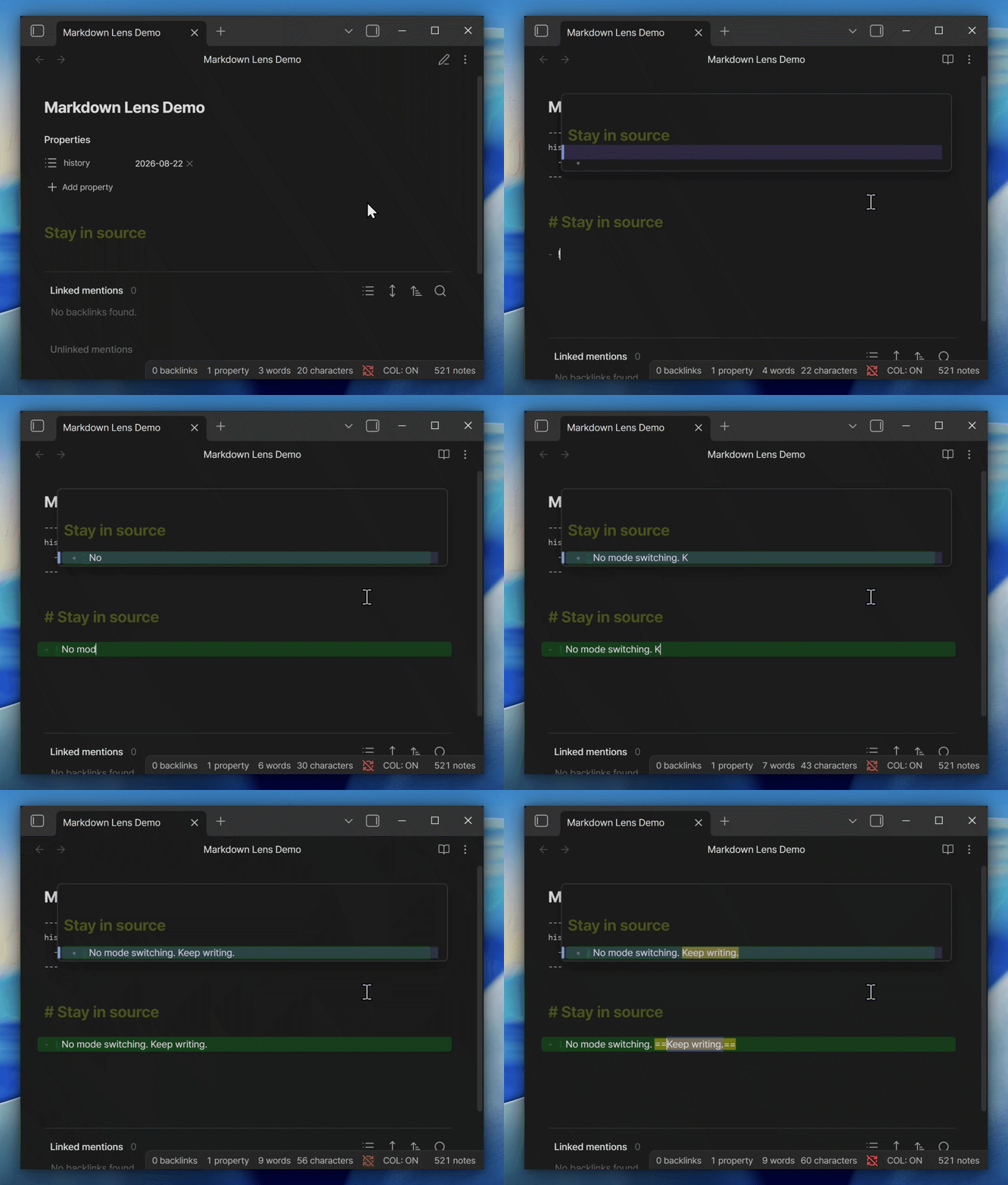
Markdown is easiest to control when its syntax stays visible. Markdown Lens keeps Source mode as the main workspace and opens a small rendered view around the cursor—without switching modes or hiding the source.
- Renders the whole note, preserving links, math, images, code blocks, callouts, and embeds.
- Tracks the current source line or selection in the rendered view.
- Also works in Canvas text nodes and restores normal image paste there.
Use
Enable the plugin, switch a note to Source mode, and place the cursor in the text. Lens width, visible lines, and font size can be adjusted in the plugin settings.
Until it reaches the Community directory, install it with BRAT from https://github.com/philaxis/markdown-lens.
Desktop only. No account, ads, or telemetry; note content is not transmitted. Closed source; personal and internal business use is allowed under the commercial license.
For plugin developers
Search results and similarity scores are powered by semantic analysis of your plugin's README. If your plugin isn't appearing for searches you'd expect, try updating your README to clearly describe your plugin's purpose, features, and use cases.