OMM MindMap
approvedby Yuan Lin
Create interactive mindmaps using simple markdown outlines. Top-down and left-right layouts, view switching, and PNG/PDF export. - This plugin has not been manually reviewed by Obsidian staff.
OMM MindMap
An Obsidian plugin that renders any Markdown outline as an interactive mindmap, and turns a mindmap back into a clean Markdown bullet list.
Features
- Multiple trees per file — every first-level bullet is its own tree, stacked top to bottom. Each tree has its own layout.
- Two layouts — top-down and left-right, toggled per tree from the toolbar. Layouts are stored as a per-tree list in front-matter (
mindmap-layout). - View switching — open a Markdown file as a mindmap, or jump back to the Markdown editor, without leaving the leaf.
- Markdown is the source of truth — the document is a nested bullet list plus a small front-matter block. Edits in either view stay in sync.
- Interaction — pan (drag), zoom (wheel), collapse/expand branches, select a node, and edit structure with the keyboard.
- Space-efficient layout — siblings and levels are packed by each node's actual size, so one wide node no longer spreads the whole tree apart. Node boxes size to their text, including full-width CJK characters.
- Multi-line nodes — a node can hold several lines; line breaks are stored in Markdown as
<br>. - Links shown as labels —
[[Folder/Note|Alias]]renders as an underlined Alias (or the note's basename — never the full path);[Label](url)renders as Label. The raw Markdown is preserved for editing and storage. - Open links — on a selected node, clicking again opens its link. Nodes with several links show a picker; internal notes open in a new tab, external URLs open in the browser.
- Undo —
Cmd/Ctrl+Z(or the toolbar) reverts the last change (rename, add, delete, layout toggle). - Export — save the current mindmap as PNG or PDF next to the note.
- Desktop and mobile — pan/zoom with touch, and edit structure from the toolbar buttons (no keyboard required).
Mouse
| Action | Result |
|---|---|
| Click a node | Select it (shows its collapse/expand toggle) |
| Click a selected node | Open its link, if any (picker when there are several) |
| Double-click a node | Edit its text |
| Click the toggle (○) | Collapse / expand the node's children |
| Drag background | Pan · wheel zooms · click background to deselect |
A collapsed node is drawn with a faint "stacked card" behind it to signal hidden children. The collapse/expand toggle appears only on the selected node.
Keyboard
| Key | Action |
|---|---|
Tab / Insert | Add child to the selected node |
Enter | Add a sibling after the selected node (a sibling of a root starts a new tree) |
Delete / Backspace | Remove the selected node (deleting a root removes that whole tree) |
F2 / double-click | Edit the selected node |
Shift+Enter | Insert a line break while editing (Enter commits) |
Cmd/Ctrl+Z | Undo the last change |
Document format
---
mindmap-layout: [top-down, left-right]
---

- Project
  - Research
    - Interviews
    - Surveys
  - Design
  - Build
    - Build 1
    - Build 2
    - Build 3
- Backlog
  - Bugs
  - Ideas
…renders as two trees — Project (top-down) and Backlog (left-right):
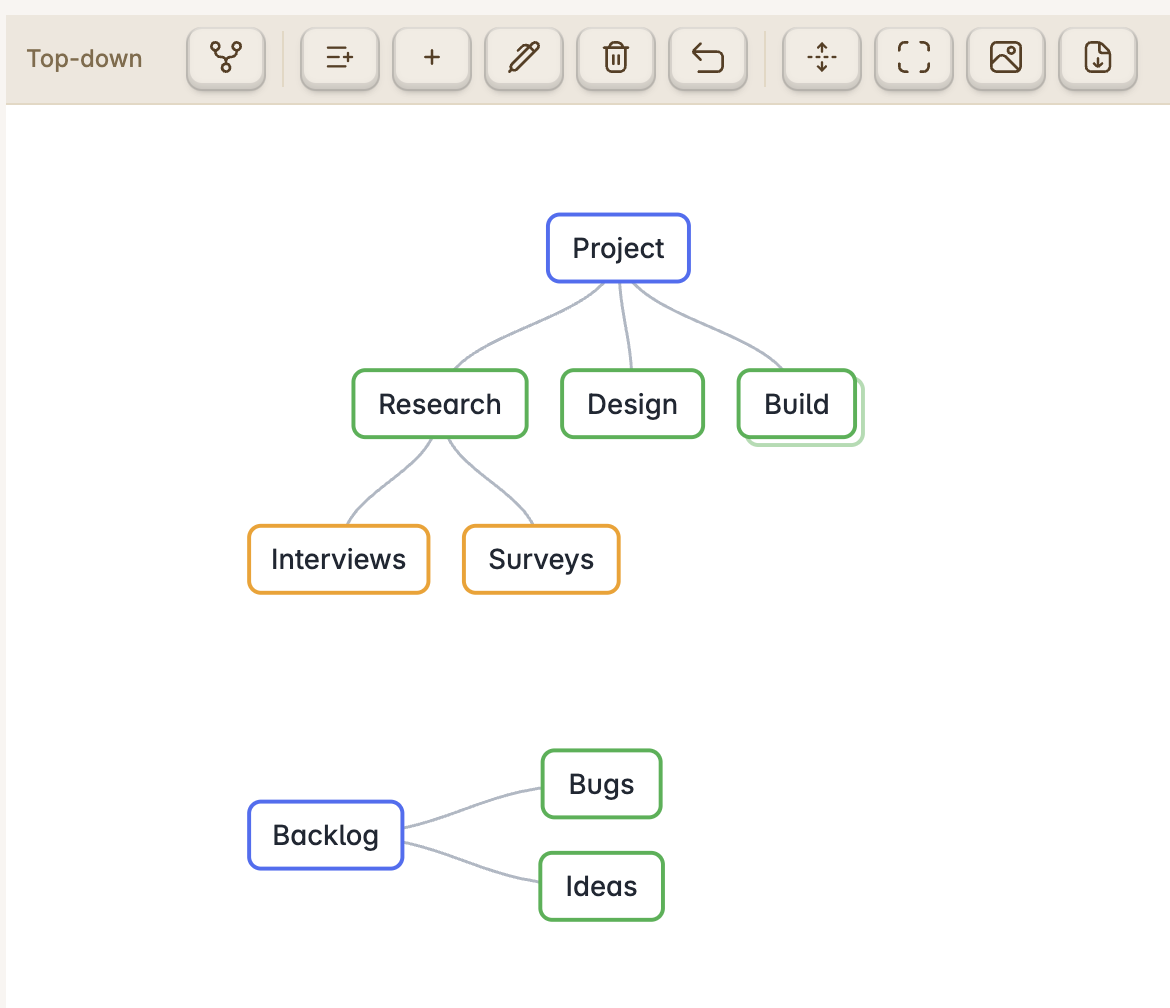
- Each first-level bullet is a separate tree, rendered top to bottom (the example above has two: Project and Backlog). There is no file-name root.
mindmap-layoutis a list with one style per tree, in order. If there are more trees than entries, the extra trees use the default (left-right). A bare value likemindmap-layout: top-downis accepted for a single tree.- Toggling a tree's layout (toolbar) updates its entry in the list.
- Unknown front-matter keys are preserved on save.
Usage
- Ribbon icon Open as OMM mindmap, the command "Open current file as OMM mindmap", or the file's right-click menu.
- In the mindmap toolbar: toggle the selected tree's layout; add child / add sibling / edit / delete the selected node; undo; expand all; fit to view; export PNG/PDF; and Open as Markdown. The label shows the selected tree's layout.
- On mobile, tap a node to select it, then use the toolbar buttons to edit (no keyboard needed). Exports are written next to the note instead of downloaded.
- Set the default layout for new files in the plugin's settings tab.
Development
npm install
npm run dev      # watch build → main.js
npm run build    # typecheck + production bundle
node test-model.mjs   # model tests (round-trip, links, display labels)
To try it in a vault, copy main.js, manifest.json, and styles.css into
<vault>/.obsidian/plugins/omm-mindmap/, then enable the plugin in
Obsidian's Community Plugins settings.
For plugin developers
Search results and similarity scores are powered by semantic analysis of your plugin's README. If your plugin isn't appearing for searches you'd expect, try updating your README to clearly describe your plugin's purpose, features, and use cases.