Pairwise Glicko Ranking
pendingby Jack Williams
Easily sort notes by any subjective criteria - Rank cohorts of notes in your vault by pairwise comparisons using the Glicko rating system.
Pairwise Glicko ranking for your notes
Easily sort notes by any subjective criteria.
Rating something on an arbitrary five-star scale is hard - what happens when you find something better? Do you have to readjust your old ratings?
Pairwise comparisons avoid the ambiguity of absolute ratings and create a dynamic ranking that adjusts as you add more comparisons. Just ask yourself "which of these two notes wins?" and the rest is calculated for you.
Learn more about yourself and your preferences by seeing how you rank your own notes. Try these ideas in seconds:
- Which book or movie is really your favourite? Rank your Books#Read or Movies#Watched Bases.
- Which project ideas are most worth pursuing? Rank your #idea tag.
- Which purchase is the highest priority for you right now? Rank your #to-buy tag.
- Which experiences, restaurants, hikes, or travel destinations should you explore next? Rank your Places Base.
- Which people should you cut from your life?* Rank your People Base. Ooh, spicy!

Other comparison arena UI options are available in Settings - shown here is right-split, useful if you'd like to watch your Base update as your ranks change, but I personally use new window/popout. Mobile devices are supported by an additional single-note layout type for phones with smaller screens.
How it works: Try it in two minutes
- Install: Not yet in the Community Plugins list, so first install BRAT
- Add the Pairwise Glicko Ranking repo -
https://github.com/WilliamsJack/pairwise-glicko-rankingand enable the plugin - Run the Pairwise Glicko Ranking: Start rating session command (or click the trophy icon)
- Pick a cohort of notes to rank (vault, folder, tags, or (my favourite way) - Bases).
- The plugin opens two notes side-by-side and you choose a winner.
- The plugin (optionally) writes stats like Rank (1 = best in cohort), Rating , or Wins to frontmatter (property names are configurable).
- Your Bases can then sort or filter by those properties, so you can rank notes by subjective criteria without having to decide what star rating a note "deserves".
Overview
- Define the cohort of notes to rank - works especially well with Obsidian Bases: pick a Base and a view to define your cohort dynamically
- Efficiently review and pick a winner with keyboard shortcuts and an unobtrusive on-screen bar
- Per-cohort stats and rankings can be written to frontmatter
- Information-gain matchmaking that automatically picks the most useful pairs to compare
- A stability progress bar that shows how close your rankings are to converging
- Glicko-1 rating updates - uncertainty (sigma) governs step sizes automatically, so new notes converge fast and experienced notes stay stable
- Robust to note renames and moves via stable per-note IDs
- Cohorts are saved so you can resume ranking sessions, picking up where you left off
Workflow
1. Start a session
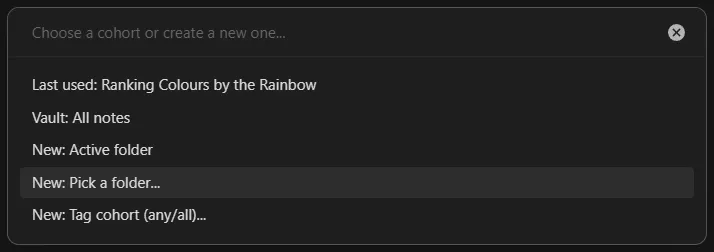
- Click the trophy icon in the left ribbon, or run the command "Pairwise Glicko Ranking: Start rating session".
- Create a cohort (the set of notes you're ranking together) in the picker:
- Vault: all Markdown notes
- Base: notes returned by a specific Base and a specific view
- Folder: a single folder, with or without recursive subfolders
- Tag (any): notes that match any of the selected tags
- Tag (all): notes that match all of the selected tags
- Previously saved cohorts appear here too
Saved cohorts can be renamed and reconfigured in Settings. If the folder or Base that defines a cohort is later moved or renamed, the plugin will prompt you to point it to the new location to safely migrate your saved ratings.
2. Compare two notes
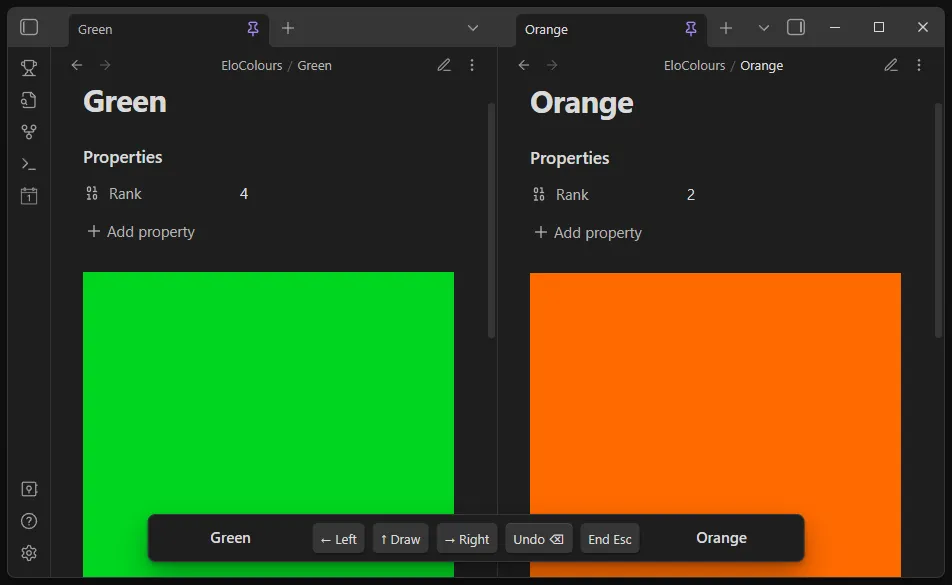
Two notes open side-by-side in Reading mode for you to compare. Use the arrow keys on your keyboard or the buttons on the session bar to choose a winner.
- Left Arrow: choose left
- Right Arrow: choose right
- Up or Down Arrow: draw
- Backspace: undo last match
- Escape: end the session
A toast shows the winner after each comparison (toggle in Settings).
3. End the session
Press Escape or run "Pairwise Glicko Ranking: End current session". If you've enabled a Rank property for this cohort, the plugin recomputes ranks across the cohort and writes them to frontmatter.
Optionally, the plugin can generate a post-session report - a Markdown note summarising the session (biggest gains, losses, surprises, leaderboard snapshot, match log, and more). Reports use a template with {{glicko:...}} placeholders that you can customise, or you can use the built-in default. Run the command "Generate example report template" to create a starting template you can edit. Report generation is configurable per-cohort and globally in Settings.
Frontmatter
The plugin can write the following properties to frontmatter (configurable per-cohort, all optional, names customisable):
- Rating
- Rank (1 = highest within the cohort)
- Matches
- Wins
- Uncertainty (sigma)
You can then use the values computed by the plugin however you want. For example, enable the Rank property and then sort a Base by it to see your notes in ranked order, or use the Rating property to filter for your best notes with a rating above a certain threshold.
Tip: Configure global defaults in Settings, and (optionally) set per-cohort overrides when creating or editing a cohort.
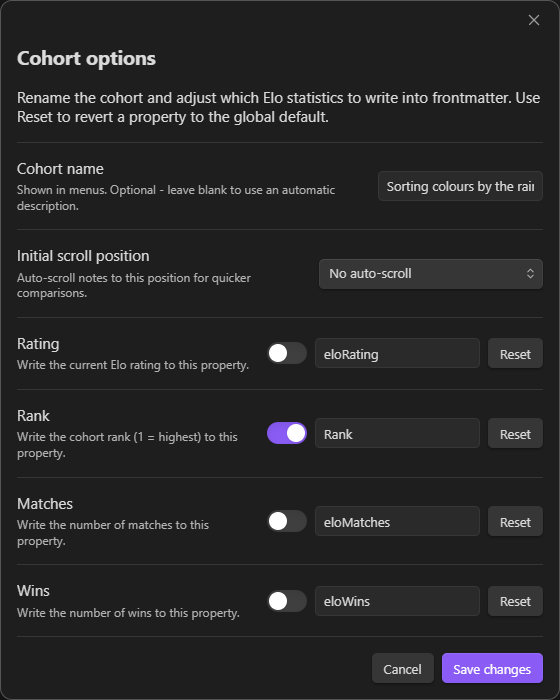
Settings overview
- Winner toasts
- Where to store note IDs: frontmatter (default) or end-of-note comment
- Note ID property name (default:
glickoId) - Progress bar settings (stability threshold, surprise highlight)
- Default frontmatter properties (names and which to write)
- Ask for per-cohort overrides when creating a cohort (on by default)
- Post-session reports: enable/disable, report folder, file name template, and custom report template path
- Cohorts section: rename a cohort and change its frontmatter, scroll, and report overrides. The plugin can preview and perform bulk updates (write, rename, remove) across the cohort.
Mobile support
The plugin is fully functional on mobile devices, with support for all desktop layouts on tablets (except popout/new window), and an additional single-leaf layout for phones that allows comparison between two notes using a switch button.

If you've made it this far: start a session, pick a small cohort, and do a dozen comparisons. You'll be surprised how quickly a meaningful order appears.
*Disclaimer: I have not used this plugin to end any friendships. If you try it out, please let me know how it goes! Although I accept no responsibility for any fallout. :)
For plugin developers
Search results and similarity scores are powered by semantic analysis of your plugin's README. If your plugin isn't appearing for searches you'd expect, try updating your README to clearly describe your plugin's purpose, features, and use cases.