Gesture Control
pendingby with-geun
Control your vault with hand gestures via webcam using MediaPipe hand tracking.
Gesture Control for Obsidian
Control your vault with hand gestures via webcam. No mouse, no keyboard -- just your hands.
macOS only -- requires camera and Accessibility permissions.
Disclosure
| Item | Details |
|---|---|
| Platform | macOS only (Apple Silicon or Intel) |
| Native binary | GestureCamera.app -- a macOS camera helper built from Swift source included in this repo. Must be installed explicitly by the user via Settings. |
| Network access | (1) One-time download of native helper + WASM files from this repo's GitHub Releases when the user clicks "Install native helper" in Settings. (2) One-time download of the hand tracking model (~12 MB) from storage.googleapis.com on first camera launch. No other network requests are made after initial setup. |
| Permissions | Camera (required for hand tracking). Accessibility (optional, for Dictation/Mic toggle features only). |
| Temp files | /tmp/gesture-control-frame.jpg (camera frame), /tmp/gesture-control-status (camera ready state), /tmp/gesture-control-pid (camera process ID). All deleted when the camera stops. No files are created inside or outside the vault. |
| Telemetry | None. No analytics, no tracking, no data sent anywhere. |
Features
- 8 hand gestures mapped to any Obsidian command (Palm, Fist, Thumb Up/Down, Victory, ILoveYou, OK, Three)
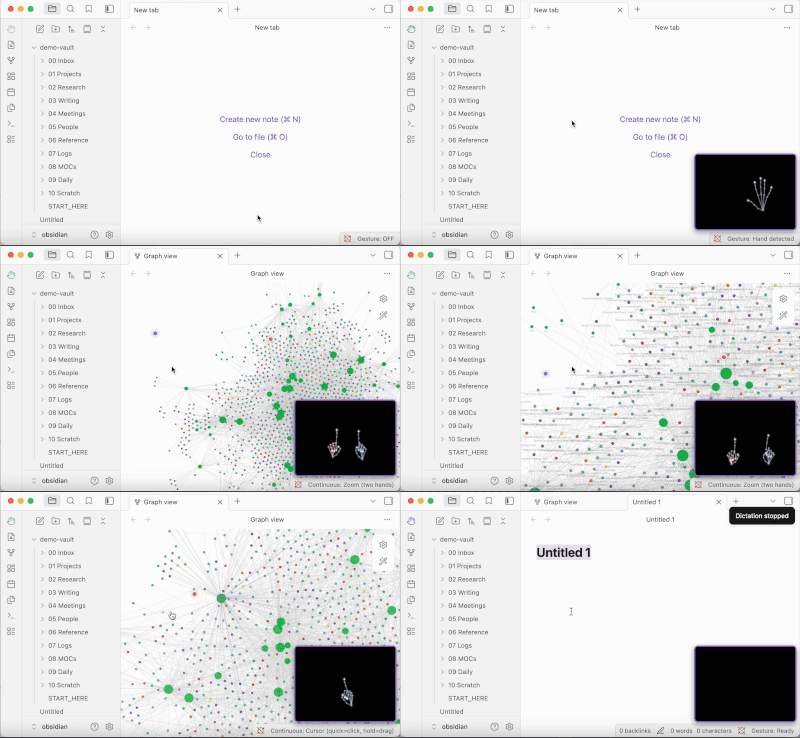
- Continuous mode -- point with both hands to enter zoom/cursor/click/drag mode
- Two-hand pinch zoom
- Single-hand cursor control
- Thumb trigger for click and drag
- Camera preview HUD -- cyberpunk-style skeleton overlay, draggable and resizable
- Dictation toggle -- trigger macOS Dictation with a gesture (requires Accessibility permission)
- Mic toggle -- mute/unmute microphone with a gesture
- Custom action system -- extend beyond Obsidian commands with system-level actions
- Privacy-first -- all processing happens locally via MediaPipe WASM, no data leaves your machine
Installation
Community Plugins (Recommended)
- Open Obsidian Settings > Community plugins
- Click "Browse" and search for Gesture Control
- Click Install, then Enable
- Go to Settings > Gesture Control and click "Install native helper"
- This downloads the camera helper app and WASM files (~3 MB) from GitHub Releases
- The download URL and source code are shown in Settings for full transparency
- You're ready! Click the hand icon to start.
Manual Install
- Download
main.js,manifest.json, andstyles.cssfrom the latest release - Create
<vault>/.obsidian/plugins/gesture-control/ - Place the downloaded files in that folder
- Download
gesture-control-native-macos.zipfrom the same release - Extract it into the plugin folder (should produce
GestureCamera.app/andwasm/) - Enable "Gesture Control" in Settings > Community plugins
Getting Started
- Click the hand icon in the ribbon (left sidebar) or run "Toggle Gesture Camera" from the command palette
- macOS will ask for camera permission -- allow it
- A camera preview appears in the bottom-right corner showing a skeleton overlay of your hand
- Show your hand and try a gesture!
Gestures
Discrete Gestures
Each gesture triggers a mapped Obsidian command after holding it for the configured dwell time.
| Gesture | Default Action | How to Make |
|---|---|---|
| Open Palm | Toggle left sidebar | All 5 fingers extended |
| Fist | Navigate back | All fingers curled |
| Thumb Up | Dictation toggle | Only thumb extended upward |
| Victory | New file | Index + middle finger extended (peace sign) |
| ILoveYou | Command palette | Thumb + index + pinky extended |
| OK | (not set) | Thumb tip touches index tip, others extended |
| Thumb Down | (not set) | Only thumb extended downward |
| Three | (not set) | Index + middle + ring extended |
All mappings are fully configurable in Settings.
Continuous Mode
Point with both hands (index finger only) to enter continuous mode:
- Zoom phase -- two tracking dots appear; move hands apart/together to zoom in/out
- Cursor phase -- remove one hand; the remaining hand controls the cursor
- Click -- quickly extend and retract your thumb
- Drag -- extend your thumb and hold to start dragging, retract to release
Settings
Open Settings > Gesture Control to configure:
| Setting | Default | Description |
|---|---|---|
| Native helper | -- | Install/reinstall the camera helper and WASM files |
| Confidence Threshold | 0.7 | How certain detection must be (0.5--1.0) |
| Dwell Time | 500ms | How long to hold a gesture before triggering (200--1500ms) |
| Cooldown Time | 1000ms | Minimum wait between triggers (300--3000ms) |
| Gesture Mappings | (see above) | Map each gesture to any Obsidian command or custom action |
| Continuous Mode | Enabled | Enable/disable zoom + cursor mode |
| Preview Mode | Skeleton | Camera feed, skeleton only, or hidden |
| Preview Size | 320px | Resizable 160--480px, maintains 4:3 ratio |
Requirements
- macOS (Apple Silicon or Intel) -- this plugin relies on native macOS camera APIs (AVFoundation) because Electron's
getUserMediadoes not deliver video frames in current versions - Webcam (built-in or external)
- Obsidian 1.0.0+
- Camera permission for GestureCamera
- Accessibility permission for Dictation/Mic features (optional)
- Internet connection for initial setup only (downloading native helper + hand tracking model)
Why macOS Only?
Electron (Obsidian's runtime) has a known issue where getUserMedia returns a "live" MediaStream but delivers zero video frames. All standard web APIs for camera access fail. The workaround requires a native macOS app (GestureCamera.app, built from Swift/AVFoundation) that captures frames to a temp file, which the plugin reads. The Swift source code is included in this repository for full auditability.
Privacy
- All video processing runs locally using MediaPipe WASM -- no cloud APIs
- No images or video are stored, recorded, or transmitted
- Camera frames exist only in a temporary file (
/tmp/gesture-control-frame.jpg) which is deleted when the camera stops - Additional temp files (
/tmp/gesture-control-status,/tmp/gesture-control-pid) are used for IPC with the camera helper and deleted on stop - The hand tracking model is downloaded once from Google's CDN (
storage.googleapis.com) and cached locally by the browser - The plugin makes zero network requests after initial setup
- No telemetry, analytics, or tracking of any kind
Troubleshooting
"Native helper not installed" Go to Settings > Gesture Control and click "Install native helper". This downloads the camera app and WASM files (~3 MB) from this plugin's GitHub Releases.
Camera permission denied Go to System Settings > Privacy & Security > Camera and allow Obsidian (or GestureCamera).
Camera started but no hand detected Make sure your hand is visible and well-lit. The skeleton overlay should appear when a hand is detected.
Gesture triggers too easily / not easily enough Adjust Confidence Threshold and Dwell Time in Settings.
Dictation not working Ensure Accessibility permission is granted in System Settings > Privacy & Security > Accessibility for Obsidian. Also verify that Dictation is enabled in System Settings > Keyboard > Dictation.
Native helper download failed
Download gesture-control-native-macos.zip manually from the releases page and extract it into the plugin folder (<vault>/.obsidian/plugins/gesture-control/).
Third-Party Licenses
- MediaPipe (Apache 2.0) -- hand landmark detection model and WASM runtime
Development
git clone https://github.com/with-geun/obsidian-gesture-control.git
cd obsidian-gesture-control
npm install
npm run dev    # watch mode
npm run build  # production build
Native Camera Build (macOS)
swiftc -O -o GestureCamera.app/Contents/MacOS/GestureCamera src/camera/native-camera.swift \
  -framework AVFoundation -framework CoreImage -framework Cocoa
License
For plugin developers
Search results and similarity scores are powered by semantic analysis of your plugin's README. If your plugin isn't appearing for searches you'd expect, try updating your README to clearly describe your plugin's purpose, features, and use cases.