by Talgarbek
See yourself as an RPG character: skill trees and constellations built from checklists in your notes, without XP or levels.
Skill Tree
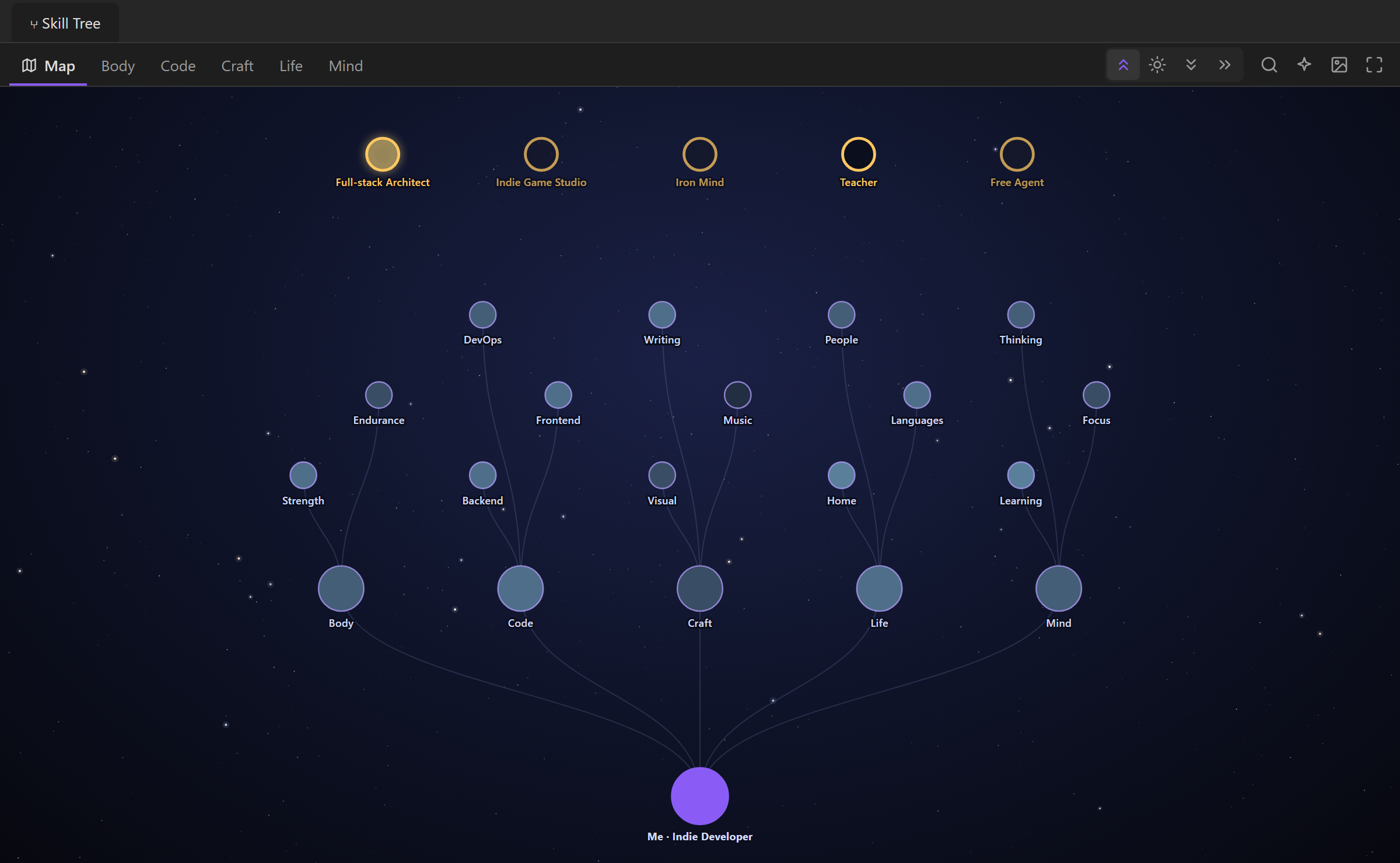
See yourself as an RPG character. Skill Tree turns plain checklists in your notes into skill trees and constellations — branches, prerequisites, what you know, what you are learning and what is unlocked next.
There is no XP, no levels and no scores. Real progress is not a number; the tree only shows where you are and what is next.
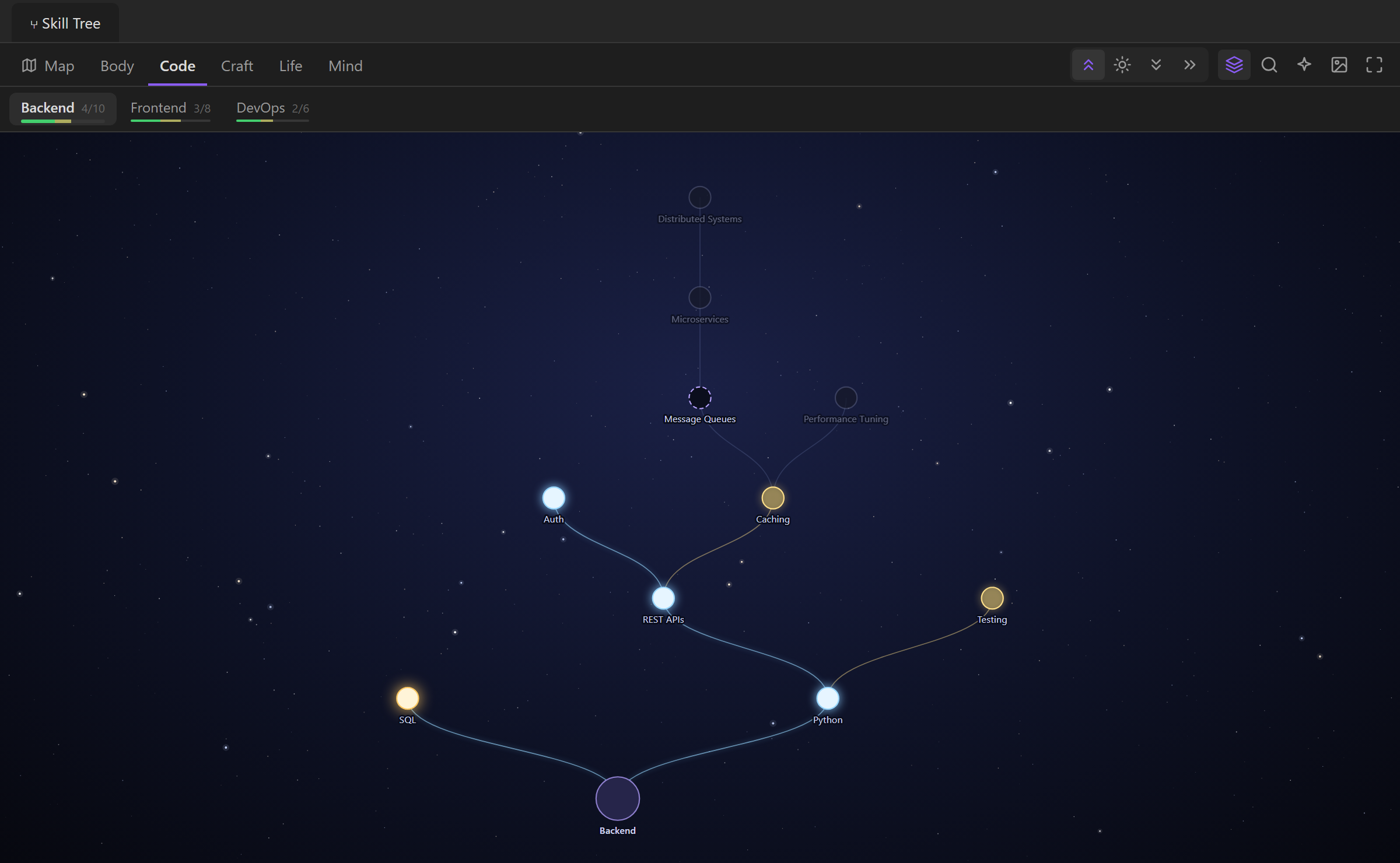
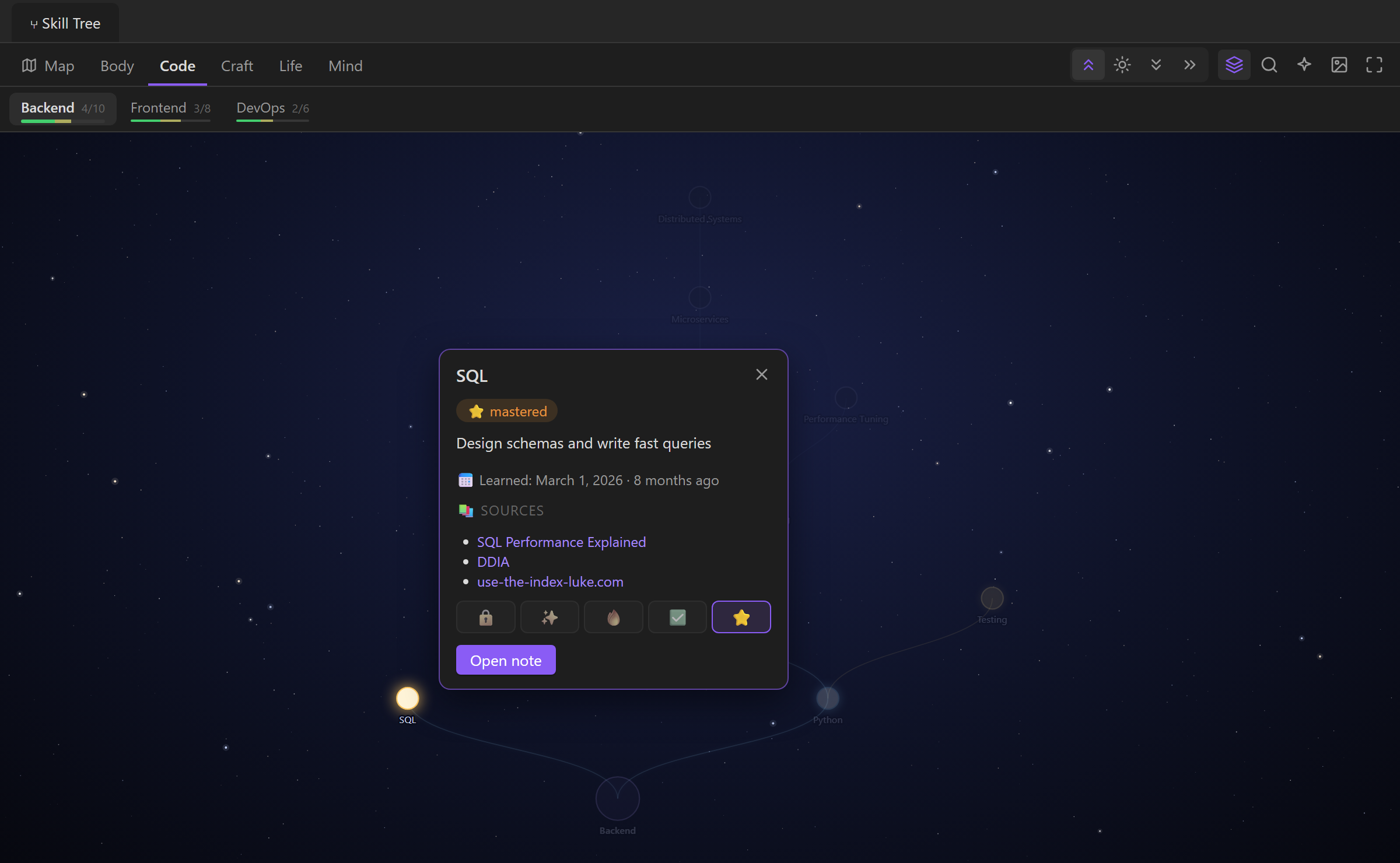
| A branch tree | Click a skill to pin its card |
|---|---|
 |  |
Features
- Main map: every branch, its constellations and cross-branch legendary skills on one screen. Brighter constellations = more skills known.
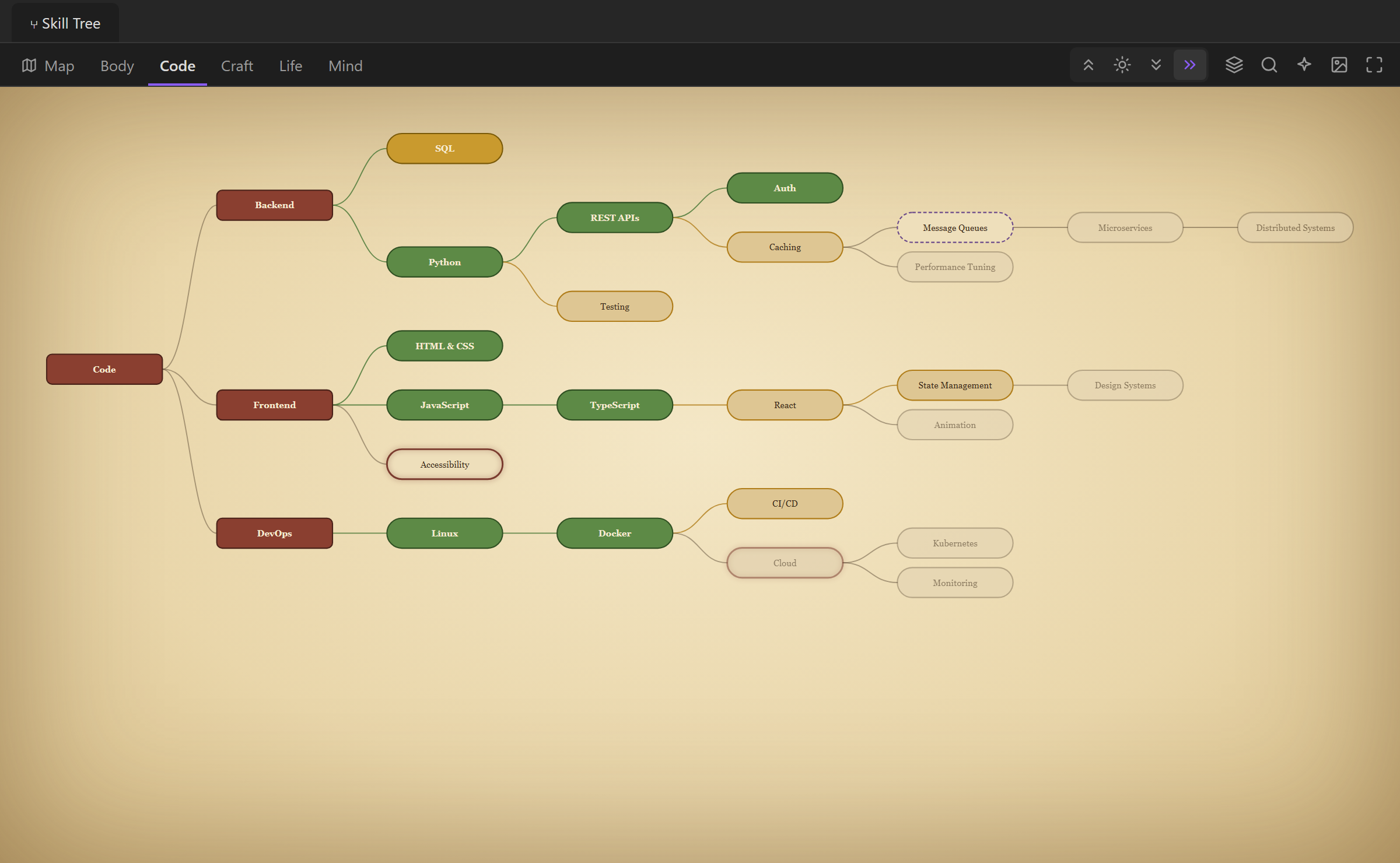
- Branch trees: one tree per branch, either all at once or one constellation at a time.
- Four layouts shared by the map and the trees: ▲ up (Skyrim-like), ☀ star, ↓ top-down, → left-right.
- Five looks: Classic, Night sky, Old map, Blueprint and Neon. Two node shapes: stars with a label or boxes with the text inside. Every combination works in every layout.
- Prerequisites without spaghetti: a skill needs all (
A & B) or any (A | B) of other skills. Hover a skill to highlight what it requires. - Skill card: hover shows status, description, progress and requirements; click pins the card, with a button to open the note.
- Change status from the card: pin a skill and press 🔒 ✨ 🔥 ✅ ⭐; the checkbox in the note is updated for you.
- What's next: a panel with everything you are learning and everything that is unlocked, across all branches.
- Find a skill: type a name and the view flies to it. Both are also commands you can bind to hotkeys.
- Constellation tabs show how many skills of each constellation you know.
- Sources and dates: list the books and courses behind a skill and when you learned it; both show in the card. Marking a skill known from the card records today’s date.
- Right-click a skill to add a new skill under it, change its status or open the note — no need to leave the tree.
- Save as PNG: the current map or tree as a picture, in the look you use.
- Clean zoom: small skill labels hide when you zoom far out and come back as you zoom in; switching trees fades in smoothly.
- Available skills glow when their requirements are met.
- Ctrl/Cmd+click opens the note at that line. Pan by dragging, zoom with the wheel; on phones and tablets drag with one finger and pinch to zoom.
- Remembers the last opened tree, layout and constellation.
- English and Russian interface (follows Obsidian's language).
Quick start
- Install and enable the plugin.
- Run the command Skill Tree: Create example tree (or press the button in the empty view).
- Open the view from the ribbon icon or Skill Tree: Open.
Data format
Skills/                    ← skills folder (configurable)
├── Map.md                 ← map center + legendary skills (optional)
├── Programming/           ← a branch = a subfolder
│   ├── Programming.md     ← branch root note
│   ├── Backend.md         ← a constellation
│   └── Frontend.md
└── Physical/
    └── ...
Branch root note
---
type: branch
description: Everything about writing software
---
Constellation note
Every checkbox is a skill. Plain bullets under a skill are its description and notes.
---
type: branch
parent: "[[Skills/Programming/Programming|Programming]]"
---

- [x] SQL — I design schemas and write queries
	- source:: [[SQL Performance Explained]], https://use-the-index-luke.com
	- learned:: 2024-03-01
- [x] PHP
- [/] Laravel
	- requires:: PHP
	- First plain bullet is the description
	- Other bullets show up as notes in the tooltip
- [ ] Performance tuning
	- requires:: SQL & Laravel
- [ ] Microservices
	- requires:: Laravel | Go

## Testing
- [ ] Unit tests
	- requires:: Laravel
requires:: A & B— needs all of them;requires:: A | B— needs any of them (требует::works too).- A skill hangs under its first requirement from the same constellation; requirements from other places are only highlighted on hover.
## Headingsinside a constellation make sub-groups.Name — descriptionon the checkbox line is a shortcut for a description.source:: [[Book]], [[Course]], https://…lists where you learn it (источник::works too);learned:: 2026-03-01is when you learned it (изучено::). Skill notes can usesource/learnedin their frontmatter.
Statuses
| Checkbox | Status |
|---|---|
- [x] | ✅ known |
- [/] | 🔥 learning |
- [>] | ✨ want |
- [ ] | 🔒 locked |
- [*] | ⭐ mastered |
A locked or wanted skill whose requirements are known is shown as 🔓 available.
Map note
---
type: map
center: "Me · Engineer"
---

- [ ] Full-stack Architect
	- Designs whole systems end to end
	- requires:: Performance tuning & Frontend:State management
Top-level checkboxes are legendary skills. Requirements are looked up across all branches; use Branch:Skill when two branches have a skill with the same name.
Settings
- Skills folder — where branches live (default
Skills). - Map file — the map note inside that folder (default
Map.md). - Look — Classic, Night sky, Old map, Blueprint or Neon.
- Nodes — stars with a label, or boxes with the text inside.
- Star size, Lines (straight, curved or right angles), Line thickness, Text size and Glow — the same in every layout and on the map.
- Hide labels when zoomed out and Record the learned date — both on by default.
Installation
Install it from community.obsidian.md or search for Skill Tree in Settings → Community plugins → Browse. Manual install: download main.js, manifest.json and styles.css from the latest release into <vault>/.obsidian/plugins/skill-tree/, then enable it in Settings → Community plugins.
License
For plugin developers
Search results and similarity scores are powered by semantic analysis of your plugin's README. If your plugin isn't appearing for searches you'd expect, try updating your README to clearly describe your plugin's purpose, features, and use cases.