Graph Sparks
unlistedby TheBeStNakee
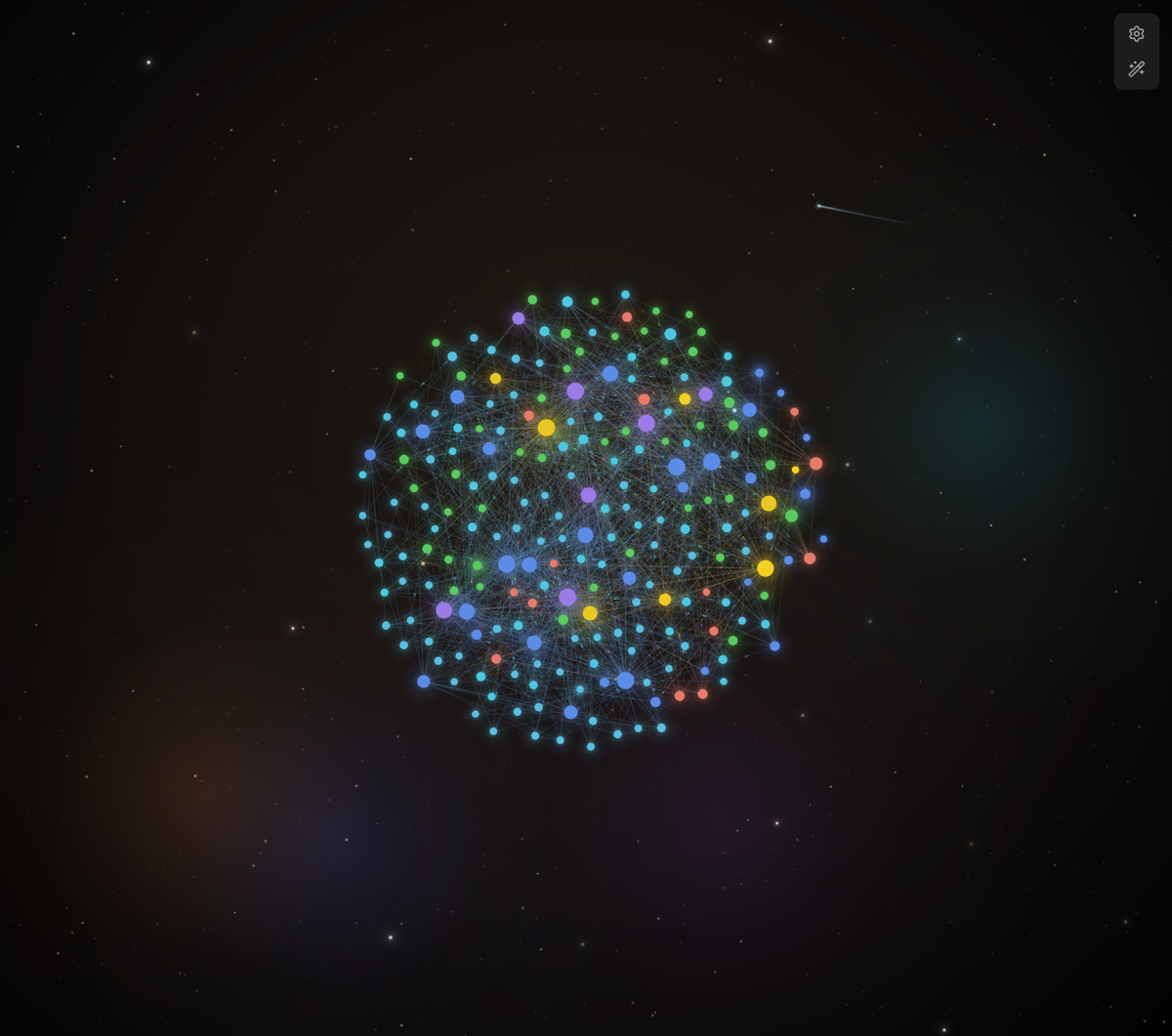
Space-style graph view: glowing nodes, coloured links, tiny sparks travelling between notes, stars, nebulae and rare sky events.
Graph Sparks
Turns Obsidian's core graph view into a small piece of deep space. Your notes glow, tiny sparks travel between them along real links, and far behind the graph stars twinkle, nebulae drift and, once in a while, a comet passes by.
What it does
| Effect | Details |
|---|---|
| Sparks | About a quarter of the notes quietly send tiny dots of their own colour along their links to neighbours. The set of "emitting" notes changes every 20 s. Hover or drag a note and it starts sending sparks too. |
| Glow | Every node gets a soft halo in its colour. Hubs (25+ links) gently breathe and flash when they send a spark. |
| Coloured links | Each link takes the mixed colour of the two notes it connects, so clusters are visible from afar. Hover highlight stays Obsidian's own. |
| Deep space | Three layers of stars (700 far, 130 mid, 16 bright with halos) with parallax, dark vignette, and soft nebulae that live in graph space around the ball. |
| Rare sky events | Shooting stars (every 35–100 s), star flares (80–180 s), comets (4–8 min) and meteor showers (7–12 min). They fly behind the graph; about a third may pass behind the ball itself. |
| Balanced node sizes | Obsidian makes every note with few links equally tiny. Graph Sparks uses a softer scale: small notes are easier to see, hubs are still the biggest. |
| Works out of the box | Notes without a colour group get a colour by their top folder. On first run, comfortable graph forces and sizes are set once; change them freely afterwards. |
Everything is drawn on top of Obsidian's own graph renderer: search, filters, groups, forces, local graph and clicking notes all keep working. Disable the plugin and the graph is back to normal.
Install
Manually
- Download
main.js,manifest.jsonandstyles.cssfrom the latest release. - Put them into
<your vault>/.obsidian/plugins/graph-sparks/. - Obsidian → Settings → Community plugins → turn off Restricted mode if needed → Reload → enable Graph Sparks.
- Open the graph (
Ctrl/Cmd + G).
With BRAT
Add TheBeStNakee/obsidian-graph-sparks in the BRAT plugin.
Settings
Settings → Graph Sparks lets you switch every effect on or off and tune it, live, without reloading:
- Sparks: on/off, share of notes that send them, speed, size
- Glow: on/off, brightness, breathing hubs
- Links and nodes: coloured links and their strength, balanced node sizes, colour by folder
- Space: stars and their density, nebulae and their brightness, rare sky events, how often they happen, how many pass behind the graph
- Graph: one-click recommended graph settings, reset plugin settings
The settings tab is in Russian or English, following Obsidian's language.
Tips
- Set your own colour groups in the graph settings (gear icon → Groups): sparks, halos and links follow them.
- When the graph tab is hidden, the animation stops, so it costs nothing in the background.
Notes
- Desktop and mobile. Tested on Obsidian 1.15.
- The plugin hooks into the internal graph renderer (PIXI). A big Obsidian update may change it; if effects disappear, open an issue.
Русский
Превращает граф Obsidian в кусочек далёкого космоса. Заметки светятся, по настоящим связям между ними бегут крошечные огоньки, а позади графа мерцают звёзды, плывут туманности и иногда пролетает комета.
Что делает
- Огоньки: примерно четверть заметок сама пускает крошечные точки своего цвета по связям к соседям; какие именно — меняется каждые 20 с. Наведи курсор или потяни заметку — она тоже начнёт пускать огоньки.
- Свечение: у каждого шарика мягкий ореол его цвета; хабы (25+ связей) «дышат» и вспыхивают, когда выпускают огонёк.
- Цветные связи: линия окрашена в смесь цветов двух заметок, кластеры видны издалека.
- Космос: три слоя звёзд с параллаксом, виньетка и мягкие туманности вокруг графа (двигаются вместе с ним).
- Редкие события: падающие звёзды, вспышки звёзд, кометы и звездопад — позади графа.
- Ровные размеры: заметки с малым числом связей не превращаются в точки, хабы всё равно крупнее всех.
- Работает сразу: заметки без цветовой группы окрашиваются по своей папке; при первом включении один раз ставятся удобные настройки графа.
Установка
- Скачай
main.js,manifest.json,styles.cssиз последнего релиза. - Положи в
<хранилище>/.obsidian/plugins/graph-sparks/. - Obsidian → Настройки → Сторонние плагины → выключи безопасный режим → Обновить → включи Graph Sparks.
- Открой граф (
Ctrl + G).
Настройки → Graph Sparks: каждый эффект включается и выключается отдельно, есть ползунки силы, плотности и частоты; кнопки «рекомендуемые настройки графа» и «сбросить». Всё применяется сразу. Выключишь плагин — граф станет обычным.
License
MIT
For plugin developers
Search results and similarity scores are powered by semantic analysis of your plugin's README. If your plugin isn't appearing for searches you'd expect, try updating your README to clearly describe your plugin's purpose, features, and use cases.