DMN
approvedby joleaf
Enable viewing DMNs using dmn-js.
★ 3 stars↓ 4,254 downloadsUpdated 23d agoMIT
DMN-Plugin for Obsidian 


This plugin lets you view DMNs interactively in your Obsidian notes. The viewer is based on the dmn-js library. If you want to evaluate/execute your DMNs inside your note, look at the DMN Eval Plugin.
Install ..
.. automatically in Obsidian
- Go to Community Plugins in your Obsidian Settings and disable Safe Mode
- Click on Browse and search for "DMN Plugin"
- Click install
- Toggle the plugin on in the Community Plugins tab
.. manually from this repo
- Download the latest release
*.zipfile. - Unpack the zip in the
.obsidan/pluginsfolder of your obsidian vault
How to use
- Add a valid
*.dmnfile to your vault (e.g.,my-diagram.dmn) (e.g., modeled with the Camunda Modeler) - Add the DMN to your note:
```dmn
url: [[my-diagram.dmn]]
```
Parameter
You can customize the view with the following parameters:
| Parameter | Description | Values |
|---|---|---|
| url | The url of the *.dmn file (required). | Relative/Absolute path, or [[*.dmn]] as markdown link. |
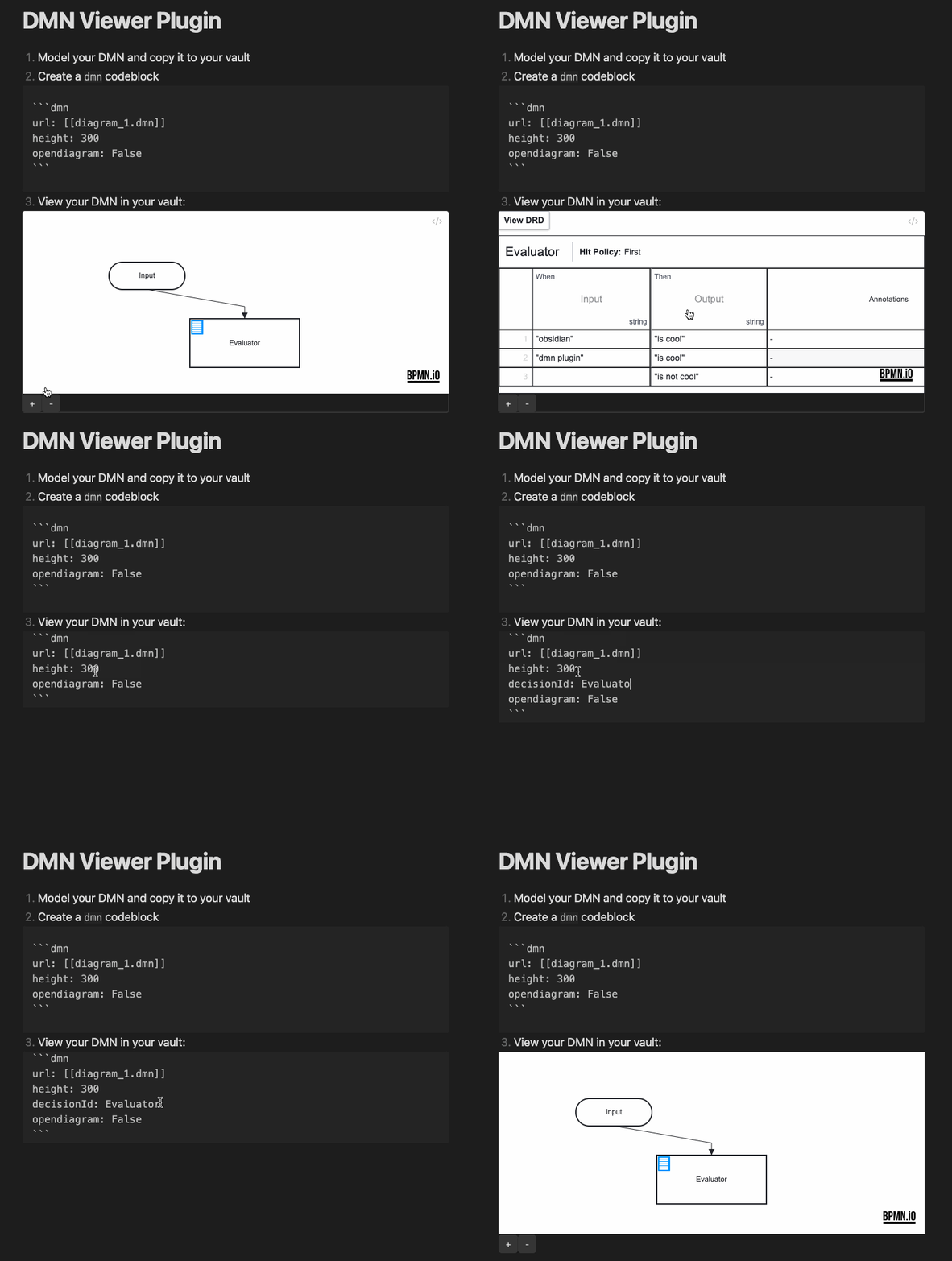
| decisionid | An ID of a decision table to open (if empty open the DRD). | String value |
| height | The height of the rendered canvas. | [300..1000] |
| opendiagram | Show a link to the *.dmn file. | True/False |
| showzoom | Show the zoom buttons below the canvas. | True/False |
| zoom | Set the zoom level. Default is 'fit-viewport'. | 0.0 - 10.0 |
| x | Set the x coordinate, if a zoom value is set. | 0 - ... (default: 0) |
| y | Set the y coordinate, if a zoom value is set. | 0 - ... (default: 0) |
| forcewhitebackground | Force a white background. | True/False |
Example
How to dev
- Clone this repo into the plugin folder of a (non-productive) vault (
.obsidian/plugins/) npm inpm run dev- Toggle the plugin on in the Community Plugins tab
Donate

For plugin developers
Search results and similarity scores are powered by semantic analysis of your plugin's README. If your plugin isn't appearing for searches you'd expect, try updating your README to clearly describe your plugin's purpose, features, and use cases.